CARD
2
54 - Getting to know your vehicle
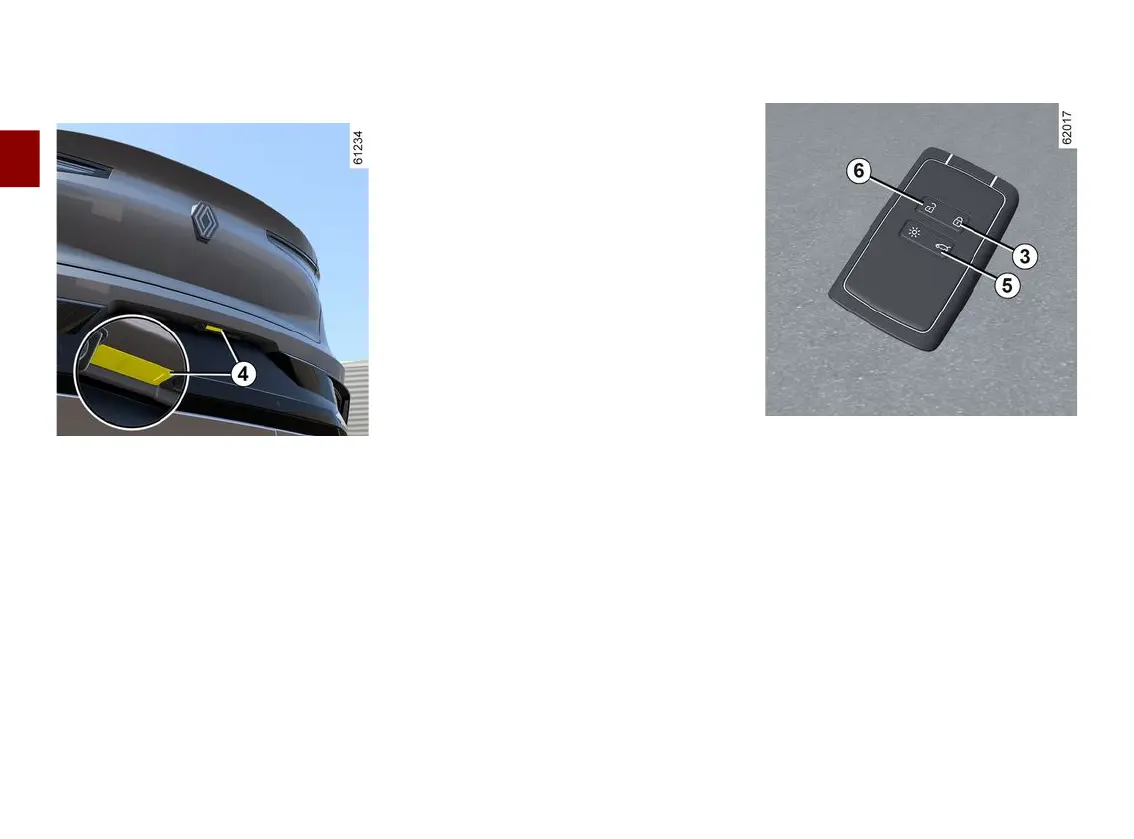
"Hands-free" unlocking by opening
the luggage compartment
With the card in the zone
1
and the
vehicle locked, press button
4
once to
unlock the entire vehicle.
The hazard warning lights flash twice
to indicate that the vehicle is unlocked
and, depending on the vehicle, the
door mirrors automatically fold out.
Special features of the unlocking
system
Undercertaincircumstances,ap-
proach unlocking is deactivated:
– if the vehicle has not been used for
eight days;
– if the card remains close to vehicle
zone
2
duringapproximatelyfivemin-
utes after the vehicle has been un
locked;
– after several passes in the vicinity of
zone
2
without the doors having
been opened.
Press the luggage compartment door
opening button
4
or use the card as a
remote control to unlock the vehicle
and reactivate "hands-free" mode.
Special features relating to locking
in "hands-free" mode
After locking in "hands-free" mode, you
havetowaitapproximatelythreesec-
onds before being able to unlock the
vehicleagain.Duringthesethreesec-
onds, the door handles can be tried to
make sure that the vehicle is locked
properly.
Note:ifadoorortheluggagecom-
partment door is open or not properly
shut, the vehicle will not be locked. A
beep sounds and the hazard warning
lights and side repeaters do not flash.
Using the card as a remote control
Unlocking with the card
Press the button
6
. The hazard lights
and side repeaters flash oncetocon-
firm that the doors have been unlocked
and,onsomevehicles,thedoormir-
rors fold out automatically.
Press and hold the button
6
to unlock
the vehicle and open the front and rear
windows (depending on the vehicle). In
the case of a vehicle equipped with a
motorised tailgate, press the button
once
5
to unlock the vehicle and open
the tailgate.
Pressing the button
5
again closes the
motorised tailgate but does not lock
the vehicle. To lock the vehicle, press
the button
3
.



 To Next Page