3
2
1
4
NU650_12_G5-FRA.qxd 9/12/04 12:02 Page 5.05
TRAFIC - NU 650-12 X83
C:\Documentum\Checkout\NU650-12_T5-ENG.win 17/12/2004 7:29
-page5
5.05
CHANGING A WHEEL
Park the vehicle on firm,
level ground which is not
slippery (e.g. avoid tiled
flooring,etc.)-ifnecessary,
place a plank under the jack for
support. Switch on the hazard
warning lights.
Apply the handbrake and engage a
gear (first or reverse).
Ask all the passengers to leave the
vehicle and keep them away from
the traffic.
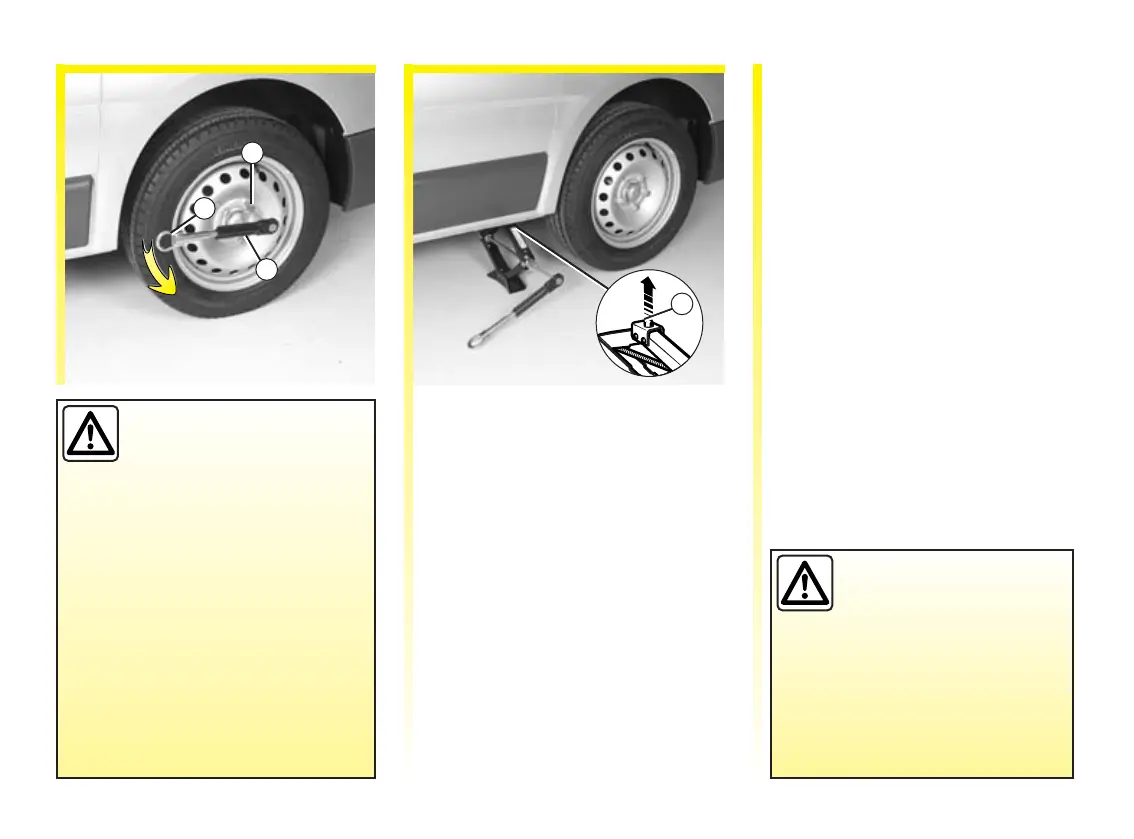
Start to undo the wheel bolts by
fitting the ratchet spanner 2
(extended, if necessary, by towing
ring 3) and pressing down rather
than pulling upwards.
Check the tightening/loosening
direction of the ratchet spanner:
reverse the spanner if it does not
work.
Insert the jack horizontally. The jack
head pin 4 must fit in the hole in the
lower part of the bodywork and
nearest to the wheel concerned.
Crank up the jack by hand at first to
align the base plate (which should
be inclined further inwards than the
jack head). Place a plank of wood
under the base plate if on soft
ground.
Insert socket 1 and raise the wheel
off the ground.
Loosen the wheel nuts and remove
thecentrehubcap.
Take off the wheel.
Fit the emergency spare wheel in
place on the centre hub.
Position the centre hubcap, tighten
the nuts and lower the jack.
With the wheels on the ground,
tighten the nuts as fully as possible
and check the tightness as soon as
possible (tightening torque
142 Nm).
If you have a puncture,
replace the wheel as soon
as possible.
A tyre which has been
punctured should always be
inspected (and repaired, where
possible) by a specialist.













 To Next Page