1
2
1
NU650_12_G1-FRA.qxd 24/09/04 13:08 Page 1.61
TRAFIC - NU 650-12 X83
C:\Documentum\Checkout\NU650-12_T1-ENG.win 17/12/2004 7:13
-page67
1.61
EXTERIOR LIGHTING AND SIGNALS
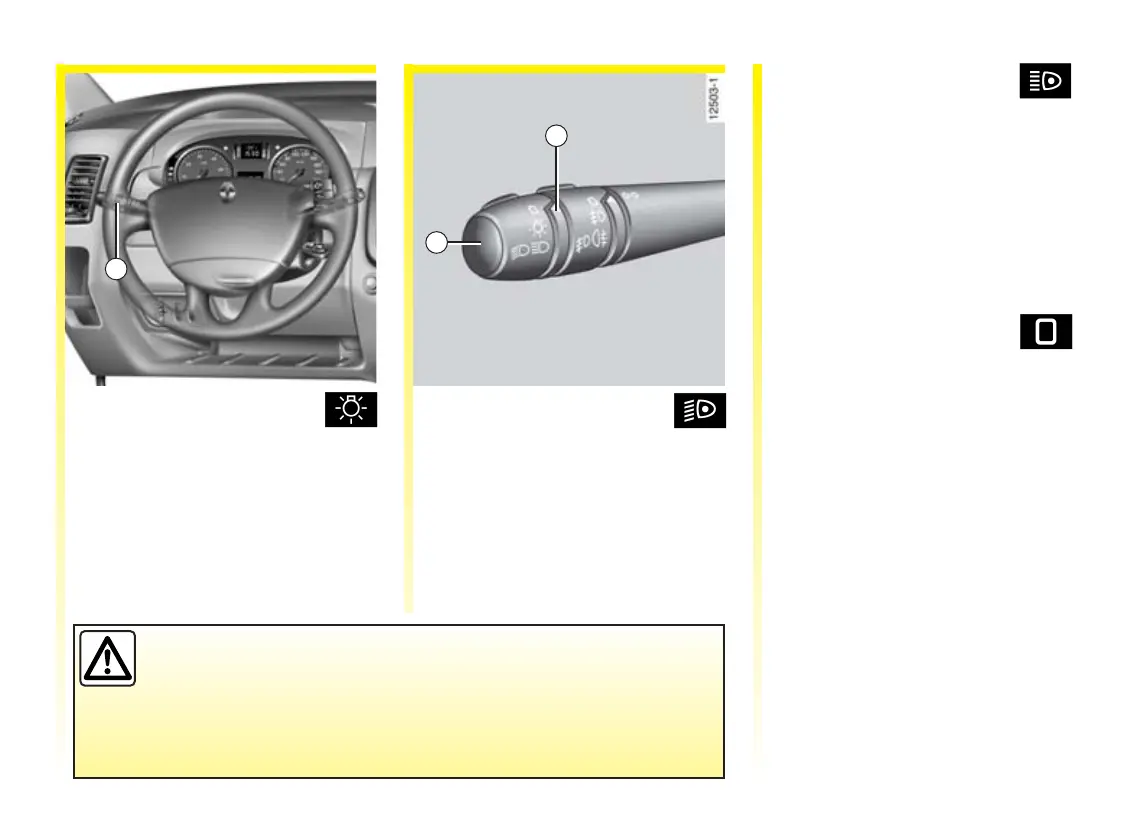
Side lights
Turn the end of switch 1
until the symbol is opposite mark 2.
The instrument panel will light up.
Dipped beam headlights
Turn the end of switch 1
until the symbol is opposite mark 2.
An indicator light on the instrument
panel will come on.
Main beam headlights
With switch 1 in the dipped
beam position, pull the switch
towards you.
When the main beam headlights are
lit up, an indicator light lights up on
the instrument panel.
To return to the dipped headlight
position, pull the switch towards
you.
Switching off the lights
Turn th e end o f swi tc h 1
back to its original position.
Lights on warning buzzer
A warning buzzer will sound when
a front door is opened and the lights
are left on after the ignition has been
switched off (to prevent the battery
from discharging).
Before driving at night, check that the electrical equipment is in
good condition and adjust the headlight beams (if your vehicle is
not carrying its normal load). Generally, make sure that the lights
are not obscured (dirt, mud, snow, objects covering them, etc.).













 To Next Page