- 14 -
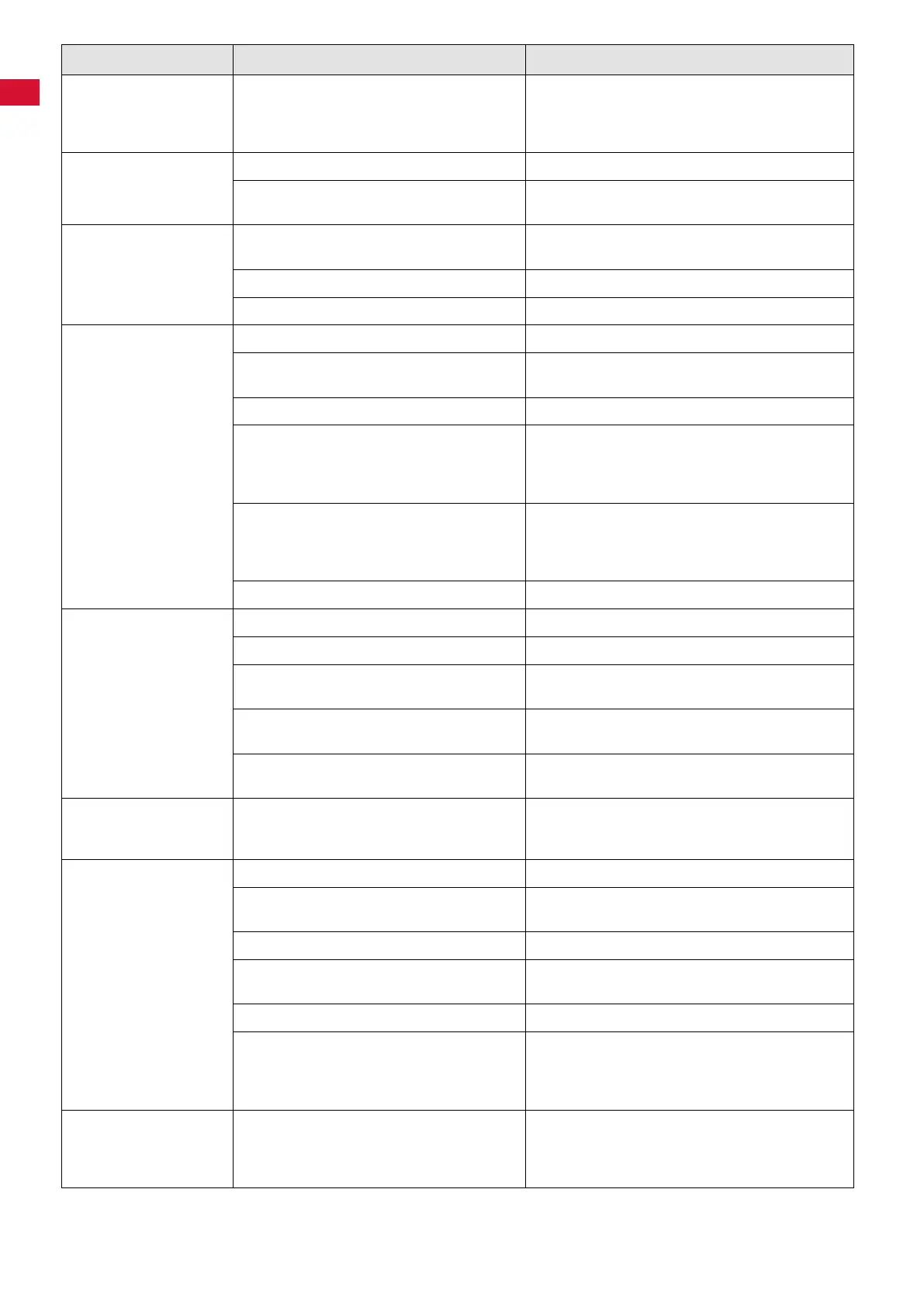
Error Possible cause Corrective action
Dust extractor stops
suddenly, for no appar-
ent reason. E4 is indi-
cated on the display.
• The electronics may be overheated due to
excessively high ambient temperature, e�g�,
if the unit is installed in a cabinet�
• Allow the extractor to cool down�
• Attempt to improve the ventilation conditions�
Refer also to Chap� 4�1�
After switching on the
unit, the display imme-
diately indicates E4.
• Temperature sensor fault� • Have the device repaired�
• After overheating, the device has not yet
cooleddownsufciently.
• Disconnect the device and let it continue to cool
down�
The self-test returns a
suction turbine error,
even though the turbine
is running.
• Filter full� • Checkdustbagandneparticlelter,replaceas
required� (Chap� 6�2 and 6�3�1)�
• Suction hose blocked� • Remove obstruction from the suction hose�
• Suction turbine fault� • Replace the suction turbine (Chap�6�6)�
Insufcientextraction
force.
• Extraction force level too low� • Increase the extraction level (Chap� 5�3)�
• Filter blocked� • Checkdustbagandneparticlelter,replaceas
required�(Chap� 6�2 and 6�3�1)�
• Suction hose blocked� • Remove obstruction from the suction hose�
• Dust drawer seal not tight� • Check the proper seat of the dust drawer
(Chap� 6�2)�
• Check the dust drawer seal for damage and re-
place as required (Chap� 6�1)�
• Upper front panel fails to close properly� • Check the proper seat of the upper front panel
(Chap� 6�3�1)�
• Check the upper front panel seal for damage and
replace as required (Chap� 6�1)�
• Suction hose damaged� • Inspect the suction hose and replace as required�
“ChangeFilter”indica-
tor goes on shortly after
lterswerereplaced.
• Fineparticlelterblocked. • Replacetheneparticlelter(Chap.6.3.1).
• Suction hose blocked� • Remove obstruction from the suction hose�
• Cross-section of the dust-generating de-
vice’shosettingistoosmall.
• Adjustthesensitivityofthe„Replacelter“indica-
tor (Chap� 5�6�1�)�
• Dustistoone. • Adjustthesensitivityofthe„Replacelter“indica-
tor (Chap� 5�6�1�)
• Flow sensor defect� • Carryoutself-diagnosis(chapt.6.5),atfault„E1“
equipment requires professional repair�
Dust bag ruptures. • The“ChangeFilter”indicator’ssensitivity
has not been adjusted for the material being
extracted�
• Reducethesensitivityofthe„Replacelter“indi-
cator (Chap� 5�6�1�)�
Dust extractor fails to
start when a dustgen-
erating device is being
used.
• Dust extractor not switched on� • Switch the dust extractor on (Chap� 5�1)�
• Dust-generating device not plugged into the
unit power outlet on the Silent TS�
• Connect the dust-generating device to the Silent
TS (Chap� 4�4)�
• Wrong operating mode selected� • Select the automatic mode (Chap� 5�4)�
• Automatic start feature’s threshold value too
high�
• Adjust the automatic start feature (Chap� 5�5)�
• Device fuse has blown� • Check and reinstall the fuse�(Chap� 6�4)�
• Automatic start feature fails to detect the
attached device’s operation�
• Some older handheld instruments do not gener-
ateasufcientlystrongsignalfortheautomatic
start feature� Switch the dust extractor to the con-
tinuous mode�
Dust extractor starts,
although a connected
device is not being
used.
• Automatic start feature’s threshold value too
low�
• Adjust the automatic start feature (Chap� 5�5)�
en


 To Next Page
 Loading...