2. Description of the Functions
2.1 Altimeter
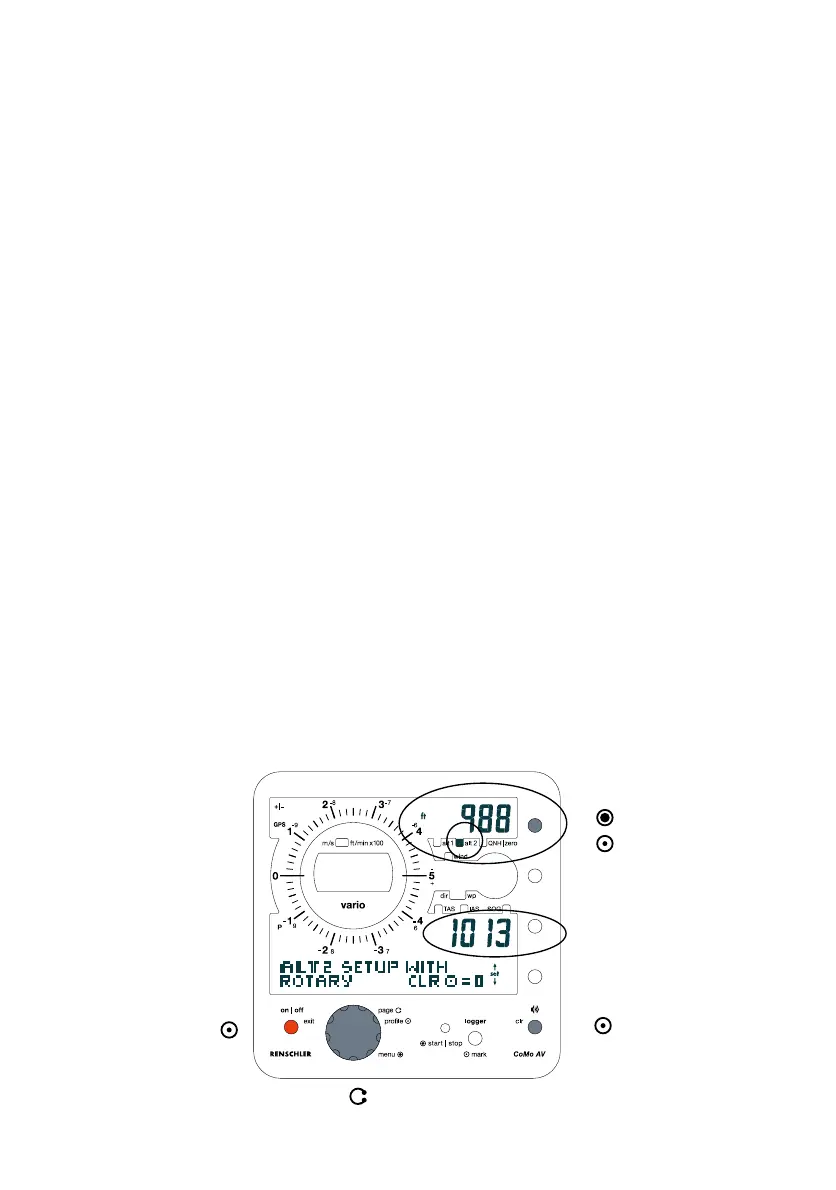
Briefly push Altitude-Function-Button to shift between three
different altitude-indications.
"alt 1" and "alt 2" can be individually adjusted. The third altitude
"zero" sets the indication to 0, whenever this function is activated.
"alt 2" is linked to QNH (air pressure). If you are within the alt
2 adjustment menu, the speed indication shows the QNH value
corresponding to altitude. You may now adjust the altitude value
to the current QNH.
"zero"-function can be useful if you are flying in weak thermal
conditions over a longer period of time and want to be informed
about altitude gain or loss at one glance!
(From software 1.32 on)
2.1.1 Altitude Adjustment
Altitude values may be changed in either "Fast Setting" (3 steps)
or "Main Menu Setting" (7 steps, but more options are available).
"Fast Setting"
- Push and hold the Altitude-Function-Button while the indication
shows the altitude value you wish to adjust. The instrument
automatically opens the adjustment menu.
- Adjust to desired altitude value by turning the Rotary-Button,
or set to zero by brief push on the CLR-Button.
- Confirm value by brief push on the Altitude-Function-Button.
The new value is confirmed by indication "o.k." and adjustment
menu is closed.
11
1.
2a.
2b.
3.
Display Altitude alt 2
set to zero
set to desired value
leave menu without
storing changed values
(push repeatedly if
necessary).
confirm
(back to standard
indication)
open adjustment-menu
Menu indication on alt 2
QNH in mbar
"Fast Setting" of "alt 2"
(Display shown after step 1.)


 To Next Page