
 Need help?
Do you have a question about the Renschler CoMo AV and is the answer not in the manual?
The CoMo AV is a versatile and feature-rich flight instrument system designed for various flying tasks, including thermalling, cross-country, and acro. It offers a user-friendly interface with a clear display and intuitive controls, making it easy to operate.
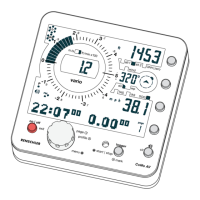
The CoMo AV provides comprehensive flight data through its analog and digital displays. The Analog-Vario-Display shows the instantaneous climb or descent rate, quickly and precisely discernible. It updates every 10 m/sec and has a range of +/- 10 m/sec. The Digital-Vario-Display shows the averaged climb or descent rate over a user-selectable period from 1 to 32 seconds, useful for analyzing performance during turns or in varying air.
The Altitude-Display offers three individually adjustable altitude indications: Alt 1, Alt 2, and QNH/Zero. Alt 1 and Alt 2 can be manually adjusted, while QNH/Zero sets the indication to 0, useful for flights in thermal conditions over a longer period. The device calculates altitude up to 9,999 m NN (0 to 29,999 ft) with a resolution of 0.3 m (1 ft). Alt 1 and Alt 2 are adjustable from -4000 to 9000 m (-12,000 to 29,999 ft). QNH/Zero displays QNH or zero-altimeter (zeroes altimeter when activation).
The Track-Display provides information about the track only in combination with a GPS module. It shows the current track direction in degrees (0-360°) and a north pointer. The track and north pointer are only shown when the instrument moves faster than 1.5 km/h, as the GPS is unable to identify track without movement at lower speeds.
The Speed-Display shows the Speed Over Ground (SOG) in combination with a GPS module, enhancing safety. It also displays True Airspeed (TAS) and Indicated Airspeed (IAS). The airspeed sensor is an impeller-sensor design, with a range of 0 to 140 km/h.
The Page-Display shows further information like time, date, and battery status. In adjustment mode, the page indication turns into a built-in instruction manual.
The GPS-State-Indication flashes when the instrument is seeking satellites. One dot lights up for every satellite found, with up to 6 satellites indicating sufficient reception for position analysis. More than six satellites are not necessary. A flashing core indicates a search for satellites with no position displayed. One dot means one satellite found. Four satellites found indicate sufficient reception for position analysis. 6-12 satellites found indicate perfect reception.
The Profile-State-Indication permanently displays the active profile, with the number of visible dots corresponding to the profile number.
The Battery-State-Indication shows the remaining battery life through a number of dots. More detailed battery information, including voltage, operating hours, and percentage remaining, is available on the Battery-Info-Page.
The Audio-Indication shows if the acoustic function is set to "soft", "loud", or "off".
The OLC-Logger-Indication shows if the instrument is recording flight data (only with built-in OLC logger).
The CoMo AV's operation is straightforward, primarily using the on/off Button, Rotary-Button, and Adjustment Group keys.
The on/off Button turns the CoMo on or off with a short push. A long push turns it off again. In adjustment mode, this button acts as an "exit" function, allowing users to leave menus by repeatedly pushing it.
The Rotary-Button shifts to the next flight profile (if active) with a brief push. Rotation turns pages forward or backward. A long push opens the adjustment menu, where rotation selects a function, confirmed by a brief push. The page display provides additional information during adjustments.
The Adjustment Group keys are mainly used before take-off or after landing.
Flight Profiles: The CoMo AV supports freely adjustable flight profiles, allowing users to pre-adjust configurations for different flying tasks (thermalling, cross-country, acro) and recall them as needed. Only profile 1 is active in the delivery state; others must be activated in the menu. A brief push on the Rotary-Button shifts between profiles, with the page-indication briefly showing the active profile. All adjustments in the menu can be stored within the actual profile.
Time and Stopwatch: The time appears on the left and a stopwatch on the right. The stopwatch can be started manually by a long push on the Logger-Button or automatically when the instrument passes through a change in altitude beyond 15 m. The date is shown on page 3.
Logbook: The logbook records flight data, including takeoff and landing times, flight duration, and maximum/minimum values for climb rate, altitude, temperature, and SOG. It can be started manually or automatically. The OLC-Logger records 3-dimensional flight positions, essential for online contest participation and graphical representation in programs like Google Earth.
Audio Settings: The volume can be quickly adjusted between "loud", "quiet", and "off". It has 6 programmable volume levels. The descent-tone threshold can be adjusted from "0" to "9.9" m/s. The time interval for beeps can be set between 2 climbing beeps or 9 intervals. Response-sensitivity, which affects how quickly the variometer reacts to vertical movement, can also be adjusted. An audio simulator allows users to experience the variometer's acoustic output.
GPS Functionality (with Add-On GPS): The GPS can be switched on or off. It searches for satellites and indicates the current position once at least 4 satellites are found. A "Cold-Start" occurs after battery changes or location changes, potentially delaying position acquisition by up to 15 minutes. A "Warm-Start" occurs if the GPS is activated at the same spot it was last turned off, allowing for quicker position acquisition (1-3 minutes). The GPS module should not be covered to ensure optimal reception.
Glide Ratio over Ground (l/d ratio): This feature calculates the ratio between speed over ground (from GPS) and the digital vario value. It helps pilots save altitude during long, straight passages and judge wind direction and speed.
OLC-Logger (OnLine Contest-Logger) (with Add-On OLC-Logger): This records 3-dimensional flight positions. It starts manually with a long push on the Logger-Button (GPS must be on) or automatically with a change in altitude. The recording stops with a long push on the Logger-Button or by switching off the CoMo. The logger has a capacity of 65,535 tracklog points, recording up to 958 hours (at a maximum recording time of 31 seconds). The sampling rate can be set from 3 to 6 seconds. Tracklog data can be transferred to a PC using a USB cable and dedicated software.
Battery Condition and Replacement: The CoMo AV uses two AA-cells. The battery-info-page displays voltage, operating hours, and remaining power percentage. New cells should provide at least 3.2 V, and replacement is recommended if voltage drops below 2.2 V. In cold conditions, battery capacity can significantly decrease. Lithium cells are recommended for low-temperature environments. If voltage drops below 2.2 V, the GPS turns off, but the audio-vario function is maintained.
To replace batteries, remove the mounting plate on the rear, then the silicon cap covering the cell compartment. Insert new cells, ensuring correct polarity (+/- are marked inside). Do not mix different kinds of cells. After replacement, the battery time counter should be reset. The washer on the safety cord can be used as a screwdriver for the mounting plate.
Software Update: Software updates can be downloaded from the manufacturer's website and installed via USB. The process involves connecting the CoMo to a PC, running a flash-loader program, and selecting the update file. It's crucial to ensure batteries are strong before an update.
The CoMo AV is designed to be a reliable and comprehensive tool for pilots, offering detailed flight information and logging capabilities, with options for expansion through add-on modules like GPS and OLC-Logger.
 General
| Brand | Renschler |
|---|---|
| Model | CoMo AV |
| Category | Measuring Instruments |
| Language | English |

 To Next Page