5b.
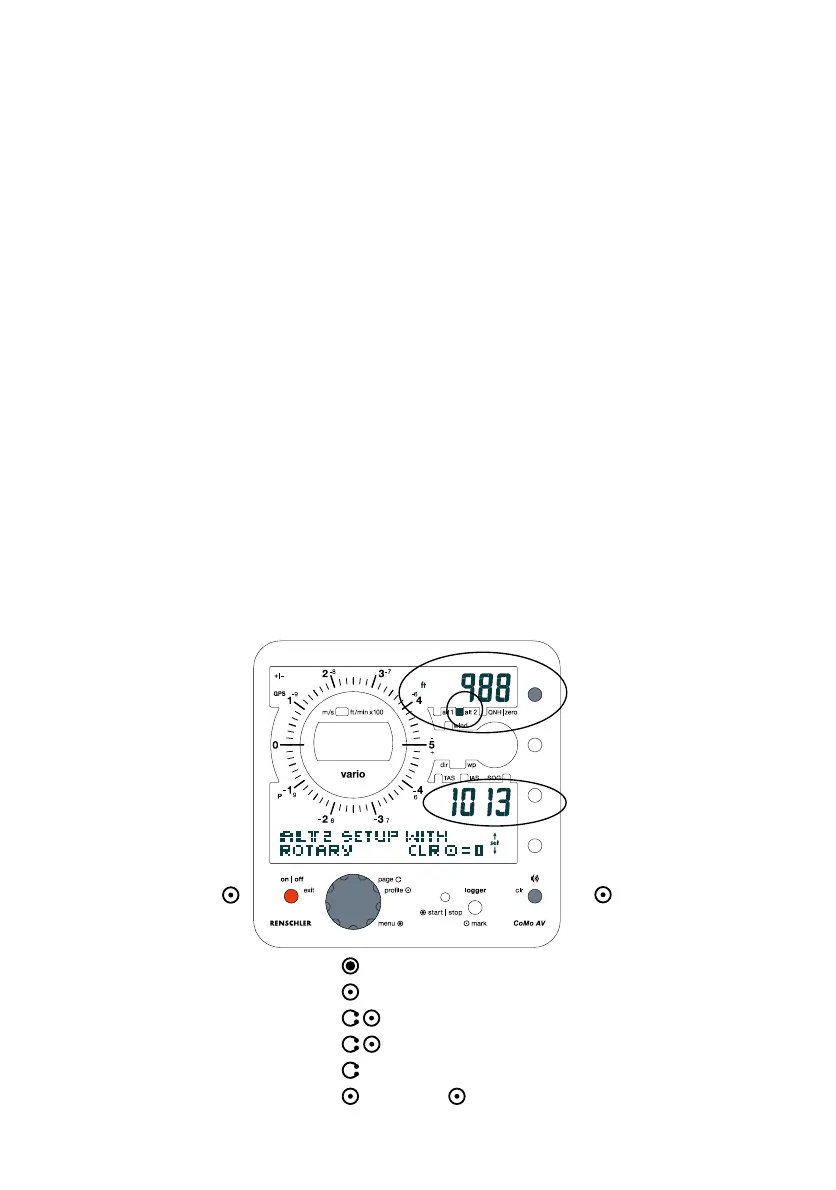
Display Altitude alt 2
set to zero
Menu indication on alt 2
QNH in mbar
"Main Menu Setting" of "alt 2"
(Display shown after step 5.)
leave menu without
storing changed values
(push repeatedly if
necessary).
12
- Push the EXIT-Button repeatedly to leave the adjustment menu
without changes.
Hint: In case you want to change more altitude values, confirm
input by pushing the Rotary-Button instead of the Altitude-
Function-Button. This way you keep the adjustment menu active
for further adjustments.
"Main Menu Setting"
Altitude values may also be adjusted within the main menu:
Push and hold the Rotary-Button to enter the main menu. The
display reads "settings". Push Rotary-Button to select "altitude".
Push again to enter the altitude adjustment menu. Any available
adjustment functions display by turning the Rotary-Button. Press
the Rotary-Button to confirm the value you like to change. Set
altitude to desired value by rotating the Rotary-Button and
confirm with a brief push. The display will read "o.k.".
Push the Exit-Button repeatedly to leave the adjustment menu
(Before confirming values you may leave the menu without
storing any changed values by pushing the Exit-Button repeatedly).
1.
4. select desired function "alt 2"
open Main-Menu
2. select "settings"
3. select "altimeter"
adjust
confirm
5a.
6. leave menu by pushing the Exit-Button (3 times)7.


 To Next Page