R 17A User’s Manual – Page 77
Performing tone audiometric tests
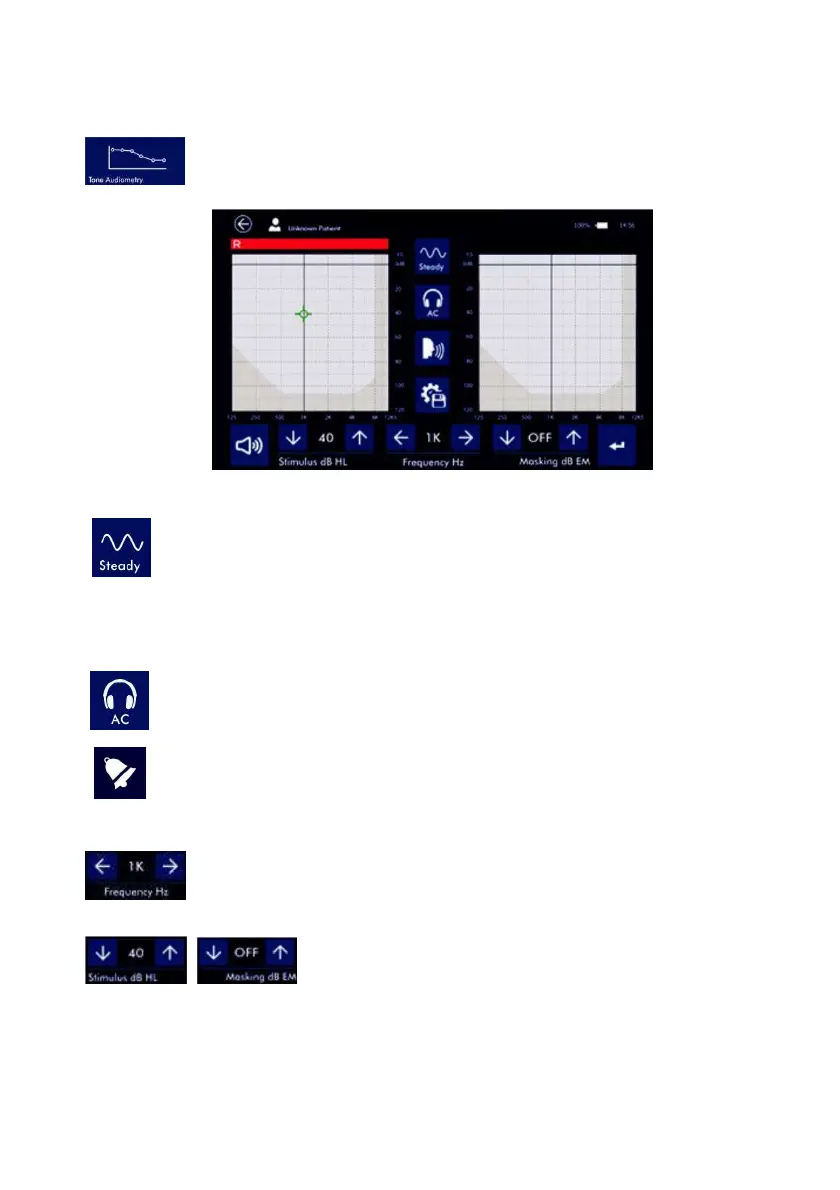
Turn the device on and, from the main page, press the TONE AUDIOMETRY button (see
image on the left) to get to the test. The display will show the parameters set for both
channels and the active function button
Stimulus configuration
Press the STEADY button to change the type of signal to be emitted: continuous, pulse (2 Hz
rate), warble. At every click on the button, the icon changes identifying the type of signal.
Output configuration
Gently press directly on the audiogram to change the side of the stimulus: right/left. Masking will be
automatically sent to the opposite ear.
By shortly pressing the icon for output selection (see image on the left), it is possible to select
AC (phones) for the threshold estimation, AC UCL (phones) for uncomfortable level or BC
(bone vibrator). By keeping it pressed for a few seconds you can select the free field output.
You can go back to the previous selection by pressing the icon again for a few seconds.
The same output connectors are used for both headsets and free field. Before starting the test
make sure the appropriate transducer has been connected.
Frequency settings
Press the ARROW keys to increase or decrease the frequency of the signals emitted
(tone for channel CH1 and narrow band noise for channel CH2). The frequency set is
shown between the two arrow keys.
Intensity settings
Press the ARROW keys to increase or decrease the intensity of the CH1
signal (stimulus) and CH2 (masking). The level reached is indicated
between the two arrow keys.



 To Next Page