R 17A User’s Manual – Page 80
4.1.1 Ambient noise monitoring
Environmental noise monitoring aims to measure in real time the noise present in the environment in
which the examination is being carried out, estimating its intensity at different frequencies in order to
assess whether the minimum conditions exist to guarantee the accuracy of the test. It is possible to
establish minimum noise requirements for each octave band and if these are exceeded, an indication on
the screen will inform that there is an unsuitable environment locking the possibility to store the threshold
level. Ambient noise is measured using a special calibrated microphone connected to the audiometer
with a USB cable, allowing it to be positioned as close as possible to the patient. Environmental noise
monitoring is an option of the tonal audiometry test that can be activated by license, see chap. 5.
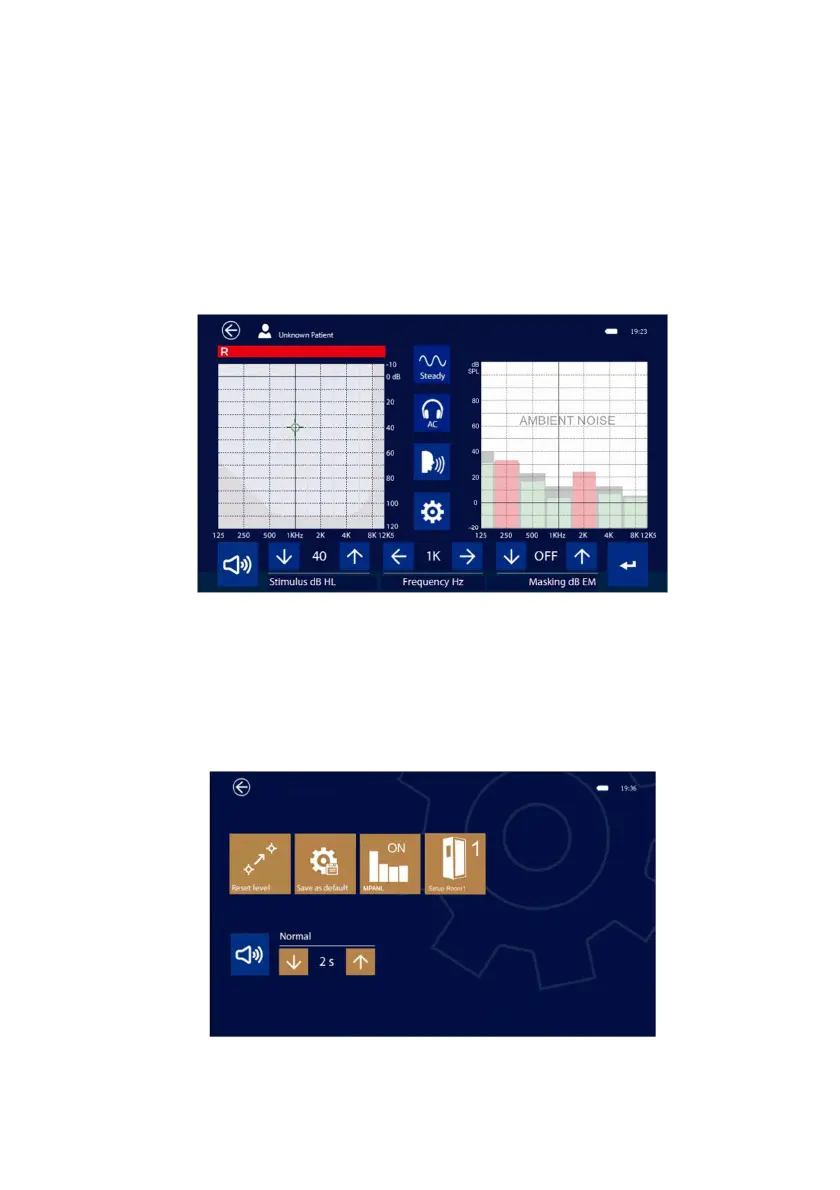
The environmental noise monitor is displayed in the graph of the non-active side; changing sides will
reverse the display. In vertical position the display of ambient noise is always deactivated.
For each octave the acceptable limit in gray color is shown in the background, while the value measured
in real time is indicated by green or red bars depending on whether the intensity is lower or higher than
the set threshold.
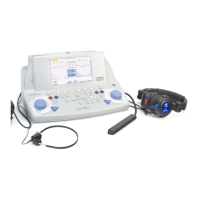
In the local setup menu, there is also the possibility to select different setups, or different curves with
different threshold levels to better adapt to the actual test conditions, for example in the case of using a
silent booth.



 To Next Page