Quick reference Quick reference52 53
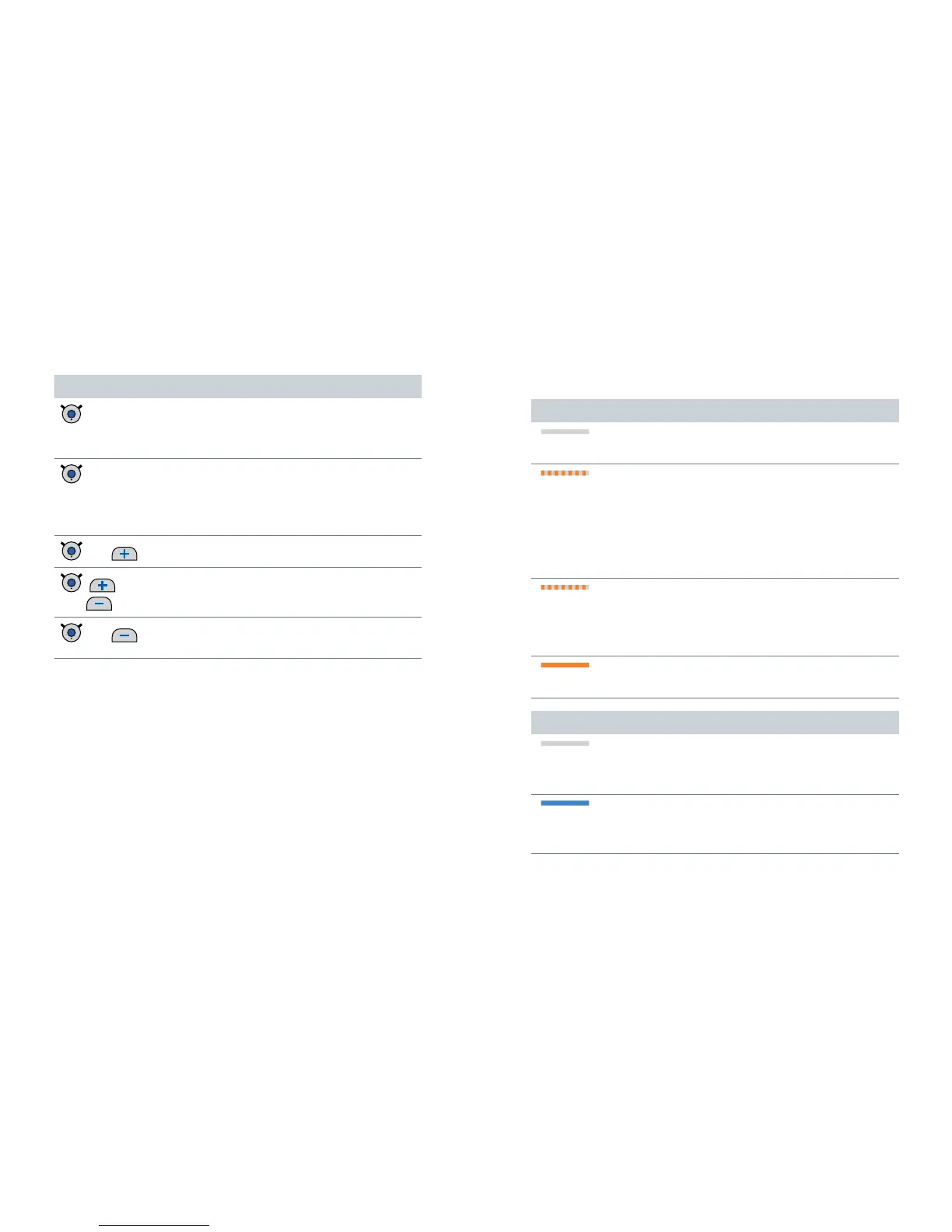
Button Description
long press
No active phone call:
Turn Smart Connect on/off
During phone call: Reject call
double-press
During phone call: Hand call over
Only for our specific transmitters:
Switch to the transmitter or toggle
between transmitters
and
Pair standard Bluetooth device
,
and
Pair our specific transmitter
and
Unpair all devices except our specific
transmitters
LED status indication
Orange LED
Orange LED off
➊
Battery is sufficiently charged.
Flashing fast for 5 seconds...
...when a button is pressed:
➊
Battery is low.
... after turning on:
➊
Battery is too low to turn on Smart Connect.
Flashing fast for 1 second
➊
An error has occurred.
Examples: Hearing instruments are not in
operating distance or the neckloop is open.
Steady orange light
➊
Charging.
Blue LED
Blue LED off
➊
No audio streaming and no phone call is
active.
Steady blue light
➊
Audio streaming is active.
➊
Phone call is active.


 To Next Page