Getting started Getting started12 13
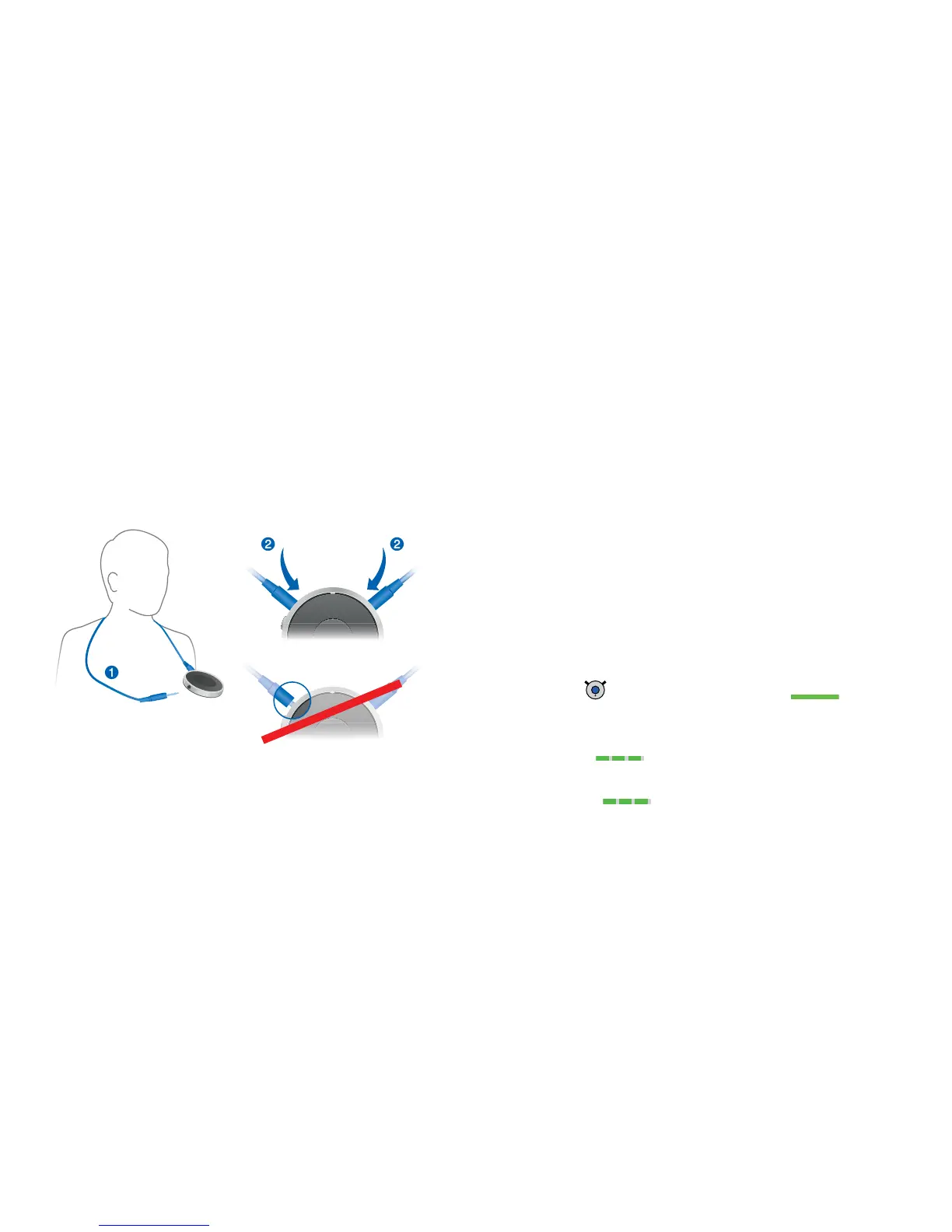
Wearing Smart Connect properly
In order to function correctly, you must wear
Smart Connect with the neckloop around your neck.
The neckloop is also the antenna.
XUnplug one neckloop plug and place the neckloop
loosely around your neck
➊
.
XInsert both neckloop plugs all the way
➊
.
Pairing hearing instruments with Smart Connect
Your hearing instruments have to be paired once with
Smart Connect. After that, the connection is automatically
established when your hearing instruments and
Smart Connect are turned on.
Preconditions:
Both hearing instruments are turned off (the battery
compartments are open) and within operating
distance.
Smart Connect is turned off.
Neckloop is plugged into both sides, and
Smart Connect is worn around the neck.
Pairing:
XPress until the green LED turns on .
This takes approximately 2 seconds.
Smart Connect searches for hearing instruments
nearby
.
XTurn on the hearing instruments while the green LED is
flashing
: Close the battery compartment.
If you are wearing two hearing instruments, both
instruments must be turned on.


 To Next Page