Printing with the Finisher
91
4
Staple
With the optional finisher installed, sets can be stapled individually when print-
ing multiple sets.
Staple Position
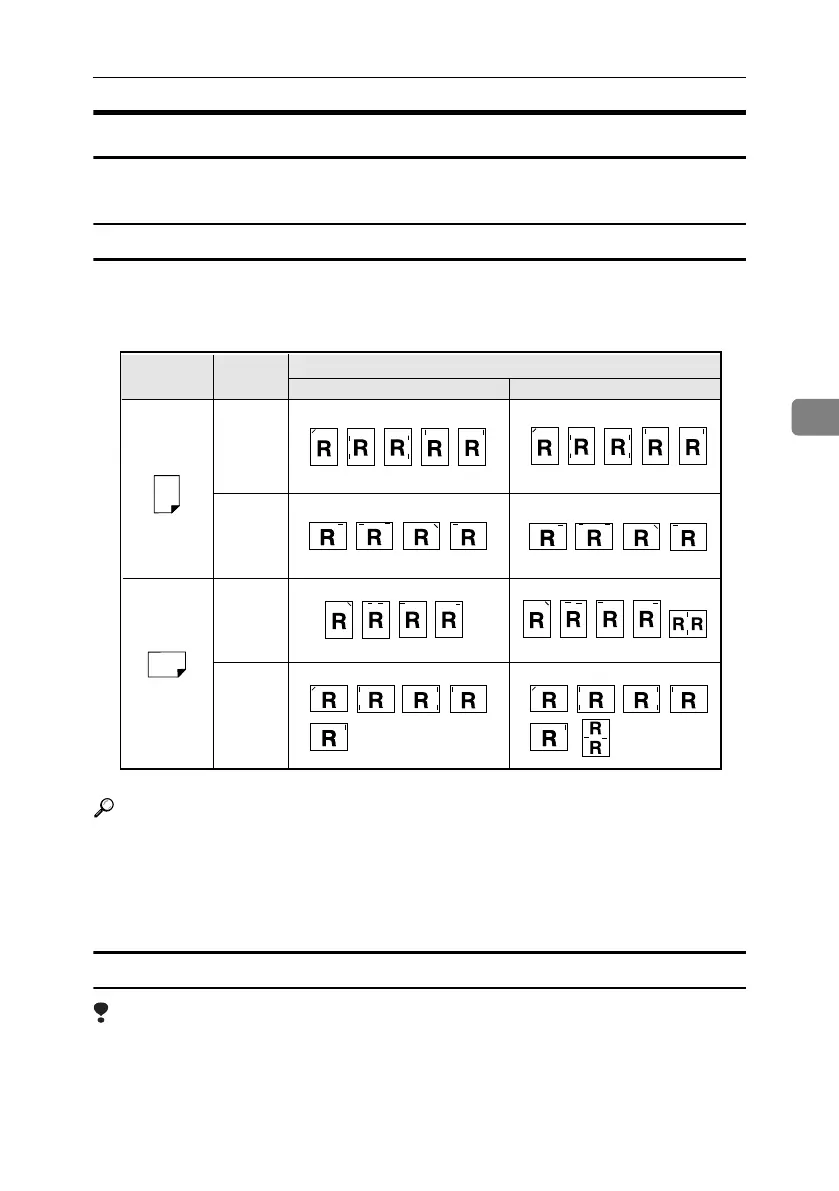
The specified staple position varies depending on paper size, type, quantity and
feed orientation. The following table shows staple positions:
Reference
• For paper sizes and maximum numbers of sheets available for stapling, see
“Specifications”, General Settings Guide.
• For printing methods, see the printer driver Help.
• The staple position will vary when using the PostScript 3 printer driver.
For more information, see the PostScript 3 printer driver Help.
Stapling Precautions
Limitation
❒ Stapling can be done only with the optional finisher installed.
❒ Stapling cannot be done when paper is fed from the bypass tray.
❒ You cannot interrupt the current job with a job for another function requiring
stapling or collating.
❒ When printing on letterhead, stapling may not be at the specified position.
Paper Orientation
on the Machine
Print Data
Direction
Staple Position
Vertical
Vertical
Horizontal
Horizontal
Finisher 3000M / 3000B
Booklet Finisher
AEW007S
MartiniC25-GB-Pref-F7_FM.book Page 91 Tuesday, November 9, 2004 3:46 PM


 To Next Page