EasyManua.ls Logo

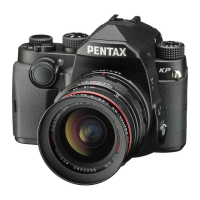
Ricoh PENTAX KF - User Manual

Ricoh PENTAX KF
152 pages
Print Icon
To Next Page IconTo Next Page
Loading...
RICOH IMAGING COMPANY, LTD.
1-3-6, Nakamagome, Ohta-ku, Tokyo 143-8555, JAPAN
(https://www.ricoh-imaging.co.jp)
RICOH IMAGING EUROPE
S.A.S.
Parc Tertiaire SILIC 7-9, avenue Robert Schuman - B.P. 70102,
94513 Rungis Cedex, FRANCE
(https://www.ricoh-imaging.eu)
RICOH IMAGING AMERICAS
CORPORATION
2 Gatehall Drive Suite 204, Parsippany, New Jersey 07054, U.S.A.
(https://www.us.ricoh-imaging.com)
RICOH IMAGING CANADA
INC.
5560 Explorer Drive Suite 100, Mississauga, Ontario, L4W 5M3, CANADA
(https://www.ricoh-imaging.ca)
RICOH IMAGING CHINA CO.,
LTD.
Room A 23F Lansheng Building, 2-8 Huaihaizhong Road, Huangpu District,
Shanghai, 200021, CHINA
(http://www.ricoh-imaging.com.cn)
https://www.ricoh-imaging.co.jp/english/
This contact information may change without notice.
Please check the latest information on our websites.
Operating Manual
To ensure the best performance from your
camera, please read the Operating Manual
before using the camera.
Introduction
1
2
Getting Started
3
Shooting
4
Playback
5
Sharing
6
Settings
SLR Digital Camera
7
Appendix
Specifications and external dimensions are subject to change without notice.
Copyright © RICOH IMAGING COMPANY, LTD. 2022
R01DTF22 Printed in Philippines
Model No. R06010
e_kb619_cover_7.4mm.fm Page 1 Tuesday, September 20, 2022 3:41 PM

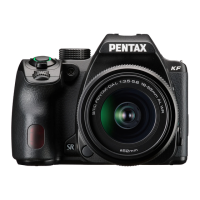
Table of Contents

Questions and Answers

  • J
    Jocelyn Turner DDSAug 7, 2025
    Why my Ricoh Digital Camera does not turn on?
    • J
      James NguyenAug 7, 2025
      If your Ricoh Digital Camera is not turning on, ensure the battery is correctly installed and properly oriented. Also, check if the battery power is low and charge it if necessary.
  • M
    Mr. William MeyerAug 13, 2025
    How to clean dust from Ricoh PENTAX KF sensor?
    • R
      Richard DiazAug 13, 2025
      If dust or dirt particles appear in your Ricoh Digital Camera images, it could be due to a dirty or dusty CMOS sensor. To resolve this, activate the [Dust Removal] function from the D5 menu. This function can be activated every time the camera is turned on and off.
  • K
    kfosterAug 18, 2025
    What to do if Ricoh PENTAX KF Digital Camera shutter cannot be released?
    • X
      xochoaAug 18, 2025
      If the shutter of your Ricoh Digital Camera cannot be released, it might be due to several reasons: * The built-in flash is being charged, so wait until charging is finished. * There is no available space on the memory card, so insert a memory card with available space or delete unwanted images. * Data is being processed, so wait until processing is finished. * The lens aperture ring is set to a position other than 9, so set the lens aperture ring to the 9 position.
  • M
    Michael SandovalAug 25, 2025
    Why doesn't my Ricoh PENTAX KF Digital Camera flash work?
    • J
      james28Aug 25, 2025
      If the built-in flash of your Ricoh Digital Camera does not discharge, the flash mode might be set to A or B. Change the flash mode to resolve this issue.
  • V
    Vincent SantiagoAug 30, 2025
    What to do if Ricoh PENTAX KF Digital Camera subject is too close?
    • C
      Christina NormanAug 30, 2025
      If the subject is too close when using your Ricoh Digital Camera, move away from the subject and take a picture.

Summary

Introduction

Checking the Contents of the Package

Lists all items included in the camera package for verification.

Getting Started

Camera Safety Precautions

Provides essential safety precautions and warnings for camera operation.

Initial Camera Setup

Covers turning on the camera and performing essential initial settings.

Basic Shooting Operation

Explains fundamental steps for taking pictures using the camera.

Shooting

Capture Settings and Modes

Configuring image settings, selecting capture modes, and exposure modes.

Exposure, Focus, and Flash Control

Adjusting exposure, focus methods, drive modes, and using the built-in flash.

Playback Functions

Navigating and Editing Images

Viewing images, deleting, editing, processing, and developing RAW files.

Movie Playback and Editing

Playing back and editing movie files.

Sharing Images

Transferring Images and Wi-Fi Use

Copying images to a computer and using Wi-Fi for sharing and remote operation.

Changing the Settings

Customizing Camera Controls and Settings

Personalizing buttons, dials, saving settings, and managing files.

Appendix

Troubleshooting and Maintenance

Solutions for common camera problems and explanations of error messages.

Technical Specifications and Compliance

Detailed camera specifications and regulatory compliance information.

Handling, Safety, and Legal Notices

Guidelines for camera care, safety, warranty, and compliance notices.

Ricoh PENTAX KF Specifications

General IconGeneral
BrandRicoh
ModelPENTAX KF
CategoryDigital Camera
LanguageEnglish

Related product manuals