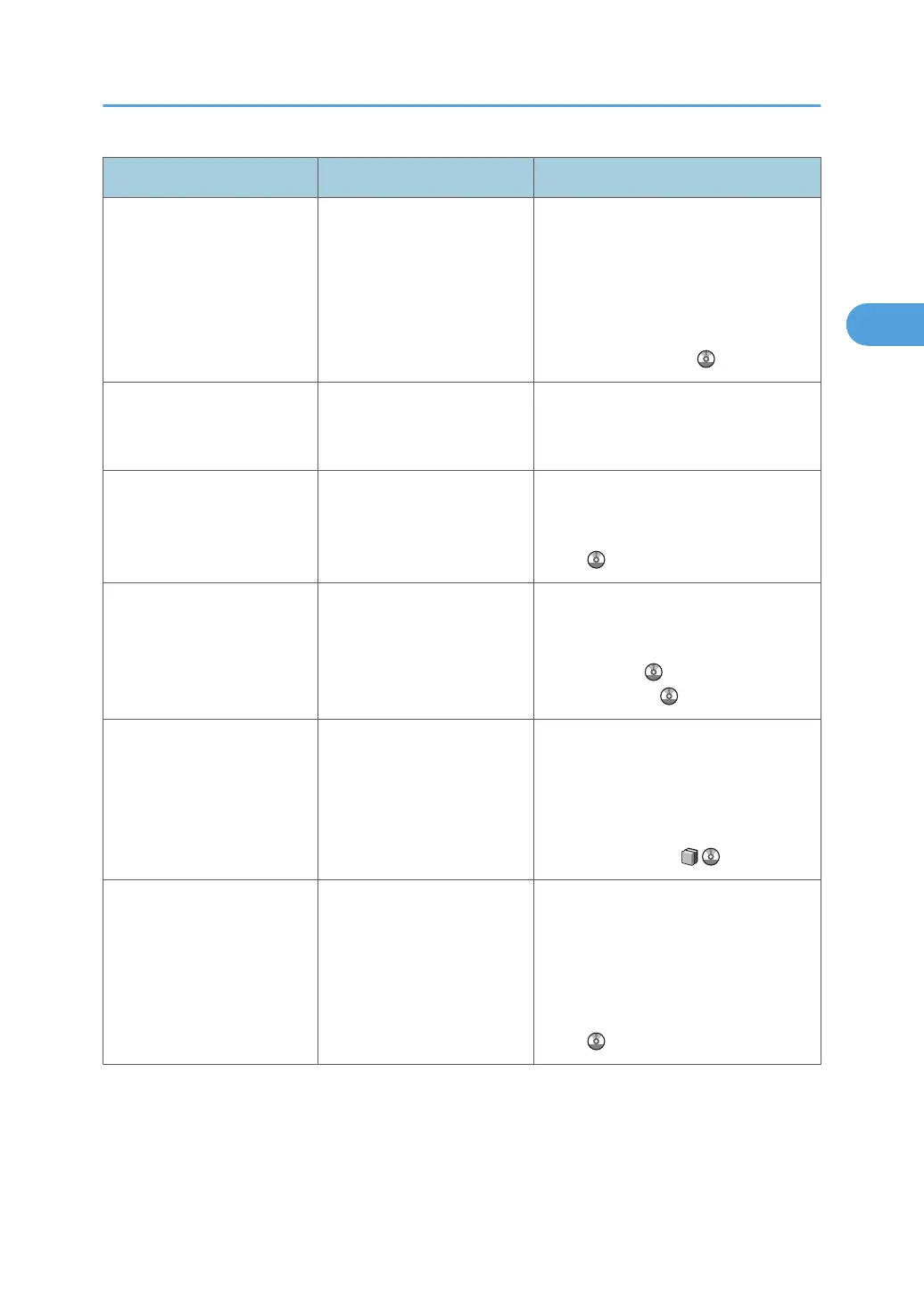
Message Cause Solution
"Cannot connect with DHCP
Server."
The machine cannot access
the DHCP server or the WINS
settings are incorrect.
Check the connection to the DHCP
server, then check the DHCP server
settings and the WINS settings, and
change them if necessary. See "Interface
Settings" or "Monitoring and
Configuring the Printer", Network and
System Settings Guide .
"Cannot connect with
network. Contact the
administrator."
The machine was
disconnected from the
network.
Contact the administrator.
"Cannot print with current tray
paper settings. Change tray
paper settings."
Tray paper settings are
incorrect.
Check the tray paper settings. For details
about the paper settings "Tray Paper
Settings", Network and System Settings
Guide .
"Cannot set within the same
subnet range."
The specified subnet range is
incorrect.
Check that the specified subnet range is
correct, and change it if necessary. See
"System Settings", Network and System
Settings Guide or "Printer Features",
Printer Reference .
"Cannot staple paper of
different sizes. Press [Job
Reset] to cancel printing."
Paper of mixed sizes was
loaded for printing with
stapling.
Press [Job Reset] to cancel the print job,
and then remove the paper from the
Folding Unit Tray. Staple is available
with same paper sizes. For details about
the staple paper size, see "Appendix",
About This Machine .
"Check IPv4 Address, Subnet
Mask and Gateway
Address."
The IPv4 address specified
for the machine is incorrect.
Check that the system's IPv4 address,
Subnet Mask and Gateway Address,
specified for the machine is correct, and
change it if necessary. For details about
the system's IP address, see "System
Settings", Network and System Settings
Guide .
Messages Displayed When Using the Printer Function
23







 To Next Page