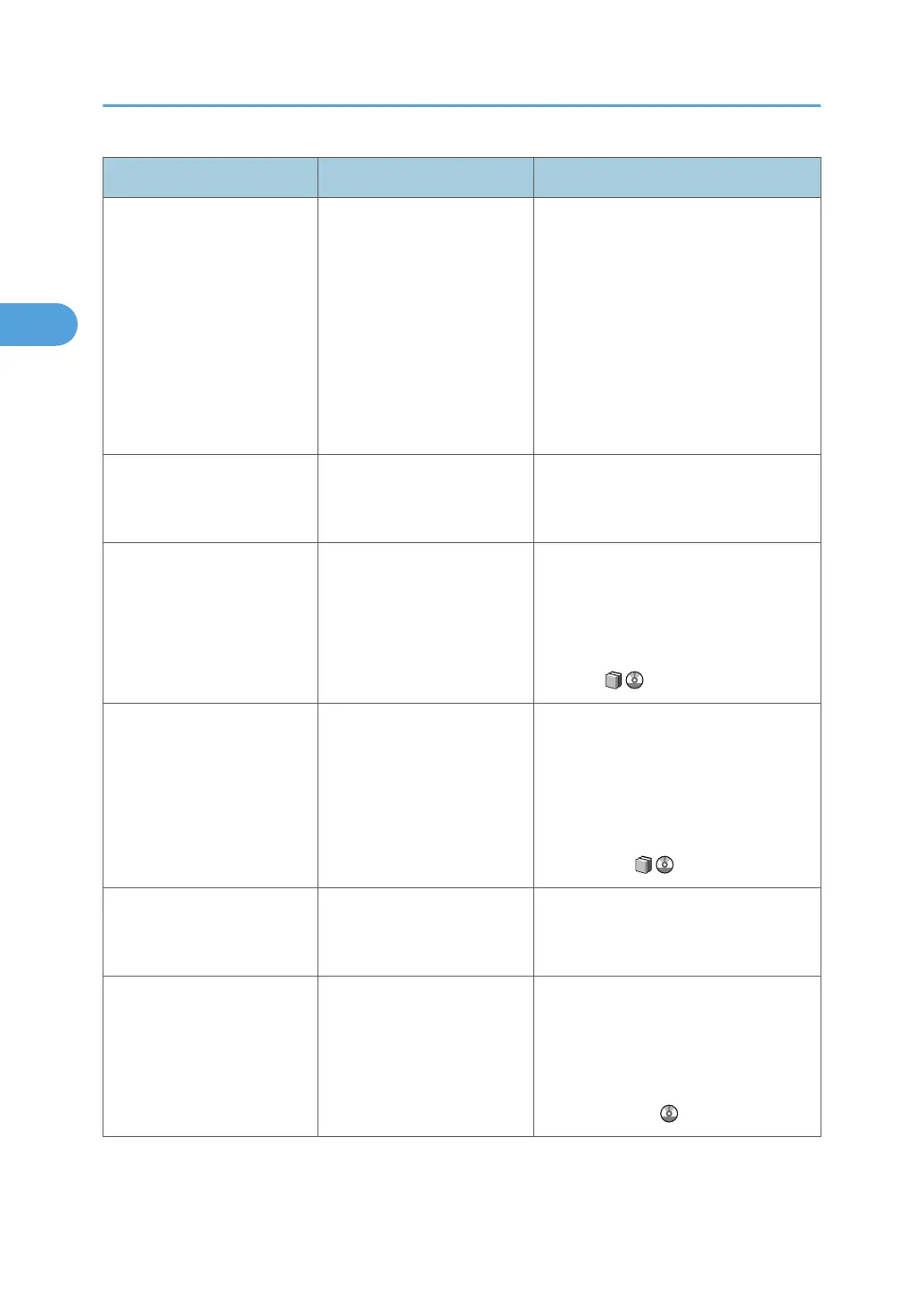
Message Cause Solution
"Connection between System
and Printer was
disconnected. Press the
operation switch, make sure
the LED is turned off. After 1
minute, turn the main power
switch off then switch back on
again. If a function is in
process, turn off the machine
after 20 minutes."
A communication error has
occurred between the system
and the printer unit.
Contact your service representative.
"Error has occurred. Press
[Job Reset] to cancel
printing."
An invalid printing parameter
has been specified.
Press [Job Reset] to cancel the print job,
and then check the printer driver settings.
"Exceeded the maximum
number of sheets possible for
Booklet. Press [Job Reset] to
cancel printing."
The maximum number of
sheets possible for booklet
stapling was exceeded
during printing.
Press [Job Reset] to cancel the print job,
and then reduce the number of sheets to
be booklet stapled. For details about the
maximum number sheets for booklet
stapling, see "Appendix", About This
Machine .
"Exceeded the maximum
number of multi-sheet fold.
Press [Job Reset] to cancel
printing."
The maximum number of
sheets that the finisher can
fold was exceeded during
printing.
Press [Job Reset] to cancel the print job,
and then remove the paper from the
Folding Unit Tray. Reduce the number of
sheets to multi-sheet fold. For details
about the maximum number of sheets to
multi-sheet fold, see "Appendix", About
This Machine .
"Fold is available only when
collate is selected. Press [Job
Reset] to cancel printing."
Collate is not selected. Press [Job Reset] to cancel the print job,
and then select collate.
"Fold is not available with
different paper sizes. Press
[Job Reset] to cancel
printing."
Paper of mixed size was
loaded for printing with
folding.
Press [Job Reset] to cancel the print job,
and then remove the paper from the
Folding Unit Tray. Fold is available with
same paper sizes. For details about the
fold function, see "Advanced Printing",
Printer Reference .
2. Troubleshooting When Using the Printer Function
24







 To Next Page