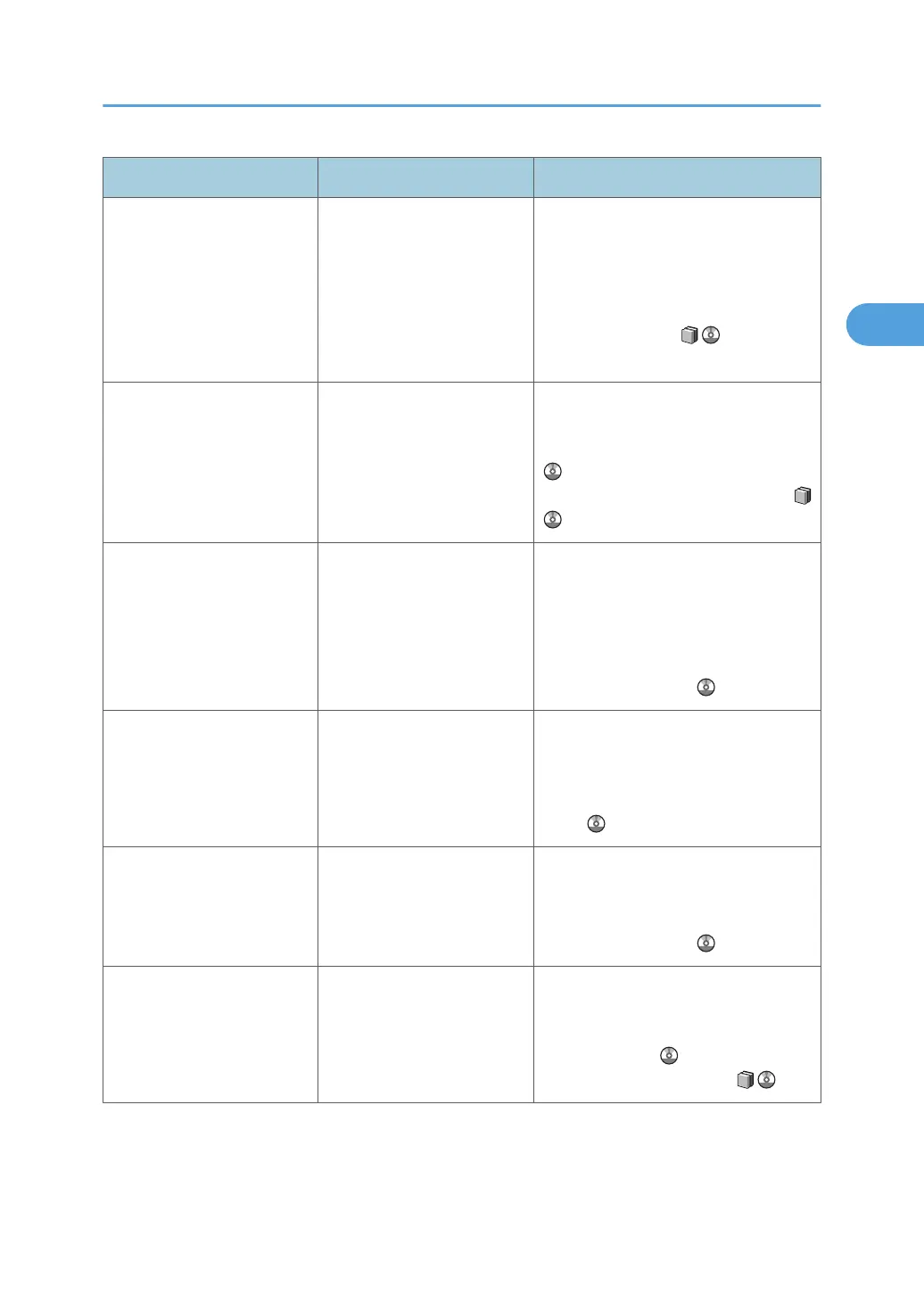
Message Cause Solution
"Fold is not available with this
paper thickness. Change the
paper in the paper tray to
paper which has the correct
thickness available for fold,
or press [Job Reset] to cancel
printing."
The selected paper tray
contains paper of an
unsuitable thickness for
folding.
Load the tray with paper of a thickness
that is suitable for folding. Alternatively,
press [Job Reset] to cancel the print job.
For details about paper thicknesses that
are suitable for folding, see "Appendix",
About This Machine .
"Fold is not available with this
paper. Press [Job Reset] to
cancel printing."
Fold was specified for paper
that cannot be folded.
Press [Job Reset] to cancel the print job.
For details about the fold function, see
"Advanced Printing", Printer Reference
or "Specifications for Multi-Folding
Unit (Optional)", About This Machine
.
"Invalid value is set to IPv6
address and Gateway
address."
The system's IPv6 address
and Gateway address
specified for the machine is
incorrect.
Check the value of the system's IPv6
address and Gateway address is
correct, and change it if necessary.
For details about the system's IP address,
see "System Settings", Network and
System Settings Guide .
"IPv4 Address is already in
use."
The system's IPv4 address is
already in use.
Check that the system's IPv4 address
specified for the machine is correct, and
change it if necessary. See "Interface
Settings", Network and System Settings
Guide .
"Load custom size paper." The size of the paper in the
paper tray was changed
while printing was
suspended.
Load paper of the specified size.
For details about the custom size paper,
see "Tray Paper Settings", Network and
System Settings Guide .
"Load following paper in Tray
n."
(A figure is placed at n.)
The selected paper tray is
empty.
Load the relevant tray, or press [Job
Reset] to cancel the print job. See "If
Paper Size and Type Errors Occur",
Printer Reference , or See "Loading
Paper", About This Machine .
Messages Displayed When Using the Printer Function
25







 To Next Page