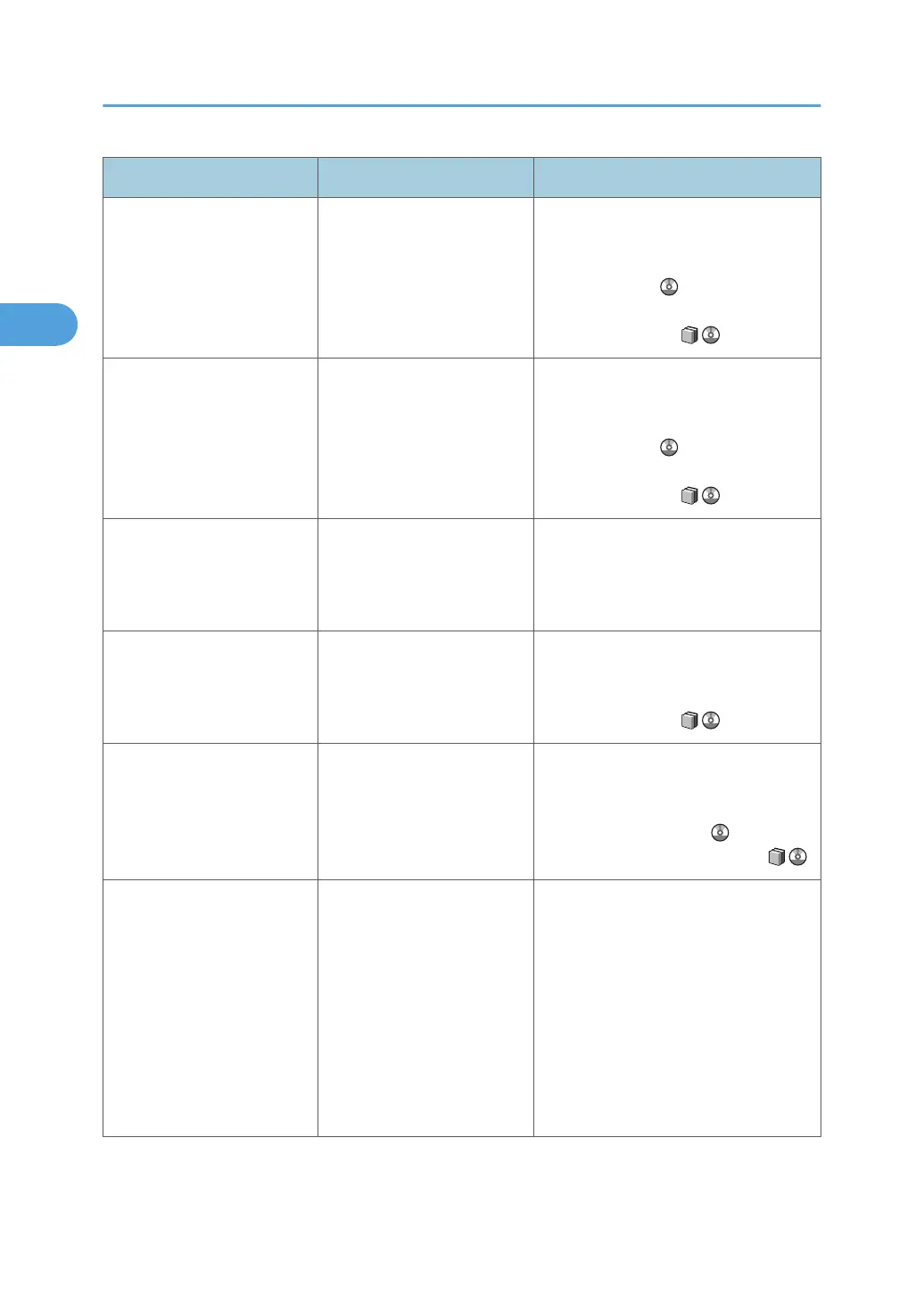
Message Cause Solution
"Load following paper in
Interposer Lower Tray"
The Interposer Lower Tray is
empty.
Load the relevant tray, or press [Job
Reset] to cancel the print job. See "If
Paper Size and Type Errors Occur",
Printer Reference . For details about
loading paper, see "Loading Paper",
About This Machine .
"Load following paper in
Interposer Upper Tray."
The Interposer Upper Tray is
empty.
Load the relevant tray, or press [Job
Reset] to cancel the print job. See "If
Paper Size and Type Errors Occur",
Printer Reference . For details about
loading paper, see "Loading Paper",
About This Machine .
"Load xx size paper."
(A figure is placed at xx.)
The size of the paper in the
paper tray was changed
while printing was
suspended.
Load paper of the specified size.
"Make sure that the paper
tray is not overloaded and the
paper is set correctly."
The paper tray is overloaded,
or the paper is not set
correctly.
Load paper only as high as the upper
limit markings of the paper tray, or load
paper correctly. See "Loading Paper",
About This Machine .
"Multi-sheet fold is not
available with the selected
fold type. Press [Job Reset] to
cancel printing."
Multi-sheet fold was specified
with a fold type that cannot be
used when multi-sheet
folding.
Press [Job Reset] to cancel the print job,
and then check the printer driver settings.
For details about this function, see
"Fold", Printer Reference , or
"Appendix", About This Machine .
"No response from the server.
Authentication has failed."
Authentication under LDAP
and server authentication has
failed. The same names with
different IDs are registered on
another server, and the
account names are
overlapping due to the
domain server being
switched or some similar
event.
Contact the administrator.
2. Troubleshooting When Using the Printer Function
26







 To Next Page