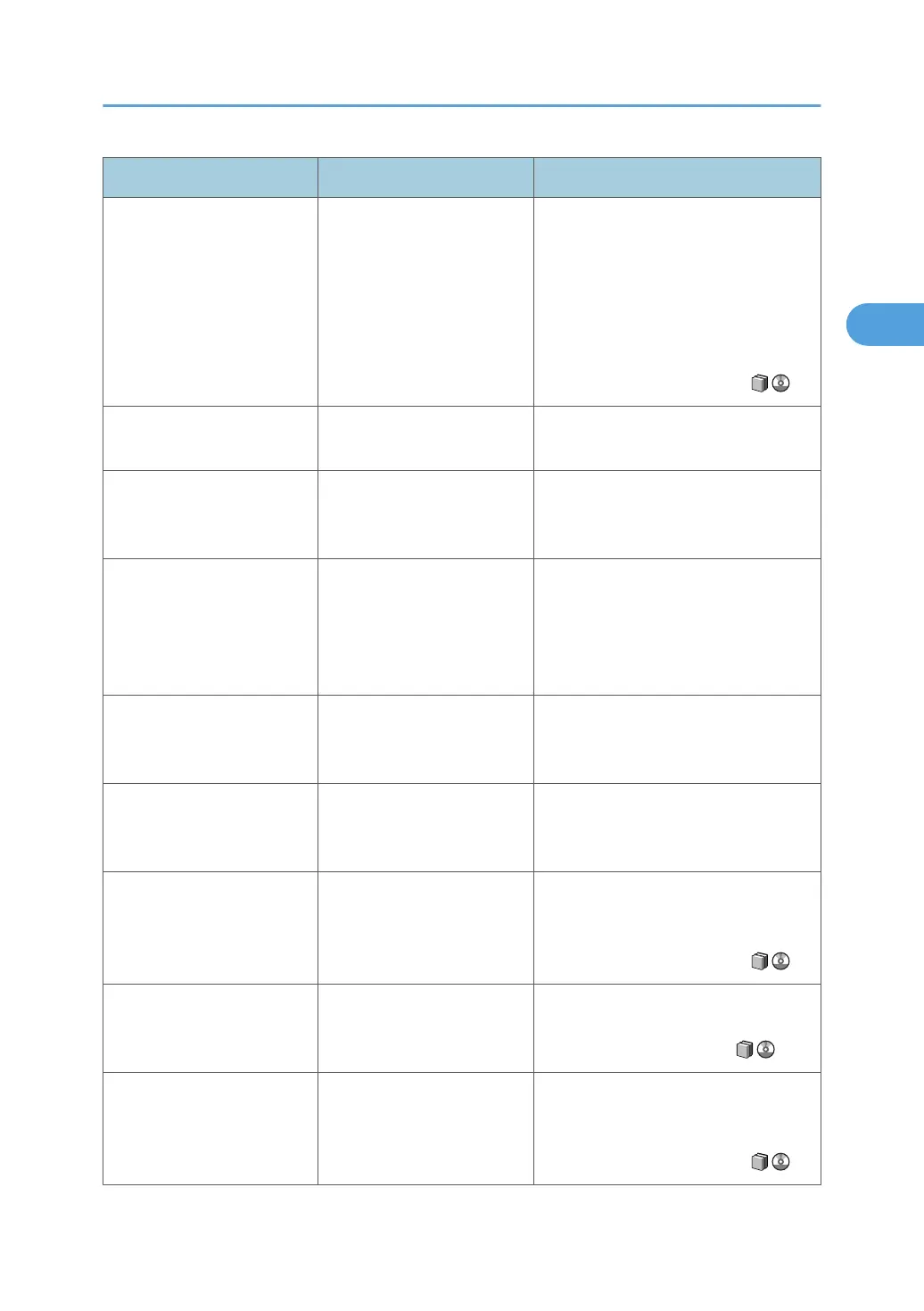
Problem Cause Solution
Misfeeds occur frequently. The paper is wrinkled or has
been folded/creased.
Use recommended paper only and be
sure its storage environment meets the
recommended temperature and
humidity conditions. For details about
recommended paper and the proper
way to store it, see "Recommended
Paper Sizes and Types" and "Paper
Storage", About This Machine .
Misfeeds occur frequently. Printed paper is being used. Do not load sheets that have already
been printed onto by another machine.
Misfeeds occur frequently. Sheets are sticking together. Fan the sheets thoroughly before
loading them. Alternatively, feed the
sheets into the machine one at a time.
Z-Folded paper is not
properly aligned.
The auxiliary tray is not set. Set the auxiliary tray for the Finisher Shift
Tray or Folding Unit Tray. For details
about how to add the auxiliary tray, see
p.78 "When Z-folded Paper Is Not
Properly Aligned".
Paper is bent. Paper may be bent when is
ejected from the Finisher
Upper Tray.
Change the output tray to the Finisher
Shift Tray.
Sheets are feeding in
together, resulting in jams.
Sheets are sticking together. Fan the sheets thoroughly before
loading them. Alternatively, feed the
sheets into the machine one at a time.
Paper becomes creased. The paper is damp. Use paper that has been stored in the
recommended temperature and
humidity condition. See "Paper
Storage", About This Machine .
Paper becomes creased. The paper is too thin. Use recommended paper. See
"Recommended Paper Sizes and
Types", About This Machine .
Edges of sheets are creased. The paper is damp. Use paper that has been stored in the
recommended temperature and
humidity condition. See "Paper
Storage", About This Machine .
Other Printing Problems
39







 To Next Page