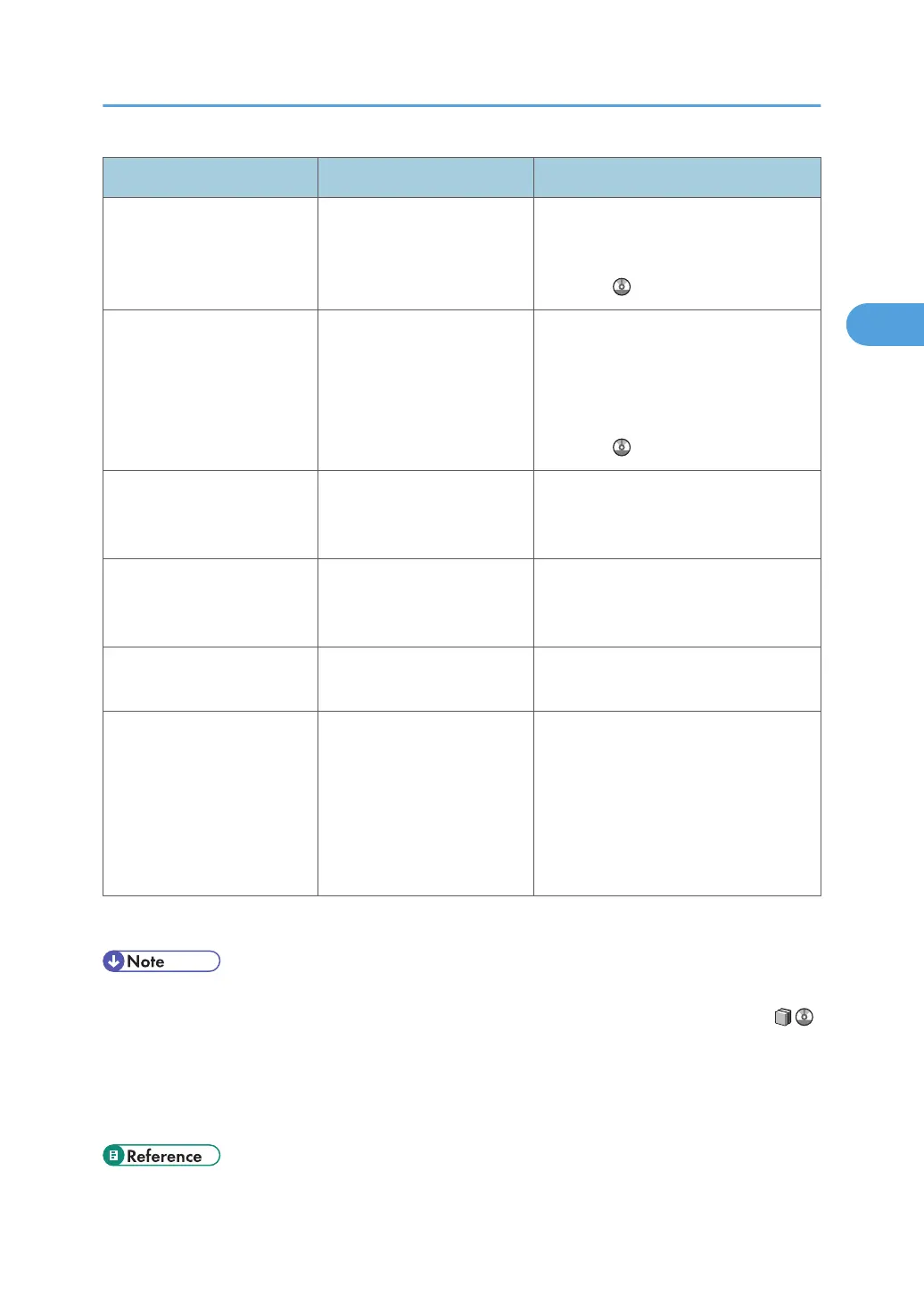
Problem Cause Solution
PDF or DTP files do not print
out properly.
PostScript is not selected as
the page description
language.
Change the page description language
to PostScript. For details, see "Switching
the Page Description Language", Printer
Reference .
PDF files do not print out/
cannot perform PDF direct
print.
PDF files are password-
protected.
To print password-protected PDF files,
enter the password in the [PS / PDF
Menu] or on Web Interface. For details,
see "Printing a PDF File Directly" or [PS /
PDF Menu] "Printer Features", Printer
Reference .
PDF files do not print out/
cannot perform PDF direct
print.
PDF files cannot be printed if
they are print-disabled in PDF
file security setting.
Change the PDF file security setting.
PDF direct print produces
strange or malformed
characters.
Fonts were not embedded. Embed fonts in the PDF file you want to
print and then print.
White stripes appear on the
OHP.
Fragments of paper are stuck
to the OHP.
Use a dry cloth to wipe any paper
fragments off the back of the OHP.
When specifying [Replace
Sheet Settings] in the printing
preferences properties
dialog box, the message
"Tray Command string too
complex !" appears and
printing is not possible.
The number of sheets
specified for [Replace sheet:]
has exceeded the maximum.
Reduce the number of specified sheets.
Depending on the setting, the maximum
number of sheets you can specify in
[Replace sheet:] varies between 18 and
35.
If the problem cannot be solved, contact your service representative.
• If you cannot make prints as you want because of paper type, paper size, or paper capacity problems,
use recommended paper. See "Recommended Paper Sizes and Types", About This Machine .
• Curled paper causes misfeeds, soiled paper edges, or slipped positions while performing staple or
stack printing. When using curled paper, first straighten the curl with your hands or by placing the
paper upside down. Also, to prevent paper from curling, lay paper on a flat surface, and do not lean
it against the wall.
• p.47 "Removing Jammed Paper"
Other Printing Problems
45







 To Next Page