9
Removing the Sanding Belt Assembly
WARNING: To reduce the risk of injury from acci-
dental start, make sure tool is unplugged before
removing the sanding belt assembly.
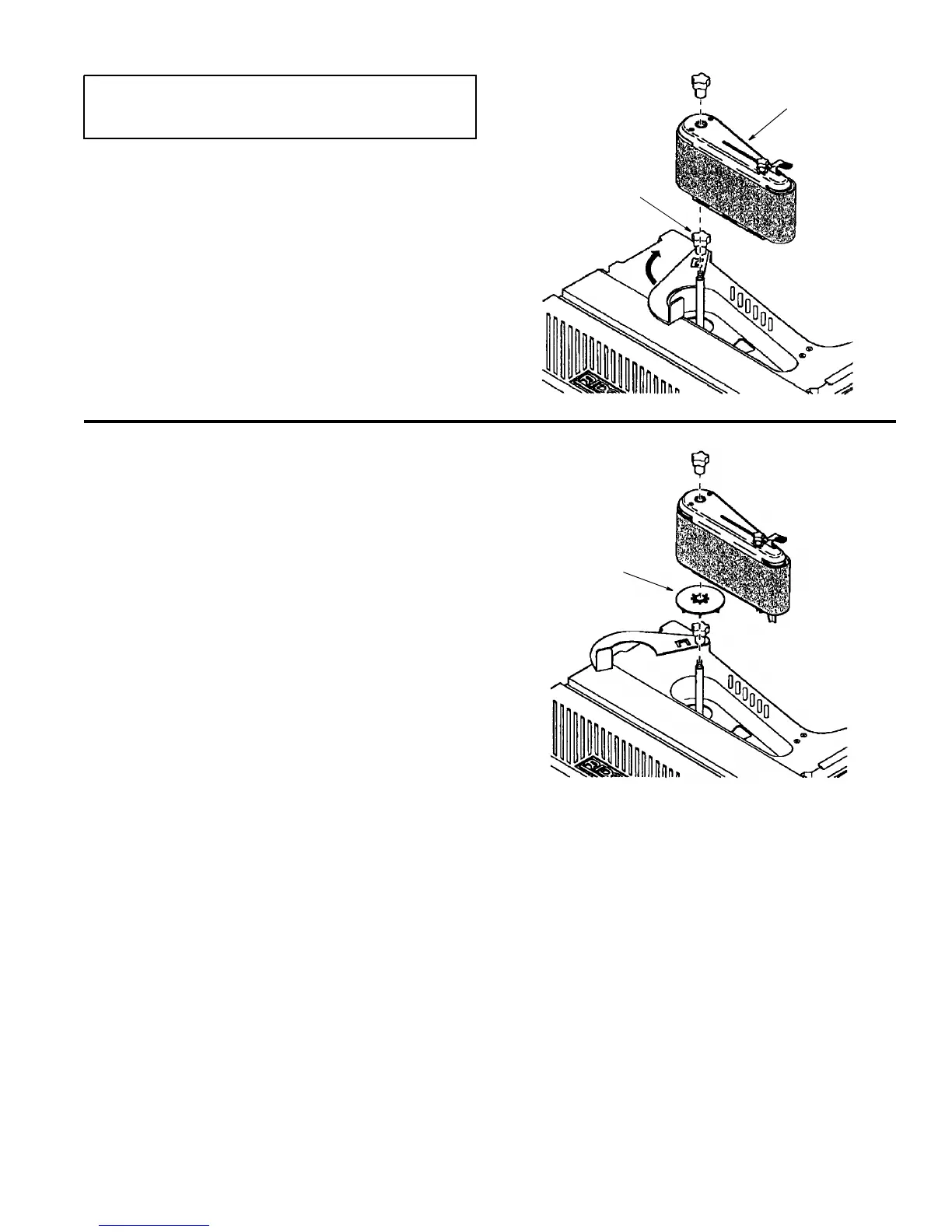
1. Loosen the backstop knob and pivot the backstop out
of the way. Tighten the backstop knob.
2. Remove the spindle knob and lift off the sanding belt
assembly. NOTE: Knob turns clockwise to loosen.
3. Store assembly in pocket in rear of base.
Installing the Sanding Belt Assembly
1. Remove the fan and clean sawdust from inside table
recess.
2. Slide the fan onto the shaft (vanes face down). The fan
is used in all sanding operations.
3. Align flat on shaft with flat in drive drum. Slide assem-
lby down shaft. While sliding assembly align assembly
into wear plate.
4. Tighten spindle knob. Do not overtighten. NOTE: Knob
turns counterclockwise to tighten.
5. Install sanding belt (see “Removing/Installing the
Sanding Belt”, page 14).
6. Plug the power cord into the power source and install
the key.
Sanding Belt
Assembly
Backstop Knob
Fan



 To Next Page