104
ENGLISH
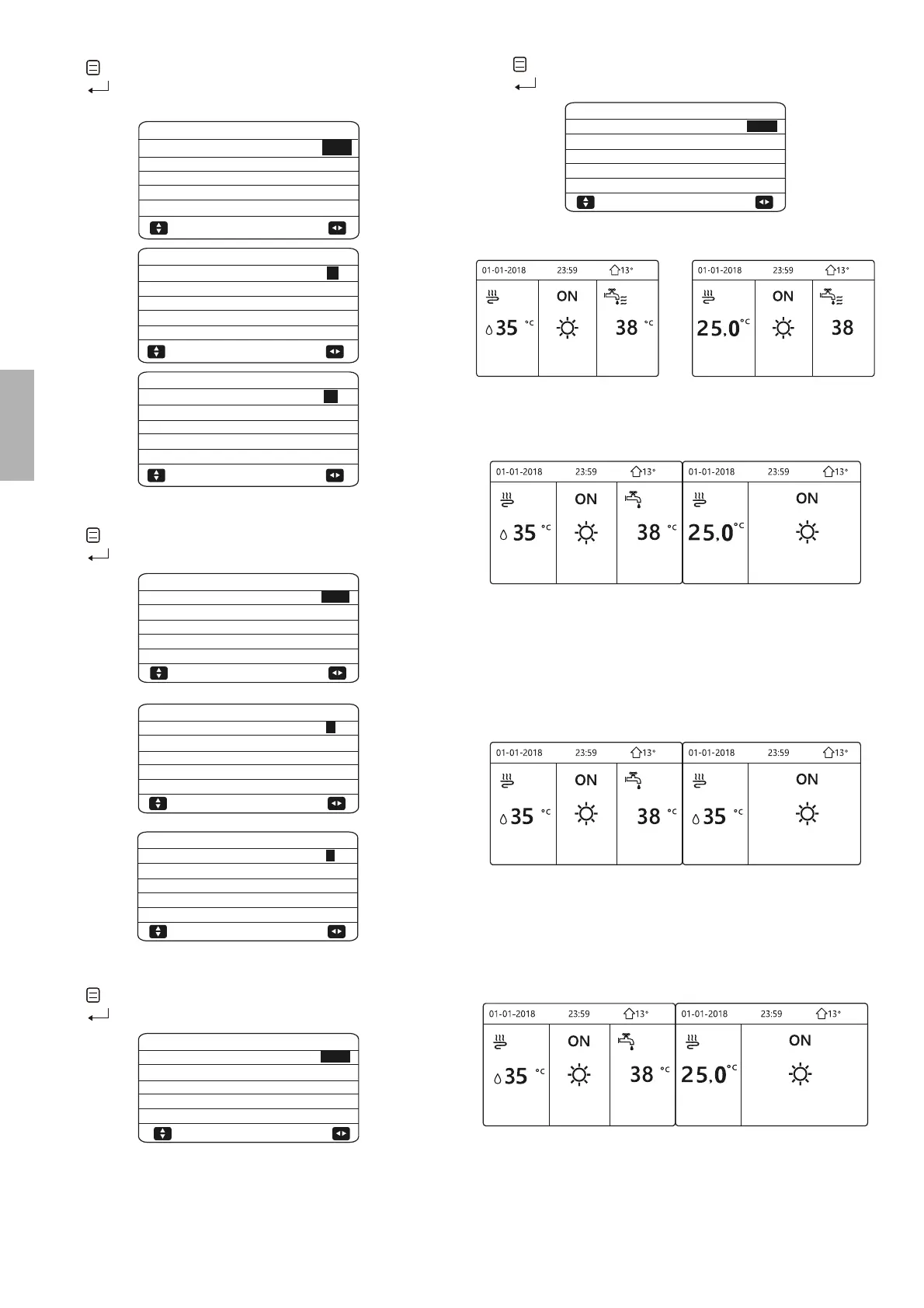
10.5.2 COOL MODE SETTING
Go to " "> FOR SERVICEMAN> 2.COOL MODE SETTING.
Press
" "
.
The following pages will be displayed:
43°C
20°C
5°C
2.0HRS
YES
1/3
2 COOL MODE SETTING
2.1 COOL MODE
2.2 t_T4_FRESH_C
2.3 T4CMAX
2.4 T4CMIN
2.5 dT1SC
ADJUST
2°C
5MIN
10°C
16°C
35°C
2/3
2 COOL MODE SETTING
2.6 dTSC
2.7 t_INTERVAL_C
2.8 T1SetC1
2.9 T1SetC2
2.10 T4C1
ADJUST
25°C
FCU
FLH
3/3
2 COOL MODE SETTING
2.11 T4C2
2.12 ZONE1 C-EMISSION
2.13 ZONE2 C-EMISSION
ADJUST
10.5.3 HEAT MODE SETTING
Go to " ">FOR SERVICEMAN> 3.HEAT MODE SETTING.
Press
" "
. The following pages will be displayed:
16°C
-15°C
5°C
2.0HRS
YES
3 HEAT MODE SETTING
3.1 HEAT MODE
3.2 t_T4_FRESH_H
3.3 T4HMAX
3.4 T4HMIN
3.5 dT1SH
ADJUST
35°C
28°C
-5°C
5MIN
2°C
3 HEAT MODE SETTING
3.6 dTSH
3.7 t_INTERVAL_H
3.8 T1SetH1
3.9 T1SetH2
3.10 T4H1
ADJUST
2/3
1/3
FLH
2MIN
RAD.
7°C
3 HEAT MODE SETTING
3.11 T4H2
3.12 ZONE1 H-EMISSION
3.13 ZONE2 H-EMISSION
3.14 t_DELAY_PUMP
ADJUST
3/3
10.5.4 AUTO MODE SETTING
Go to " "> FOR SERVICEMAN> 4.AUTO MODE SETTING.
Press
" "
, the following page will be displayed.
17°C
25°C
4 AUTO. MODE SETTING
4.1 T4AUTOCMIN
4.2 T4AUTOHMAX
ADJUST
10.5.5 TEMP. TYPE SETTING
About TEMP. TYPE SETTING
7KH7(037<3(6(77,1*LVXVHGIRUVHOHFWLQJZKHWKHUZDWHUÀRZ
WHPSHUDWXUHRUURRPWHPSHUDWXUHLVXVHGFRQWUROWKH212))RIWKH
heat pump. When ROOM TEMP. is enabled, the target water tempera-
ture will be calculated from climate-related curves.
How to enter the TEMP. TYPE SETTING
Go to "
"> FOR SERVICEMAN> 5.TEMP. TYPE SETTING.
Press
" "
. The following page will be displayed:
NON
NON
YES
5 TEMP. TYPE SETTING
5.1 WATER FLOW TEMP.
5.2 ROOM TEMP.
5.3 DOUBLE ZONE
ADJUST
If you only set WATER FLOW TEMP. to YES, or only set ROOM TEMP.
to YES, The following pages will be displayed.
only WATER FLOW TEMP. YES
only ROOM TEMP. YES
If you set WATER FLOW TEMP. and ROOM TEMP. to YES, meanwhi-
le set DOUBLE ZONE to NON or YES, the following pages will be
displayed.
Homepage (zone 1)
2
Addition page (zone 2)
(Double zone is eective)
Ż
Ż
In this case, the setting value of zone 1 is T1S, the setting value of
zone 2 is T1S2 (the corresponding T1S2 is calculated according to the
climate related curves).
If you set DOUBLE ZONE to YES and set ROOM TEMP. to NON,
meanwhile set WATER FLOW TEMP. to YES or NON, the following
pages will be displayed.
Homepage (zone 1) Addition page (zone 2)
2
Ż
Ż
In this case, the setting value of zone 1 is T1S, the setting value of
zone 2 is T1S2 (the corresponding T1S2 is calculated according to the
climate related curves.)
If you set DOUBLE ZONE to YES and set ROOM TEMP. to NON, me-
anwhile set WATER FLOW TEMP. to YES or NON,the following pages
will be displayed.
Homepage (zone 1)
2
Addition page (zone 2)
(Double zone is eective)
Ż
Ż
In this case, the setting valve of zone 1 is T1S, the setting value of
zone 2 is T1S2 (the corresponding T1S2 is calculated according to the
climate related curves).





 To Next Page