EasyManua.ls Logo

Rigol DSG800 Series - I;O Configuration

Rigol DSG800 Series
109 pages
Print Icon
To Next Page IconTo Next Page
To Previous Page IconTo Previous Page
Loading...
Chapter 2 Front Panel Operations RIGOL
DSG800 User's Guide 2-39
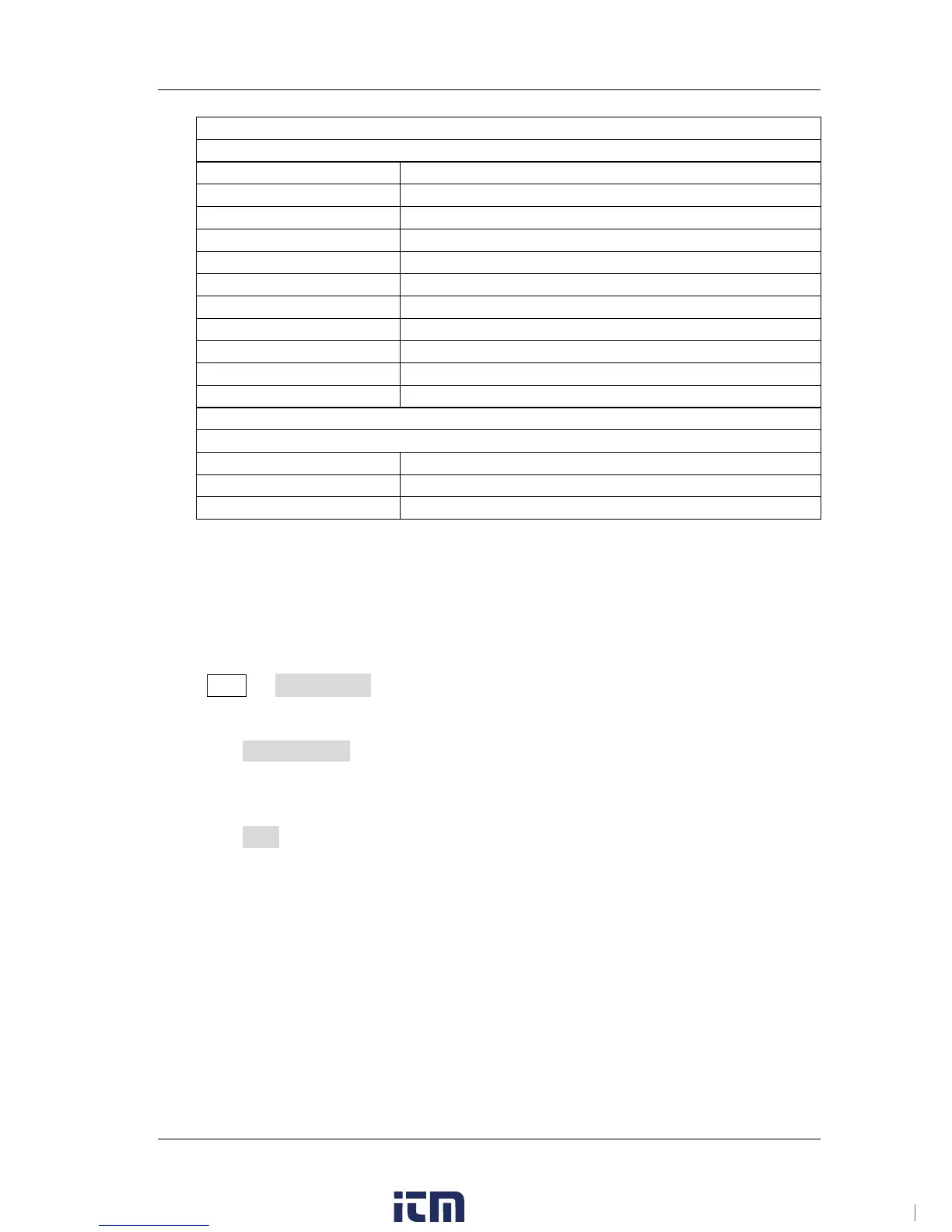
System
[1]
Language
English
Power On Setting
Preset
Preset Type
Factory
Remote Interface
Off
DHCP
On
Auto-IP
On
Manual-IP
Off
Screen State
On
Brightness
4
Time/Date
Off
Power Status
Open
Save
[1]
File Type
All
IME
Number
Prefix Switch
Off
Note
[1]
: Not affected by the preset setting.
I/O Configuration
The RF signal generator supports USB and LAN communication interfaces.
Press Syst I/O Config to set the "Remote I/O" and "LAN" parameters.
1. Remote I/O
Press Remote I/O to select "LAN", "USB", "Auto" or "Off" (turn off all the
interfaces).
2. LAN
Press LAN to set the LAN parameters.
w ww. . com
information@itm.com1.800.561.8187

Table of Contents

Other manuals for Rigol DSG800 Series

Related product manuals