13
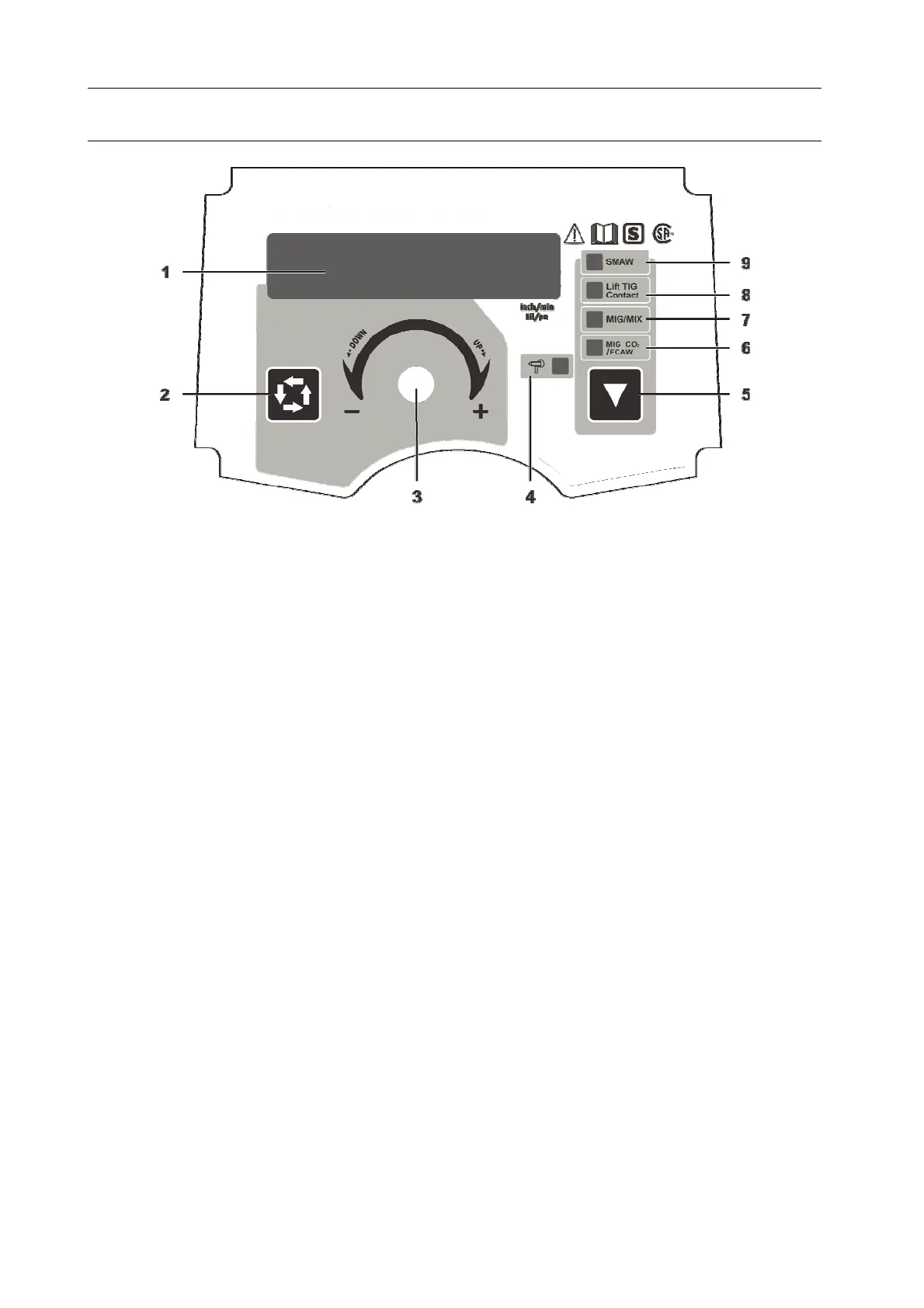
PANEL FUNCTION ILLUSTRATION
1 Multifunctional Data Display
2 Data Selection Key
Under MMA mode: can open or close VRD function by long pressing on the data selection
key.
Under MIG mode: can select parameters and choose the welding mode (2T/4T) by pressing
the Data Selection Key.
3 Multifunctional Data Adjusting Knob
Fine tuning: press the knob and turn the knob.
Coarse tuning: turn the knob.
4 Spool Torch Indicator
5 Function Switch Key
The MIG-CO
2
/FCAW, MIG/MIX, Lift TIG and SMAW switch key.
6 MIG-CO
2
/FCAW Indicator
7 MIG/MIX Indicator
8 Lift TIG Indicator
9 SMAW Indicator
Polarity conversion joint
This machine has the polarity conversion; There are positive output terminal and negative output
terminal between wire feeder and wire spool; When using solid wire with gas protection, torch
socket should be connected to the positive output terminal, ground cable should be connected to
the negative output terminal; When using flux-cored wire, the two connected cables should be
exchanged.



 To Next Page