17
4) Operation instruction under MMA mode.
1 Set welding mode:
When welding stops, press the Function Switch Key to MMA mode,the SMAW indicator
lights will illuminate.
2 VRD function:
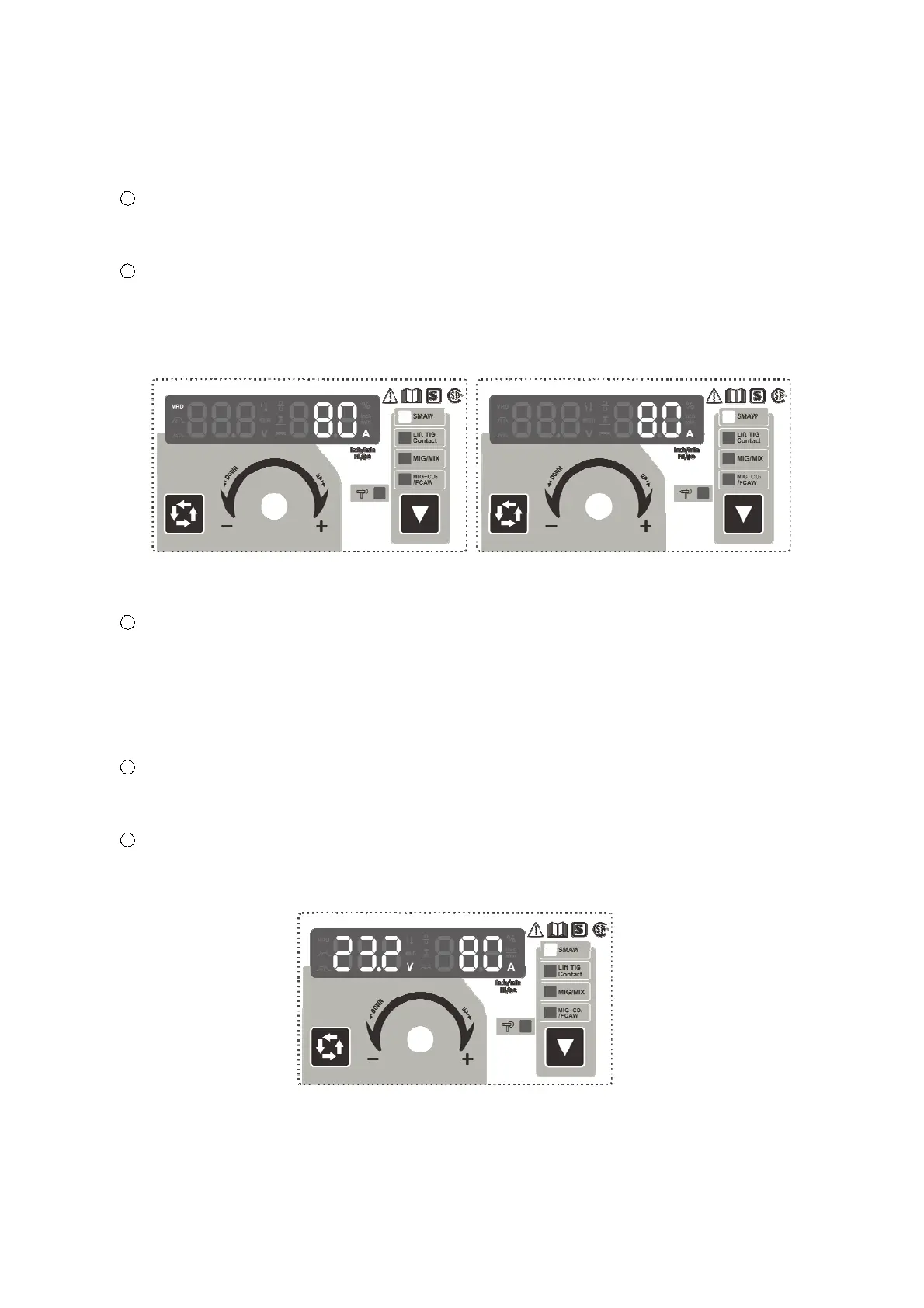
Press the Data Selection Key for 3 seconds, the VRD reduces open circuit voltage to a safe
limit and the function is enabled (Fig.11).
Press the Data Selection Key for 3 seconds again, the VRD function is closed. (Fig.12)
Fig.11 MMA Mode with VRD Enabled Fig.12 MMA Mode without VRD Display
3 Adjusting current:
Adjusting the Multifunctional Data Adjusting Knob can change the welding current during
welding process. See the chapter “TECHNICAL PARAMETERS” for the range of output
current.
The settings will be retained when the machine closed, and displayed when the machine
restarts.
4
Three seconds after setting the welding parameters, the Multifunctional Data Display will
flash for one time, which means the data has been saved. Moreover, the panel will display
these data when restarting the machine next time if the parameters keep unchanged.
5
The panel displays as Fig.13 when performing welding, the welding voltage is 23.2V, and the
current is 80A. It will go to the default state of welding current in 5 seconds when stopping
welding.
Fig.13 The Displays Status when Welding under MMA Mode.


 To Next Page