Linear operation guide: 13562-B 02-19 | 15
Please note:
If you think your problem is Wi-Fi related, please lookup/download the Wi-Fi user guide available
on the Rinnai website, enter Wi-Fi user guide in the search eld. There may be a requirement for
you to reset the Wi-Fi module in the re. To do this for the Linear make sure the re is on:
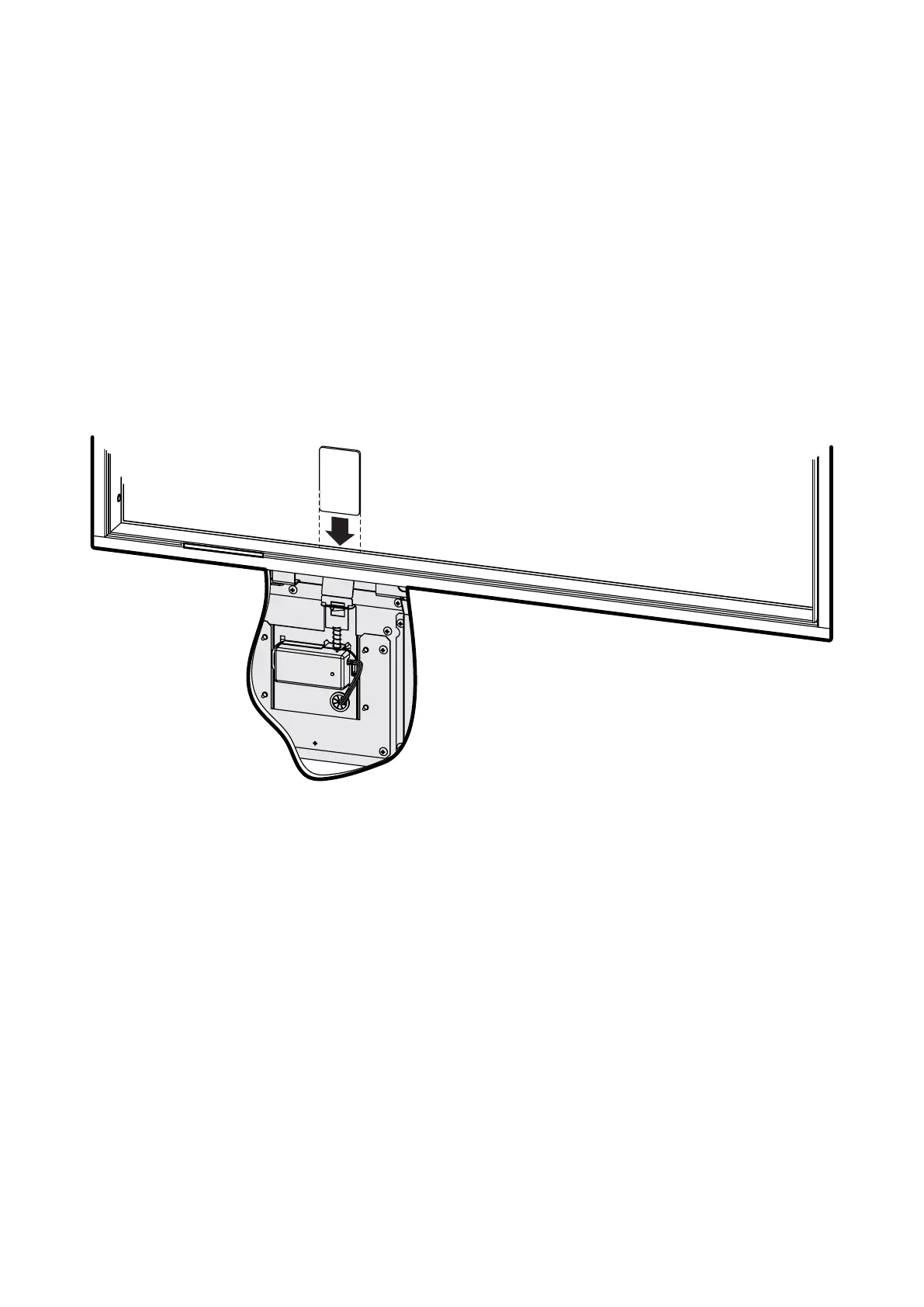
1. Grab a credit card, or something similar in thickness (non-metallic), and walk up to the re.
2. Looking left of centre and down into the Linear you will see a narrow gap with a metal sheet.
3. Using your card, gently press down to reset the Wi-Fi module.
4. Restart your app and follow the instructions.
If this doesn’t work, switch the power off (at the wall) and then back on again to reset the re—try a
couple of times if this doesn’t work the rst time.
Using a credit card or something similar
(non-metallic), press down to reset the Wi-Fi
module in the re.

 To Next Page
 Loading...