Rittal roof-mounted Blue e+ cooling unit/VX25 Blue e+ integration solution 29
7 Operation
EN
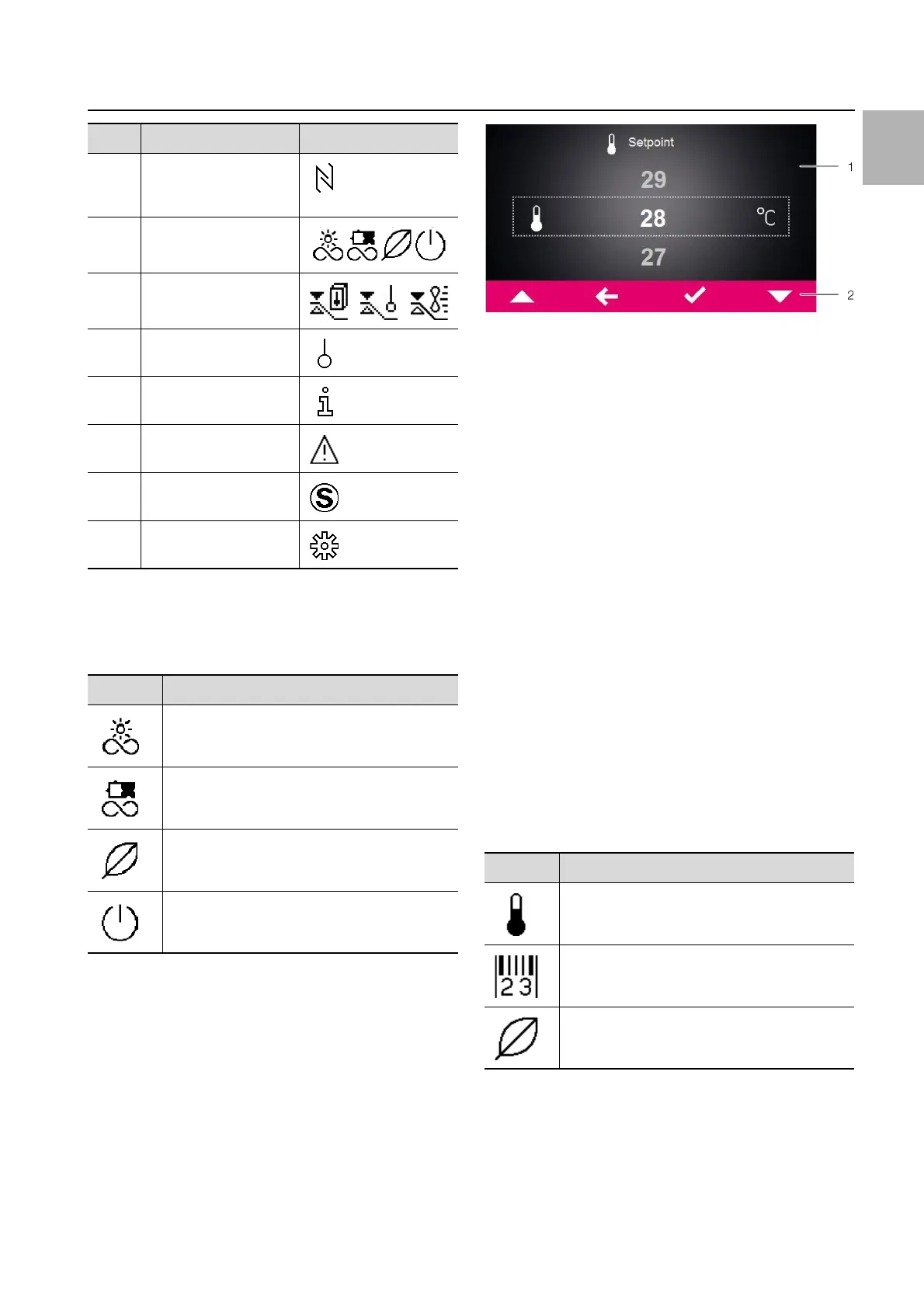
Type of cooling
The current form of cooling is indicated by one of the fol-
lowing four icons.
7.2.2 Changing a parameter value
If a parameter value is changed, the display including the
menu bar will also change.
Fig. 19: Screen for changing a parameter value
Key
1 Main screen
2 Control bar
The currently selected parameter value is displayed in
the centre of the main screen. To change this value, you
always proceed in the same way, as described below
with the example of adjusting the set temperature:
On the start screen, click on the "Configuration" but-
ton.
Enter the PIN to gain access to the lower-level screen
pages of the "Configuration" zone.
"22" is the default PIN.
Click on the "Temperature" symbol.
Click on the "Control mode" symbol.
Select your preferred control mode from the display.
Change the setting to the required temperature using
the "Up" and "Down" arrows.
Alternatively, you can also select the one of the dis-
played higher or lower values directly.
Finally, confirm the set value with "OK".
Exit this screen page with the "Back" button.
7.3 Information menu
Click on the "Information" symbol to display a list of
lower-level screen pages.
7.3.1 Temperature information
Click on the "Temperature information" symbol.
The ambient temperature and internal temperature are
displayed, in each case as an average for the last 24
hours of operation.
7 NFC connection (max.
120 seconds after con-
necting)
8 Type of cooling
9 Control based on ...
10 External sensor
11 Information menu
12 System messages
(where applicable)
13 Service icon (if re-
quired)
14 Configuration
Symbol Parameters
Cooling in compressor mode without support
from the heat pipe
Cooling in compressor mode with support
from the heat pipe
Cooling via the heat pipe only
No cooling
Tab. 7: Possible icons for the current type of cooling
Item Description Possible icons
Tab. 6: List of all icons with descriptions
Symbol Parameters
Temperature info
Device info
Efficiency info
Tab. 8: "Information" zone


 To Next Page