7 Operation
EN
30 Rittal roof-mounted Blue e+ cooling unit/VX25 Blue e+ integration solution
7.3.2 Device information
Click on the "Device information" symbol.
A list of general information about the device will be
displayed.
Page through the list using the "Up" and "Down" ar-
rows.
7.3.3 Efficiency information
Click on the "Efficiency information" symbol.
The average energy efficiency ratio (EER) for the last
24 hours of operation will be displayed. The energy ef-
ficiency ratio is the ratio of the cooling output generat-
ed to the electrical power used.
7.4 Configuration menu
Click on the "Configuration" symbol.
A screen page will appear asking you to enter the PIN
in order to access the lower-level screen pages.
For the first digit, page through the digits "0" to "9" us-
ing the "Up" and "Down" arrows until the required digit
appears in the box.
Confirm your selection with "OK".
For the second digit, once again page through the dig-
its "0" to "9" using the "Up" and "Down" arrows until
the required digit appears in the box.
Confirm your selection with "OK".
A list of lower-level screen pages will be displayed.
7.4.1 Temperature
Click on the "Temperature" symbol to display a list of
lower-level screen pages.
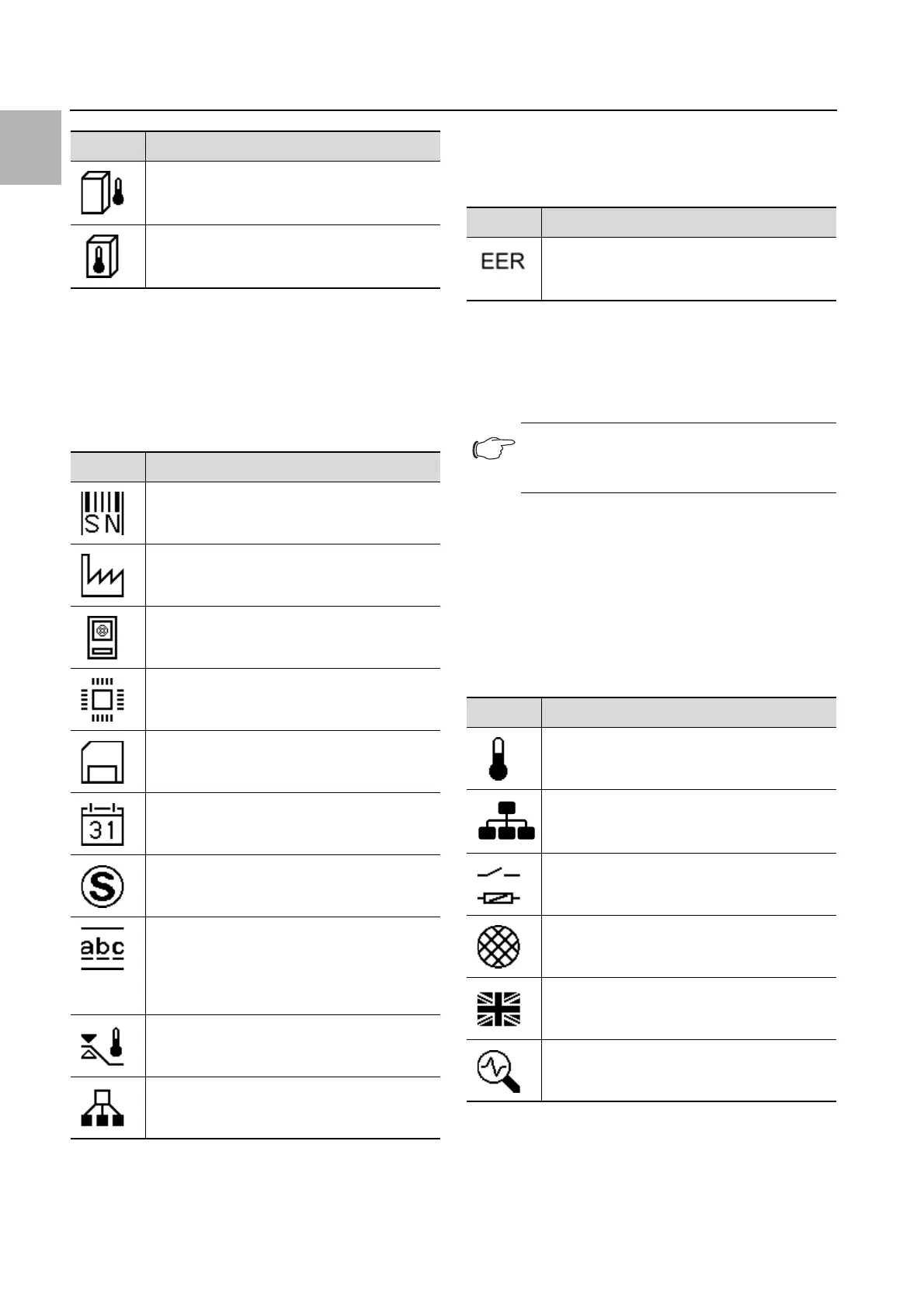
Symbol Parameter
ØTU 24h
Average ambient temperature (external tem-
perature) over the last 24 hours of operation.
ØTI 24h
Average internal temperature over the last 24
hours of operation.
Tab. 9: "Temperature information" zone
Symbol Parameter
Serial number
Manufacture date YYYY-MM-DD
Hardware Release x.xx.xx
Firmware Release x.xx.xx
Software Release x.xx.xx
Last update YYYY-MM-DD
Last maintenance YYYY-MM-DD
User device name
Name assigned to the cooling unit by the cus-
tomer. This title can be assigned using the
RiDiag software or the Blue e+ app to distin-
guish between individual units.
Act. control mode
If the unit is configured as a "slave": Slave num-
ber.
Tab. 10: "Device information" zone
Symbol Parameter
Average EER 24h
Average energy efficiency ratio (EER) of the last
24 hours of operation.
Tab. 11: "Efficiency information" zone
Note:
"22" is preset in the factory as the default
PIN.
Symbol Parameter
Temperature
Settings for set temperature and control mode
Network
Display of network information from the IoT in-
terface (3124300)
Alarm relay
Settings for the alarm relays.
Filter mats
Display language
Choice of language for display texts.
Self-test
Perform a self-test.
Tab. 12: "Configuration" zone


 To Next Page