7 Operation
EN
32 Rittal roof-mounted Blue e+ cooling unit/VX25 Blue e+ integration solution
Change the setpoint using the "Up" and "Down" ar-
rows or select the required temperature directly.
Confirm your entry with "OK".
Alarm threshold
This limit is used for an alarm message. The set value
must therefore be above the actual setpoint to which the
cooling unit has been set.
For example:
– Setpoint: 35 °C (95 °F)
– Alarm limit min.: 38 °C (100 °F)
– Alarm limit max.: 50 °C (122 °F)
Click on the "Alarm limit" symbol.
Change the setpoint using the "Up" and "Down" ar-
rows or select the required temperature directly.
Confirm your entry with "OK".
Example of "outlet temperature" control mode:
– Setpoint: 24 °C (75 °F)
– Alarm limit: 38 °C (100 °F)
Current situation:
– Temperature of air intake: 37 °C (< alarm limit)
– Temperature of expelled air: 24 °C (= setpoint)
If the alarm limit is exceeded:
– Temperature of air intake: 39 °C (> alarm limit)
– Temperature of expelled air: 22 °C (< setpoint)
If the alarm limit is subsequently undercut due to an in-
crease in the cooling output:
– Temperature of air intake: 37 °C (< alarm limit)
– Temperature of expelled air: 24 °C (= setpoint)
7.4.2 Network
Click on the "Network" symbol to display a list of low-
er-level screen pages.
Network on/off
Here, you can activate / deactivate data communication
to the IoT interface. Data communication is activated by
default.
Click on the "Network on/off" symbol.
Select your preferred setting by selecting it from the
display.
Confirm your entry with "OK".
Network info
Get IP information about how the IoT interface is incor-
porated into the network.
Click on the "Network info" symbol to display a list of
lower-level screen pages.
Note:
The external temperature sensor is available
as accessory from Rittal (see section 13 "Ac-
cessories").
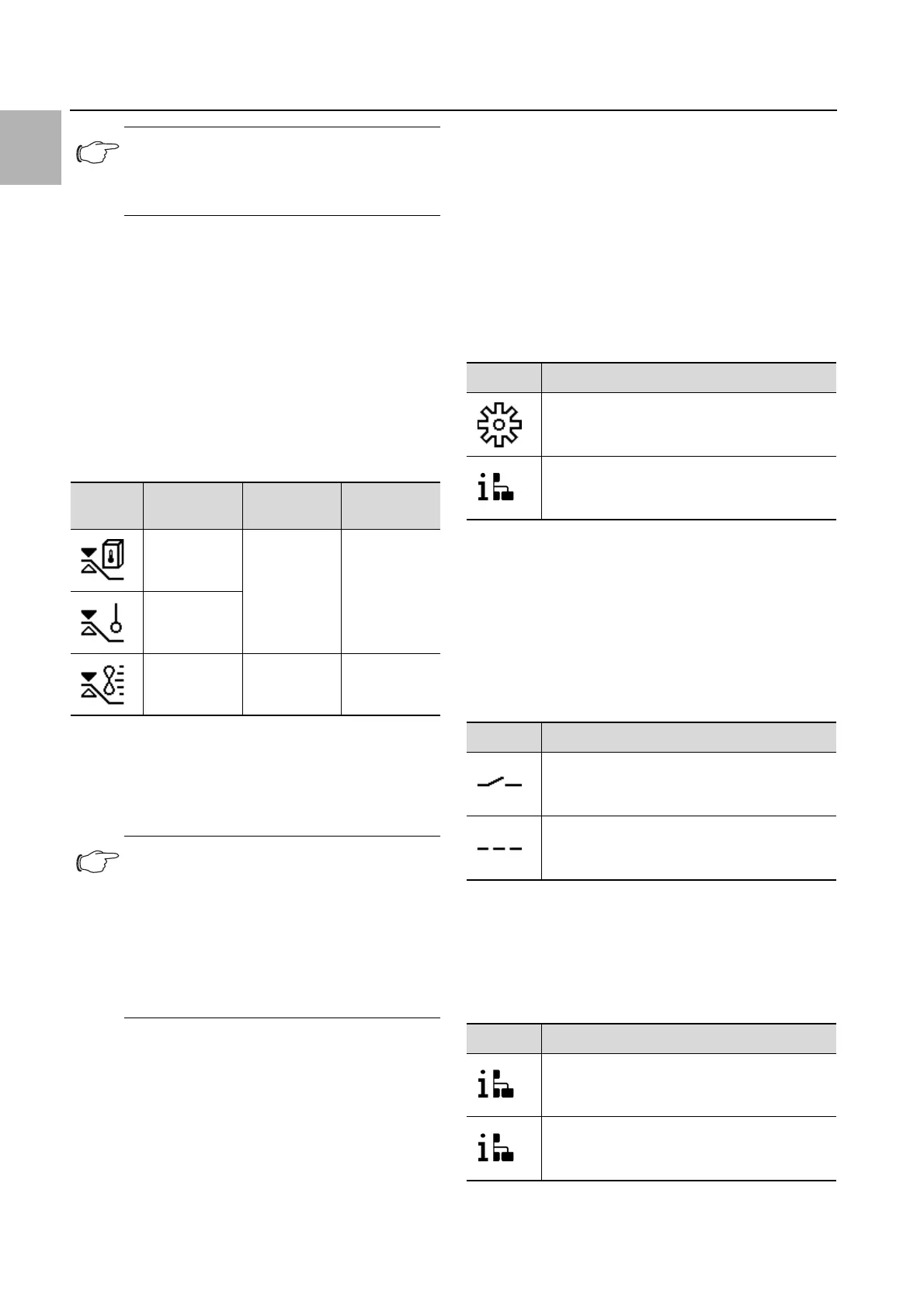
Symbol Parameter Alarm limit Factory
setting
Internal
temperature
3K…15K 5K
External
sensor
Outlet
temperature
12 K…24 K 14 K
Tab. 15: Alarm limit
Note:
In "external sensor" and "outlet temperature"
control mode, the cooling unit additionally
monitors the temperature of the air as it is
drawn in. If the set alarm limit seems likely to
be exceeded (e.g. due to a rise in heat loss),
the cooling output is increased for the dura-
tion of the threatened overtemperature, and
the setpoint is undercut.
Symbol Parameter
Network on/off
Network info
Tab. 16: "Network" zone
Symbol Parameter
Network off
Network on
Tab. 17: Data communication settings
Symbol Parameter
IPv4
IPv6
Tab. 18: Select the protocol version


 To Next Page