7 Operation
EN
34 Rittal roof-mounted Blue e+ cooling unit/VX25 Blue e+ integration solution
7.4.4 Filter mats
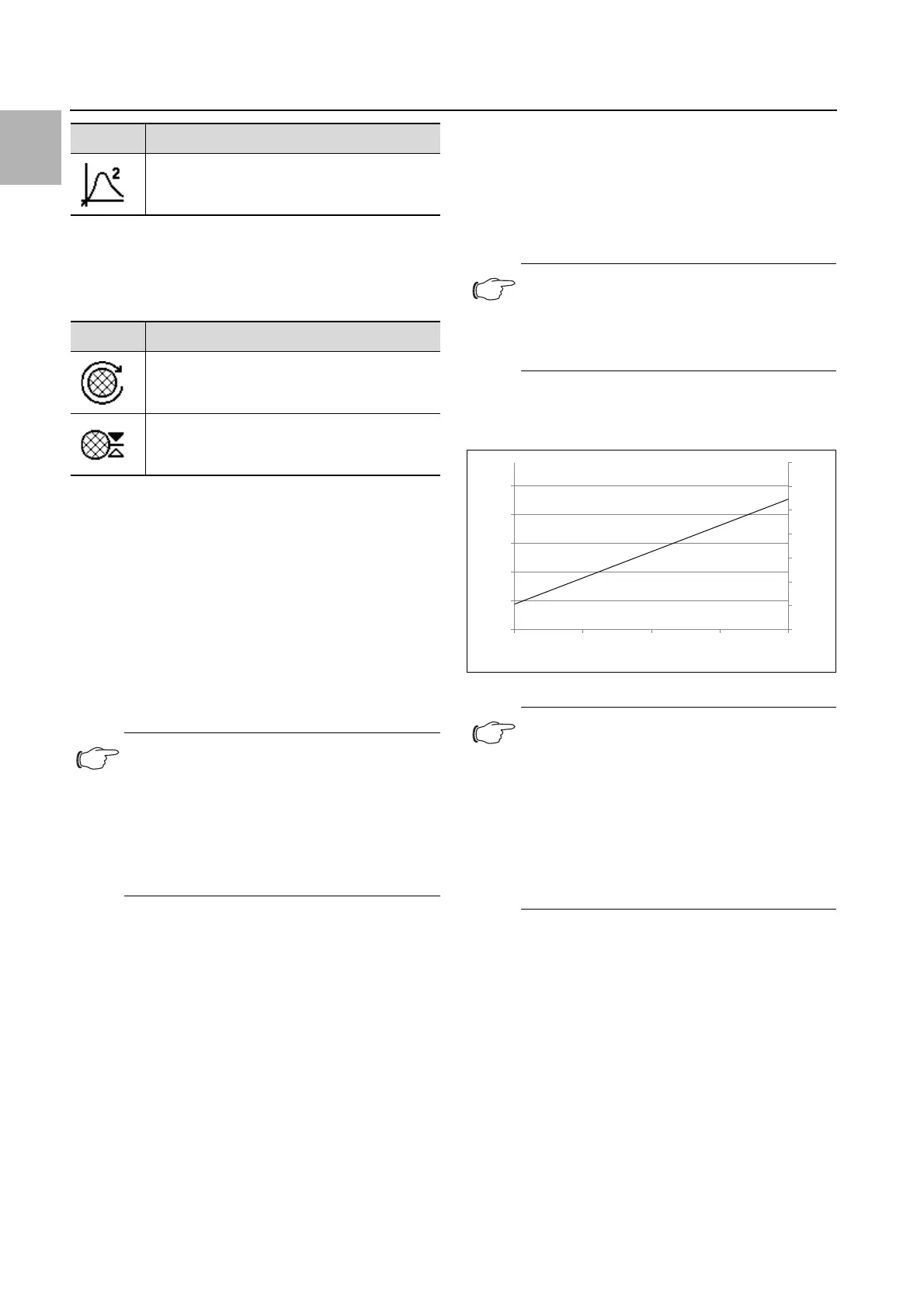
Click on the "Filter mat" symbol to display a list of low-
er-level screen pages.
Filter reference
Here the device may be set permanently to operation
with filter mats.
Click on the "Filter reference" symbol.
Click on the "New filter mat" symbol.
Confirm your entry with "OK".
If the device has already been set to operation with filter
mats, by clicking on the menu point "New filter mat", the
adjacent system message "Change filter mat" may be
reset.
Alarm tolerance
Here, the alarm tolerance may be set to one of five lev-
els, or filter mat monitoring deactivated. If the set alarm
tolerance is exceeded, the system message "Change fil-
ter" appears in the display.
Example:
– Setpoint: 35 °C (95 °F)
– External temperature: 20 °C (68 °F)
If an alarm tolerance level of "medium" is selected, the
system will tolerate an impairment to the air throughput
in the external circuit of approximately 35% before the
system message "Change filter" appears in the display.
Click on the "Alarm tolerance" symbol.
Change the alarm tolerance ("very small" – "very
large"), or deactivate filter monitoring using the "Up" or
"Down" arrows.
Alternatively, select the required level directly (factory
setting: "Medium" level).
Confirm your entry with "OK".
The following diagram illustrates the development of
cooling output depending on the air throughput in the
external circuit and the alarm limit (fig. 21).
Fig. 21: Sample cooling output development
7.4.5 Language settings
All displays on the unit are available in 21 different lan-
guages.
Click on the "Display language" symbol.
Page through to the required language using the "Up"
and "Down" arrows.
Confirm the chosen language with "OK".
The language will change over immediately, and all
menu displays will appear in the chosen language.
7.4.6 Self-test
In the event of a malfunction in the unit which fails to pro-
duce an error message, it may be useful to check the
key functions of all components with a self-test. You
Assign relay 2
Symbol Parameter
Filter reference
Alarm tolerance
Tab. 24: "Filter mat" zone
Note:
This message is also reset automatically as
soon as the device identifies an improved air
throughput in the external circuit thanks to
the use of a new filter mat. Assessment of the
air throughput only occurs when using the
compression system at constant speed, and
takes a few minutes.
Symbol Parameter
Tab. 23: List of functions
Note:
The more the air throughput in the external
circuit is impaired, the lower the maximum
cooling output and energy efficiency of the
cooling unit will be.
Note:
– If filter mat monitoring is deactivated ("De-
activate" level), it is still possible to select a
filter tolerance level. If the limit is exceeded,
the system message "Clean condenser"
appears in the display instead of "Change
filter".
– If filter mat monitoring is deactivated and no
filter tolerance level is selected, no system
message will be output.
70
65
75
80
85
90
95
100
5
15
25
35
45
55
Filter tolerance level
Very small Small Medium Large Very large
Impairment of the volumetric airflow [%]
Max. cooling output [%]


 To Next Page