EasyManua.ls Logo

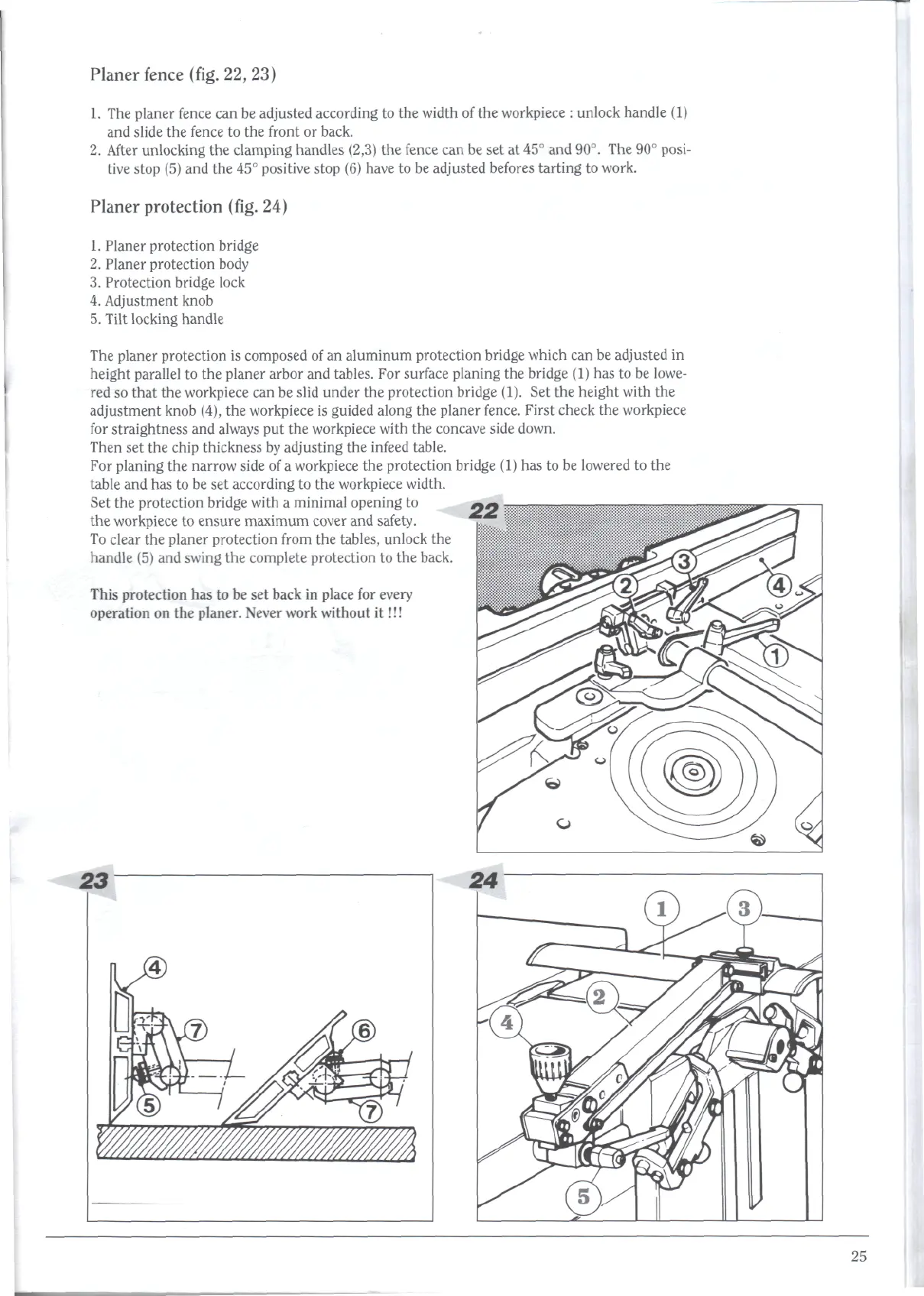
Robland XSD310 - Planer Fence (Fig. 22,23); Planer Protection (Fig. 24)

Default Icon
59 pages
Print Icon
To Next Page IconTo Next Page
To Previous Page IconTo Previous Page
Loading...
Planer
fence
(fig.
22,23)
1. The
planer
fence
can be
adjusted
according
to the
width
of the
workpiece
:
unlock handle
(1)
and
slide
the
fence
to the
front
or
back.
2.
After
unlocking
the
clamping
handles
(2,3)
the
fence
can be set at 45° and
90°.
The 90°
posi-
tive stop
(5) and the 45°
positive stop
(6)
have
to be
adjusted befores
tarting
to
work.
Planer
protection
(fig.
24)
1.
Planer protection bridge
2.
Planer protection body
3.
Protection
bridge lock
4.
Adjustment knob
5.
Tilt locking
handle
The
planer
protection
is
composed
of an
aluminum
protection
bridge which
can be
adjusted
in
height parallel
to the
planer arbor
and
tables.
For
surface planing
the
bridge
(1)
has to be
lowe-
red
so
that
the
workpiece
can be
slid under
the
protection
bridge (1).
Set the
height
with
the
adjustment knob (4),
the
workpiece
is
guided along
the
planer fence.
First
check
the
workpiece
for
straightness
and
always
put the
workpiece with
the
concave side down.
Then
set the
chip thickness
by
adjusting
the
infeed
table.
For
planing
the
narrow side
of a
workpiece
the
protection bridge
(1) has to be
lowered
to the
table
and has to be set
according
to the
workpiece width.
Set the
protection bridge
With
a
minimal
Opening
tO
the
workpiece
to
ensure
maximum
cover
and
safety.
To
clear
the
planer protection from
the
tables, unlock
the
handle
(5) and
swing
the
complete
protection
to the
back.
This
protection
has to be set
back
in
place
for
every
operation
on the
planer. Never work without
it!!!
23
25

Related product manuals