EasyManua.ls Logo

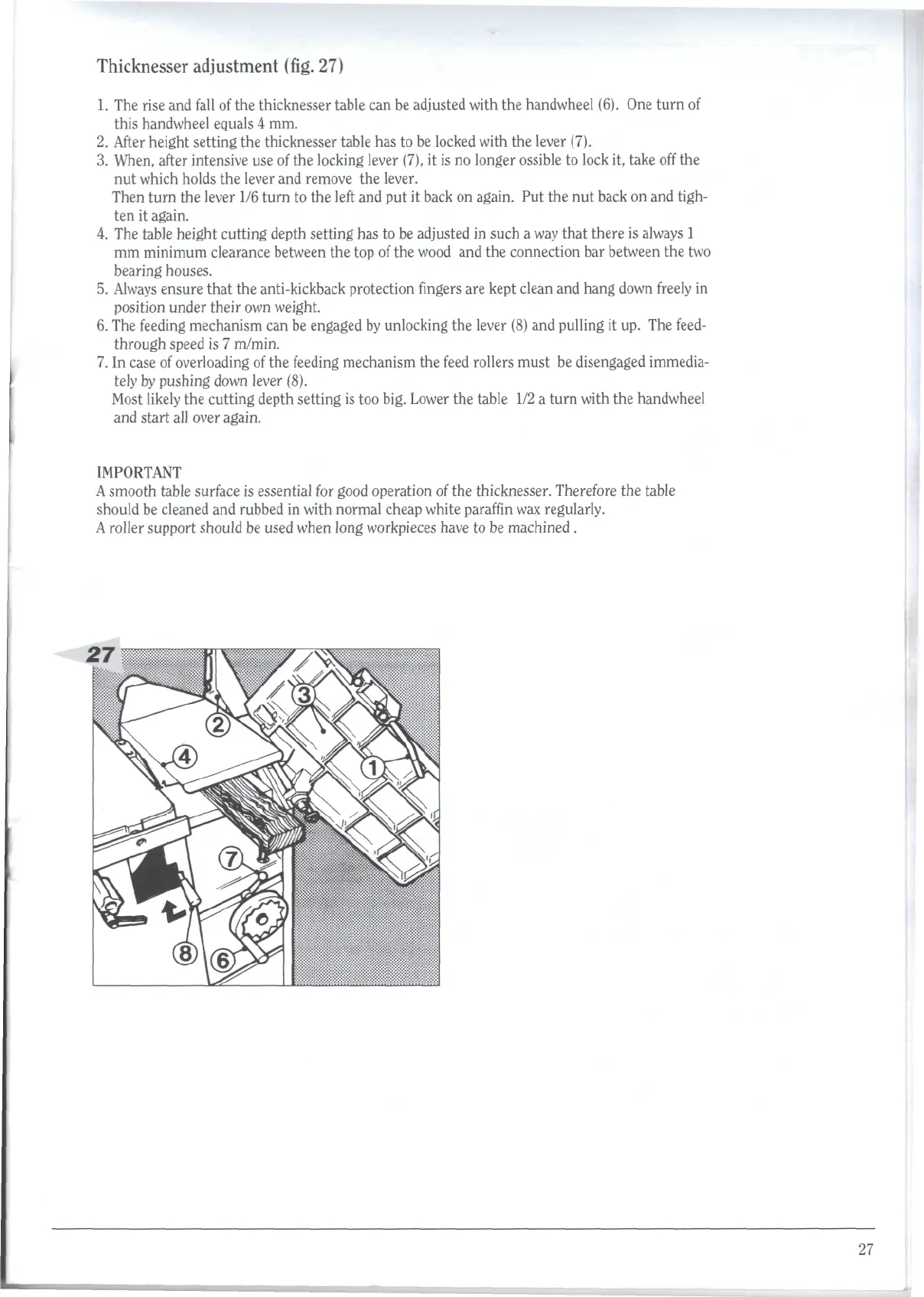
Robland XSD310 - Thicknesser Adjustment (Fig. 27)

Default Icon
59 pages
Print Icon
To Next Page IconTo Next Page
To Previous Page IconTo Previous Page
Loading...
Thicknesser
adjustment
(fig.
27)
1. The
rise
and
fall
of the
thicknesser table
can be
adjusted with
the
handwheel (6).
One
turn
of
this
handwheel equals
4 mm.
2.
After
height setting
the
thicknesser table
has to be
locked with
the
lever (7).
3.
When, after
intensive
use of the
locking lever (7),
it is no
longer
ossible
to
lock
it,
take
off
the
nut
which holds
the
lever
and
remove
the
lever.
Then
turn
the
lever
1/6
turn
to the
left
and put it
back
on
again.
Put the nut
back
on and
tigh-
ten it
again.
4.
The
table
height
cutting
depth
setting
has to be
adjusted
in
such
a
way
that
there
is
always
1
mm
minimum clearance between
the top of the
wood
and the
connection
bar
between
the two
bearing
houses.
5.
Always
ensure
that
the
anti-kickback protection
fingers
are
kept clean
and
hang down
freely
in
position
under
their
own
weight.
6. The
feeding
mechanism
can be
engaged
by
unlocking
the
lever
(8) and
pulling
it up. The
feed-
through
speed
is 7
m/min.
7. In
case
of
overloading
of the
feeding
mechanism
the
feed
rollers
must
be
disengaged immedia-
tely
by
pushing
down lever (8).
Most
likely
the
cutting
depth setting
is too
big.
Lower
the
table
1/2 a
turn
with
the
handwheel
and
start
all
over
again.
IMPORTANT
A
smooth
table
surface
is
essential
for
good
operation
of the
thicknesser.
Therefore
the
table
should
be
cleaned
and
rubbed
in
with normal cheap white
paraffin
wax
regularly.
A
roller
support
should
be
used when long workpieces have
to be
machined
.
27

Related product manuals