55
To dump a single Replifex
™
preset into a sequencer:
Operating the Replifex
™
Note: When performing data dumps to and from the Replifex
™
, always perform the dump in real time sequence mode. This
will ensure that data loaded back into the Replifex
™
is not sent faster than the Replifex
™
can receive it.
Also, make sure that the sequencer's MIDI filter is set to accept SYSX information.
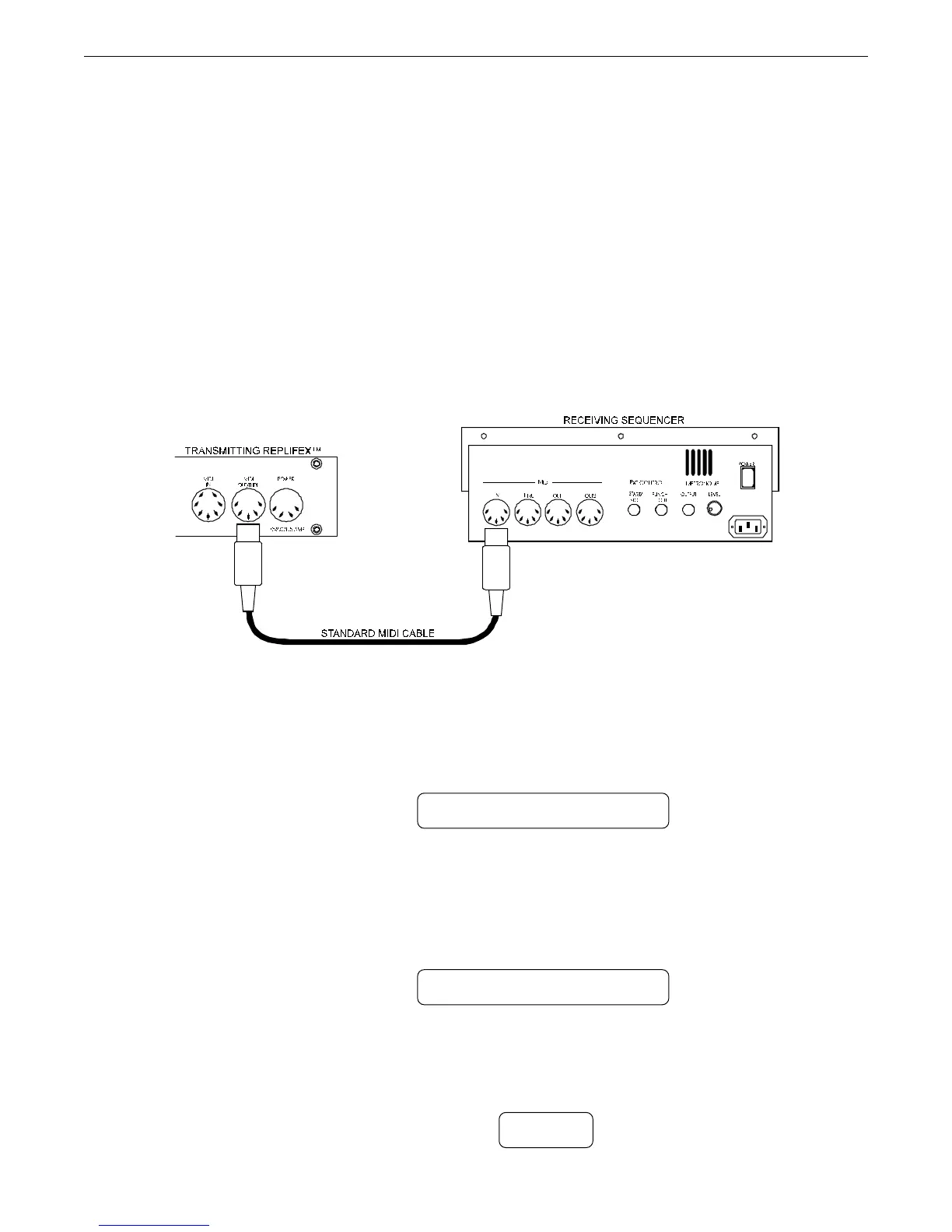
Connect a standard MIDI cable from the MIDI OUT of the transmitting Replifex
™
to the
MIDI IN on the receiving sequencer.
Step 1
Step 2
Turn the FUNCTION SELECT controls on the transmitting Replifex
™
until "MIDI DUMP/
LOAD" is displayed.
Step 3
Turn the PARAMETER SELECT control on the transmitting Replifex
™
until "BULK DUMP/
LOAD" is displayed.
MIDI DUMP/LOAD
BULK DUMP/LOAD
TRANSMITTING REPLIFEX
TRANSMITTING REPLIFEX
Step 4
Start the sequencer recording.
RECORD


 To Next Page