Programming 4-5
Password The SMC-Flex controller allows the user to limit access to the
programming system through password protection. This feature is
disabled with a factory-set default of 0. To modify the password or
login after a password is programmed, complete the procedure below.
➀
After you have changed your password, go to Parameter Management and Save to User Store.
➁ To complete the programming process, re-enter the Main Menu mode to log out. This will eliminate
unauthorized access to the programming system.
Note: If you lose or forget the password, contact your local
Allen-Bradley distributor.
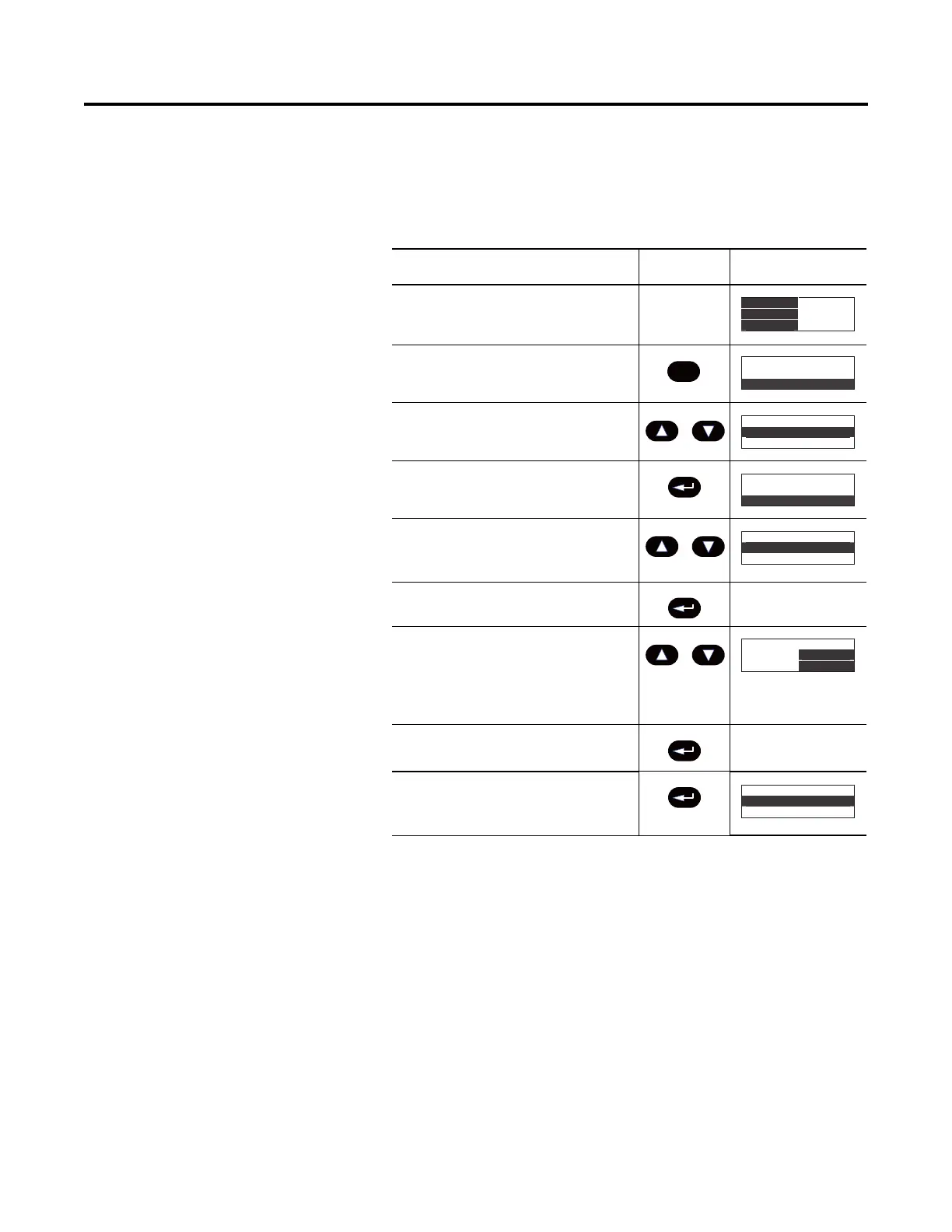
Description Action Display
——
1. Press the ESC key to go from the
status display to the Main menu.
2. Scroll with the Up/Down keys until the
Preferences option is highlighted.
3. Press the Enter key to access the
Preferences menu.
4. Scroll with the Up/Down keys until the
Change Password option is
highlighted.
5. Press the Enter key.
6. Press the Up/Down keys to enter the
desired number. If you are modifying
the password, make a note of it as
displayed. Use the Sel key to highlight
a single digit.
7. Verification of the new password is
required. Press the Enter key.
8. Press the Enter key after you have
completed modifying the
password.
➀➁
0.0 Amps
0 Volt
0 %MTU
Esc
Main Menu
Diagnosti
cs
Parameter
Main Menu
Preferences
Diagnostics
Main Menu
Preferences
Diagnostics
Preferences:
Change Passwor
d
User Dspy lines
Preferences:
Change Password
User Dspy lines
Prefs: Password
New Code:
83
Verify: 83
Preferences:
Change Password
User Dspy lines


 To Next Page
 Loading...