3.
To
change the coupler back to detected velocity, repeat step
1,
then move the Expression
Pedal to the maximum volume position.
Note: The velocity status
of
the Great and Swell MIDI couplers will be stored in the
combination action
of
the organ.
It
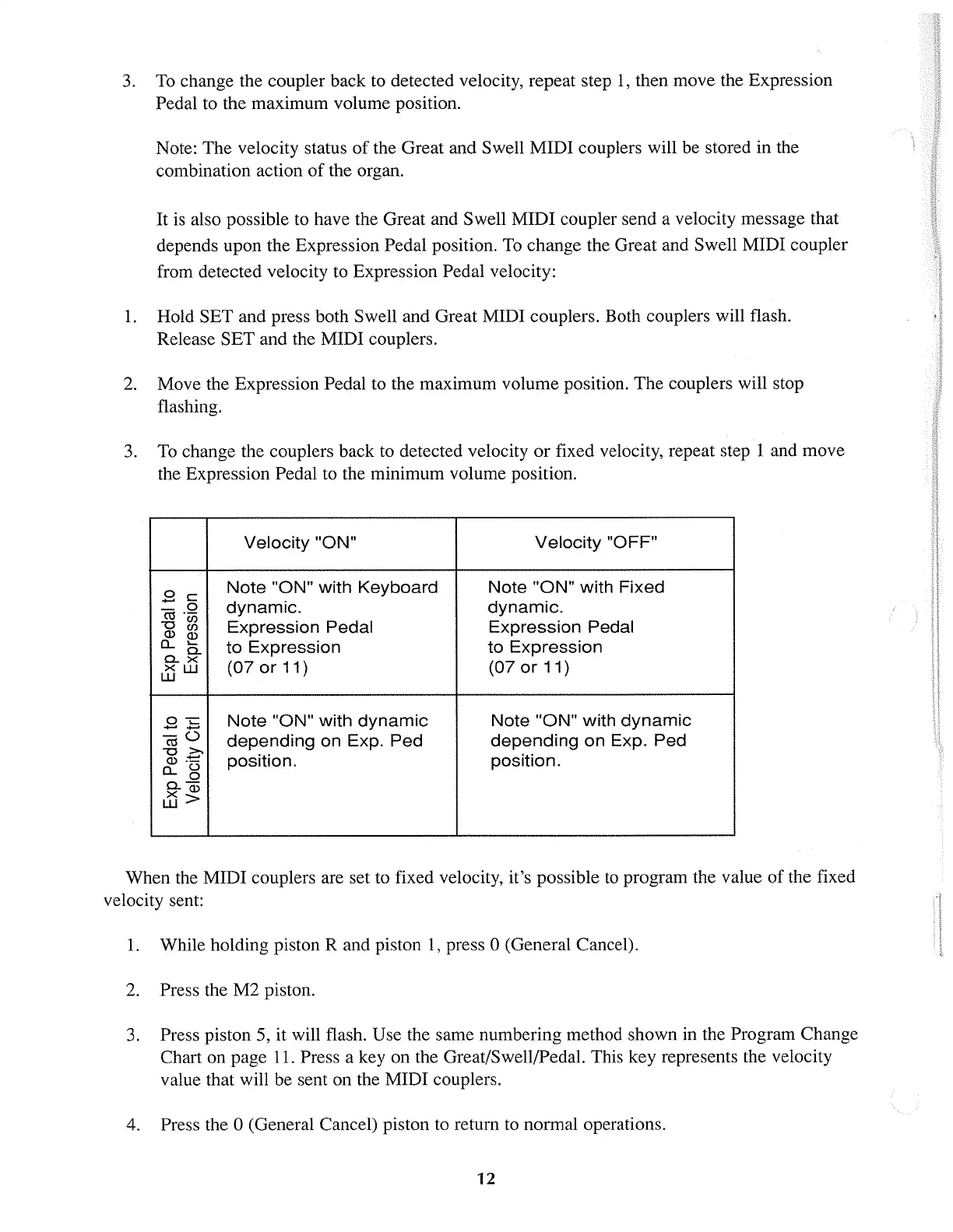
is also possible to have the Great and Swell MIDI coupler send a velocity message that
depends upon the Expression Pedal position.
To
change the Great and Swell MIDI coupler
from detected velocity to Expression Pedal velocity:
1.
Hold SET and press both Swell and Great MIDI couplers. Both couplers will flash.
Release SET and the MIDI couplers.
2.
Move the Expression Pedal to the maximum volume position. The couplers will stop
flashing.
3.
To
change the couplers back to detected velocity
or
fixed velocity, repeat step 1 and move
the Expression Pedal to the minimum volume position.
Velocity
"ON"
Velocity
"OFF"
.8 c
Note
"ON"
with
Keyboard
Note
"ON"
with
Fixed
_0
dynamic.
dynamic.
co
.-
-OW
Expression
Pedal
Expression
Pedal
Q)
00
CL
~
to
Expression
to
Expression
0..
0..
x
(07
or
11) (07
or
11)
tijw
0-.::::
Note
"ON"
with
dynamic
Note
"ON"
with
dynamic
.....
-
coO
depending
on
Exp.
Ped
depending
on
Exp.
Ped
-0
>.
Q) :!:::
position.
position.
CL<">
0
0..-
x
Q)
w>
When the MIDI couplers are set to fixed velocity, it's possible to program the value
of
the fixed
velocity sent:
1.
While holding piston R and piston
1,
press 0 (General Cancel).
2.
Press the M2 piston.
3.
Press piston 5, it will flash. Use the same numbering method shown in the Program Change
Chart on page
11.
Press a key on the Great/Swell/Pedal. This key represents the velocity
value that will be sent on the MIDI couplers.
4.
Press the 0 (General Cancel) piston to return
to
normal operations.
12



 To Next Page