[F1]: STX / 'C' / '#' / CR / LF / ETX
[F2]: STX / 'D' / '#' / CR / LF / ETX
4.2. STANDALONE MODE (OFFLINE MODE)
There are two standalone modes of operation available for the PRTxxEM reader:
Full Standalone Mode
Simple Standalone Mode
In both modes reader is capable of providing independent (i.e. autonomic) control of a single door.
4.2.1. Full Standalone Mode
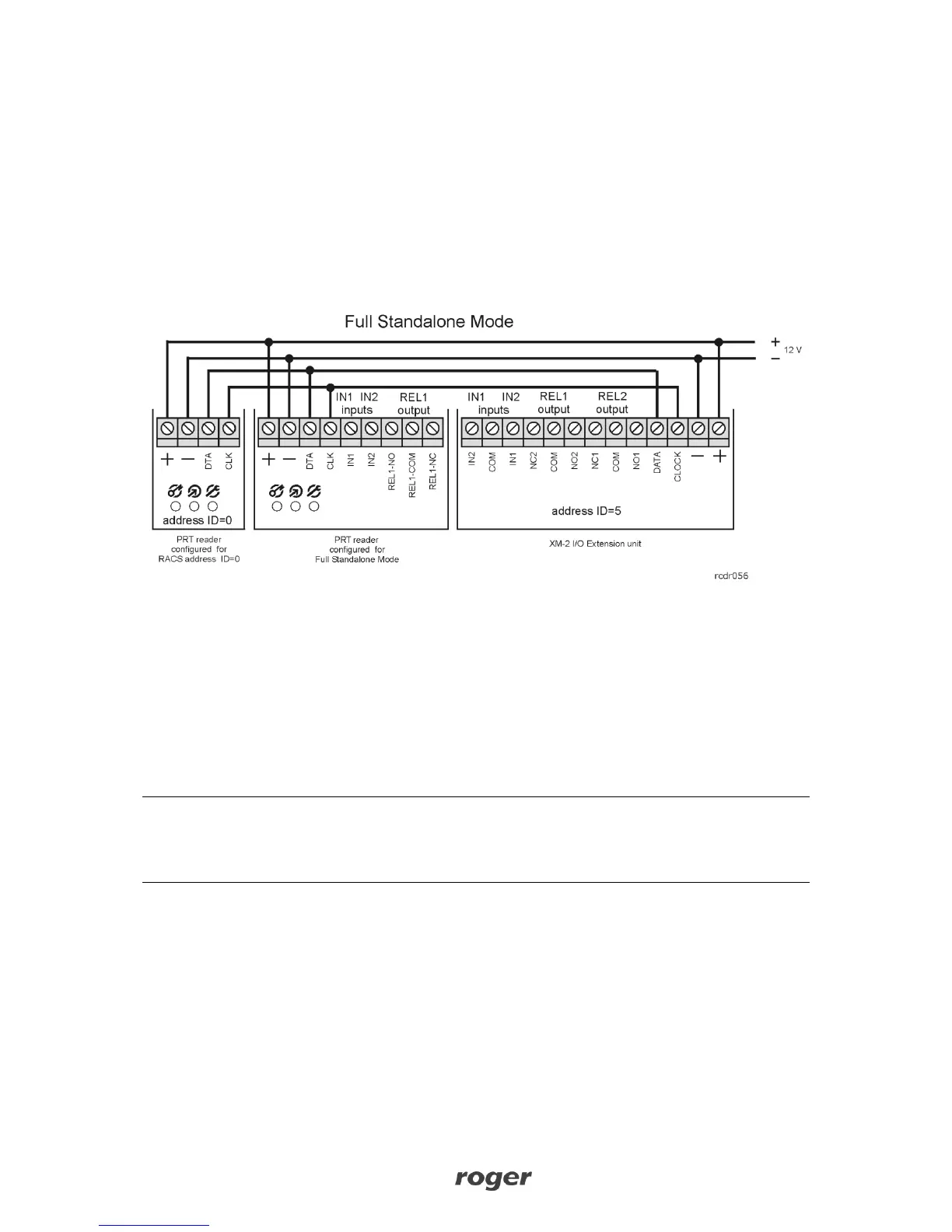
In this mode the CLK and DTA lines are used for communication with the remote XM-2 I/O
expander and the second (optional) PRT reader. The second reader enables read-in/out door
control and it can also be used for manual programming of the main reader. Each I/O line (built-in
or located on expander) can be configured with various functions. The Full Standalone Mode
offers improved security, because it separates the reader from the relay which is used to control a
door lock or other type of equipment. In Full Standalone Mode the optical and buzzer signals
occur simultaneously on both readers. This rules is valid for programming mode and normal
operation as well.
The maximum length of the cable run between the PRTxxEM reader and the XM-2 expander, or
secondary PRT reader is limited to 150m. For read-in/out door control the primary reader needs to
be configured for Full Standalone Mode while the secondary one (slave) needs to be set for
RACS address ID=0.
Note: For Full Standalone Mode the XM-2 I/O expander has to be configured with address ID=5.
Note: Any PRT series reader can communicate with PRTxxEM reader. It is not relevant if such PRT
reader is equipped with keypad. It is also possible to connect readers with different card formats
e.g. PRTxxEM + PRTxxMF.



 To Next Page