10. P R O G R A M M I N G F R O M PC
The reder can be fully programmed from the PC through standard COM port (RS232) or via
dedicated RUD-1 interface (USB port). In both cases the RARC program is required. In order to
establish the connection, select Options->Port command in RARC software, then Connection-
>Connect…, the option RS232 and then the button Start.
10.1. PROGRAMMING VIA RS232 COM PORT
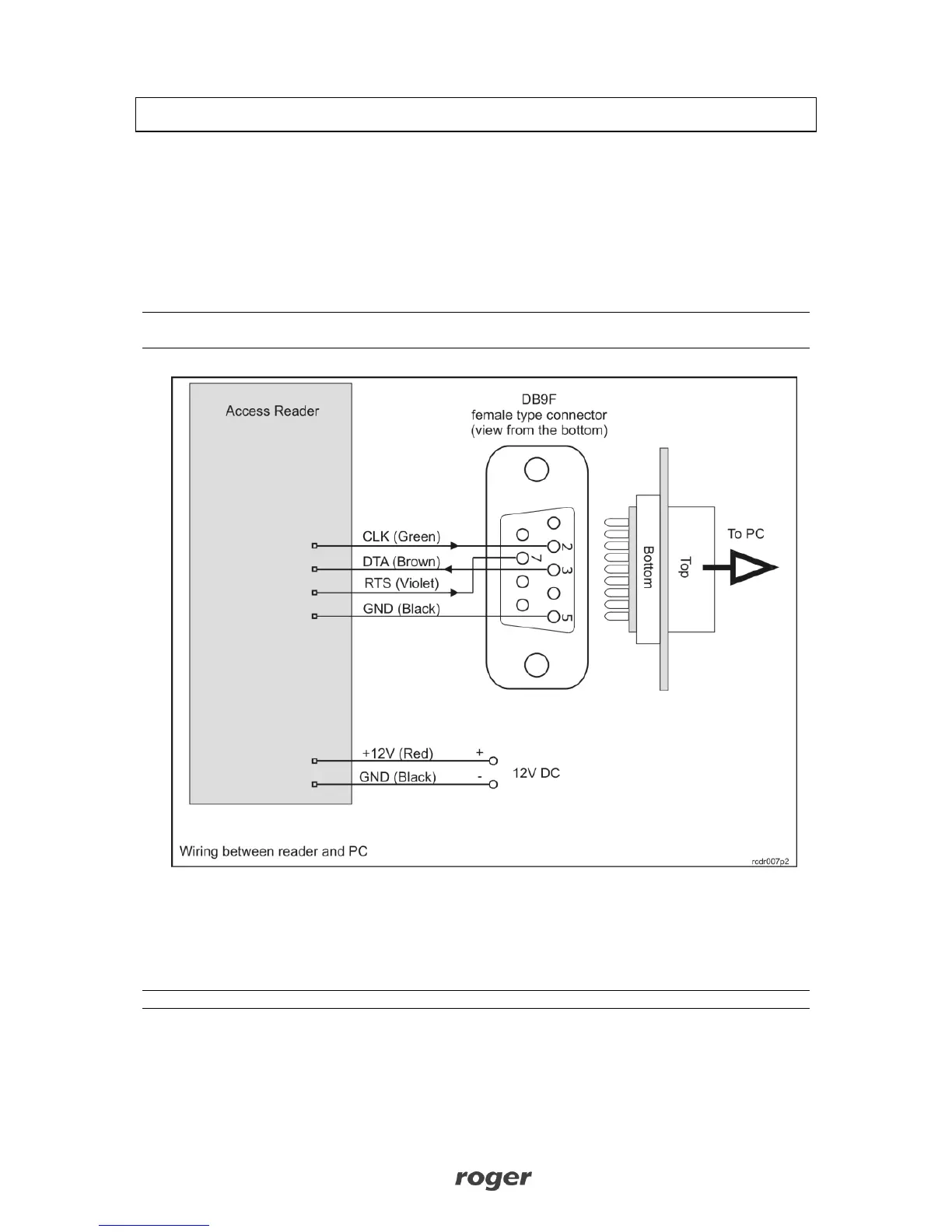
In this scenario connection between programmed reader and PC requires four wires: GND, RXD,
TXD and RTS as presented on the drawing below. The reader must be supplied from the external
source of power.
Note: For programming purpose CLK, DTA and RTS lines must be disconnected from host devices if
they were earlier connected.
10.2. PROGRAMMING VIA RUD-1 INTERFACE
In this scenario connection between programmed reader and the PC is made through dedicated
RUD-1 interface which is also used to power supply programmed reader (no extra source of power
is required).
Note: RUD-1 interface can be used for both reader programming and firmware upgrade.



 To Next Page