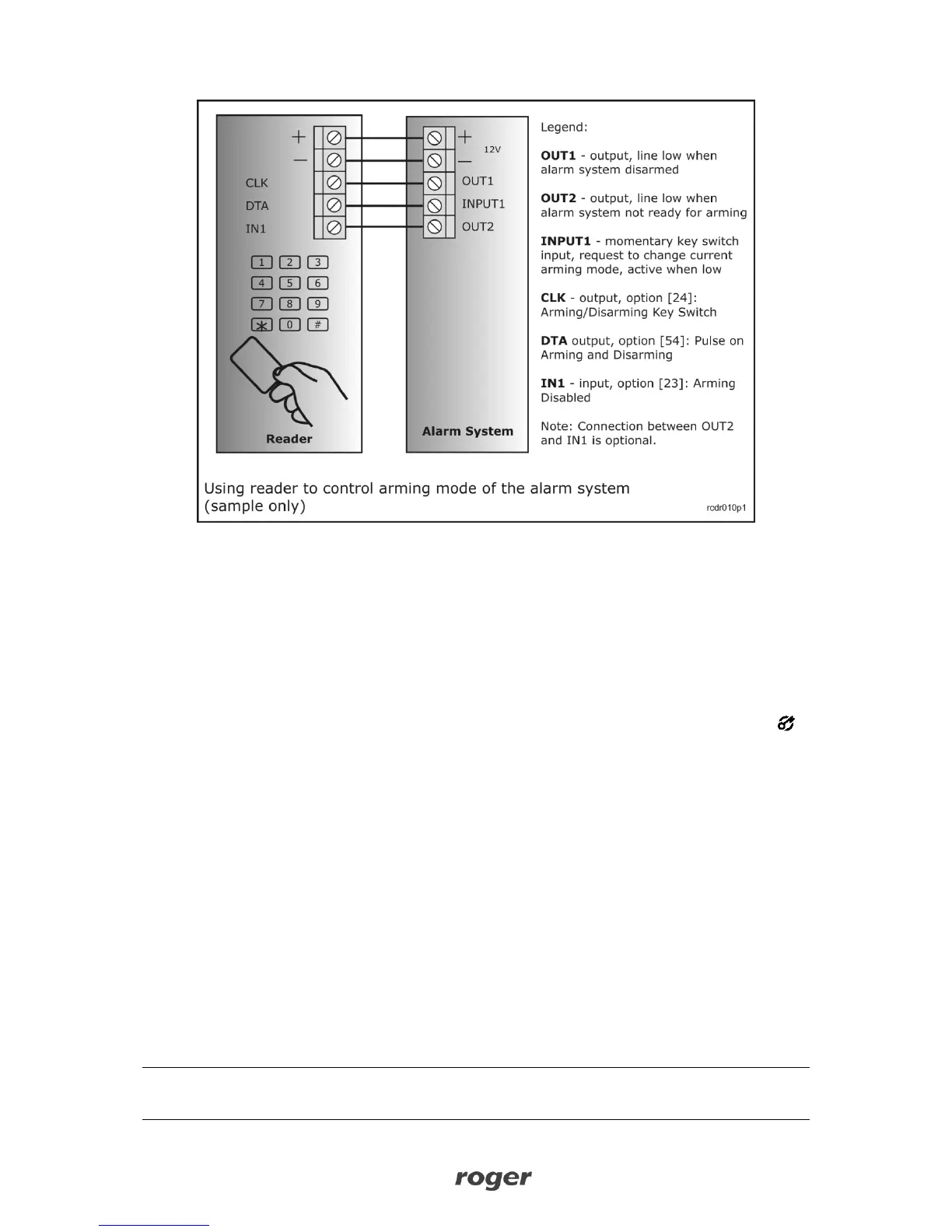
When using proposed configuration the current arming mode of the reader is controlled by the
alarm system (output line from alarm system controls reader’s arming state), as a result reader
always operates in the same arming mode as alarm system. Using TOGGLE or TOGGLE LTD
card/PIN users can “request” the reader (and thus the alarm system as well) to change its current
arming mode. Once the TOGGLE/TOGGLE LTD user changed temporary arming mode, reader waits
approx. 8s for the alarm system to follow this change, if not reader restores previous arming mode
however if alarm system will change its arming mode then reader will stay in this new arming
mode as well. There are following benefits related with this scenario:
Whenever alarm system changes it arming mode reader follows this change
The actual arming mode of the alarm system is presented on the reader’s LED STATUS
TOGGLE/ TOGGLE LTD users can change arming mode of the reader and the connected
alarm system
Alarm system can be controlled simultaneously from system keypads and from the reader
(using the reader doesn’t collide with alarm system keypads)
In order to implement this scenario alarm system should provide following signal lines:
Latched output which indicates current arming mode of the alarm system (zone)
Momentary input which when triggered requests change of current arming mode of the
alarm system (zone)
Latched output which indicates whether the alarm system (zone) is ready for arming or not
The output line which indicates that alarm system is ready for arming is not necessary and can be
omitted, however when connected to reader’s input [23]: Arming Disabled it will make that
every attempt to arm the reader by TOGGLE/TOGGLE LTD users will be immediately rejected by
the reader (reader will generate error sound and will not change its arming mode, even for
temporary time).
Note: In some cases it can be essential to hide current arming state of the alarm system or reader
therefore it is possible to use function which will conceal arming mode displayed by the reader (see
option: LED STATUS Masking later in this document).



 To Next Page