12 · Rointe efficient heating
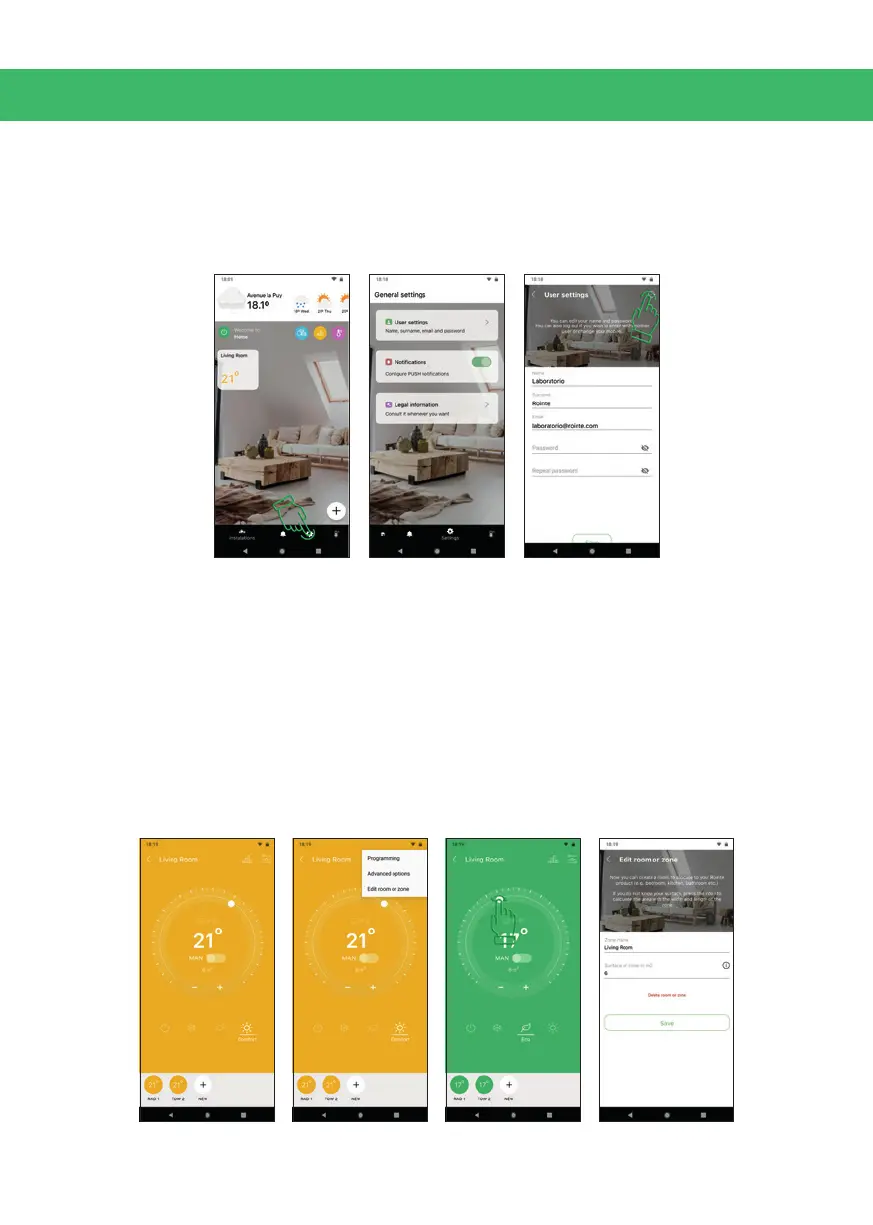
8. GENERAL SETTINGS
From the main screen, press the Settings icon. You can: activate / deactivate push
notications; view the Legal Notice; change the name / surname / password of the
account holder; or exit the account by clicking on the icon in the top right.
9. ZONE CONTROL
In a zone you can: add new products; use the slider to change temperature (or use
the + / - buttons); set the product mode to anti-frost / eco / comfort by using the
buttons; activate / deactivate the programming by pressing the control below the
temperature); turn the zone on or o; or view zone statistics. The temperature icons
indicate the status of the functions: Pilot Wire and Presence Detect (not available
on standard products, only on request); or Open Windows (standard on radiators
and towel rails. By pressing the menu button in the top right you can: access the
programming; edit the zone; delete it; or access advanced options.


 To Next Page