Rointe efficient heating · 13
Rointe Connect App user manual
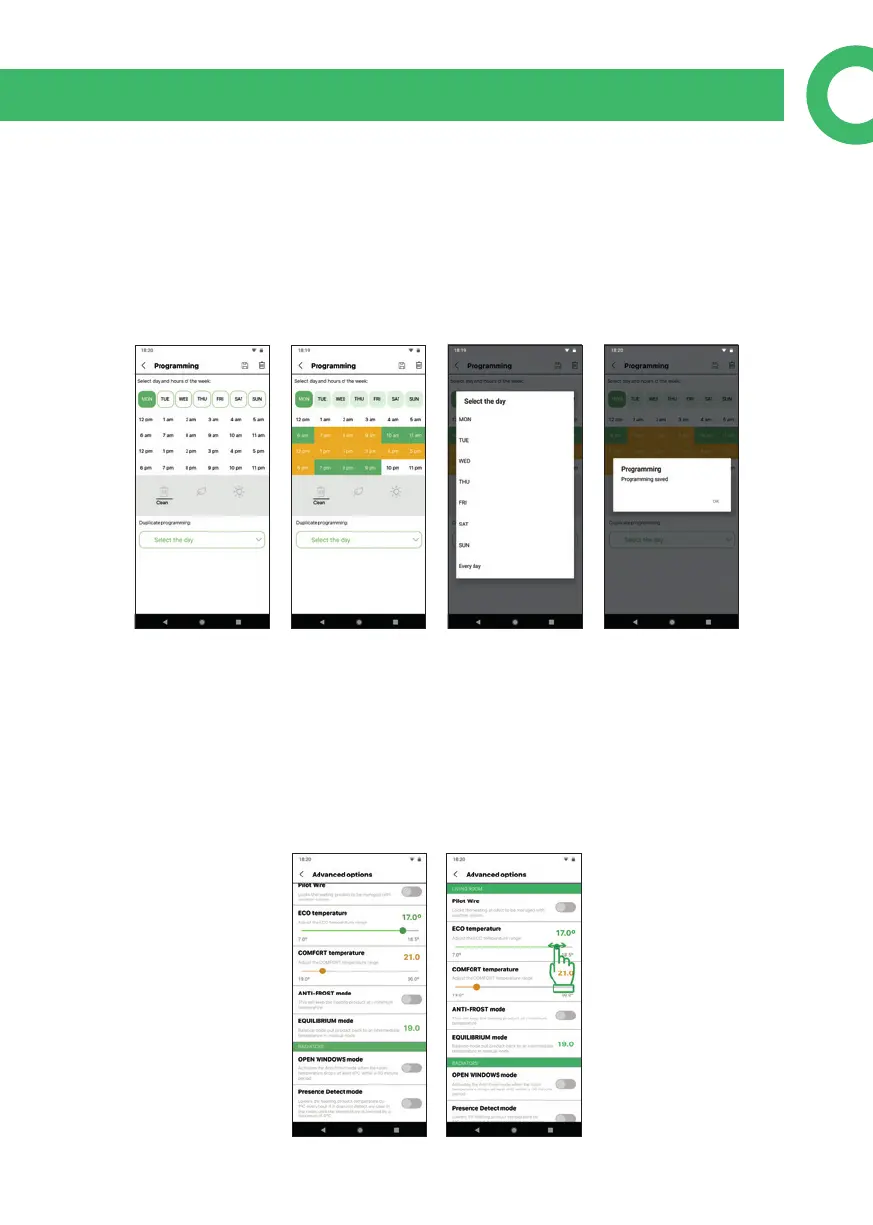
9.1. Programming
In the Programming screen you can choose (for each hour) whether your product
should be in Eco, Comfort or O / Anti-frost (if it is congured in advanced options).
Press the Eco / Comfort icon or delete, then click on the hours you want to modify.
You can have dierent programming for each day or use the option to duplicate
programming to have several equal days. Above to the right, you have the buttons
to erase the programming or to save it.
9.2. Advanced options
You can: congure Eco / Comfort temperatures; activate / deactivate the Anti-frost
mode (radiators and towel rails at 7ºC and water heaters at 45º) when the product
is not in Eco / Comfort mode; activate the Balance function to reset radiators and
towel rails to 19º in manual mode (55º if water heaters); or activate / deactivate the
Open Windows function. You can also activate / deactivate Pilot Wire and Presence
Detect functions (not available as standard, only on request).



 To Next Page