18 · Rointe efficient heating
11. ENVIRONMENTS
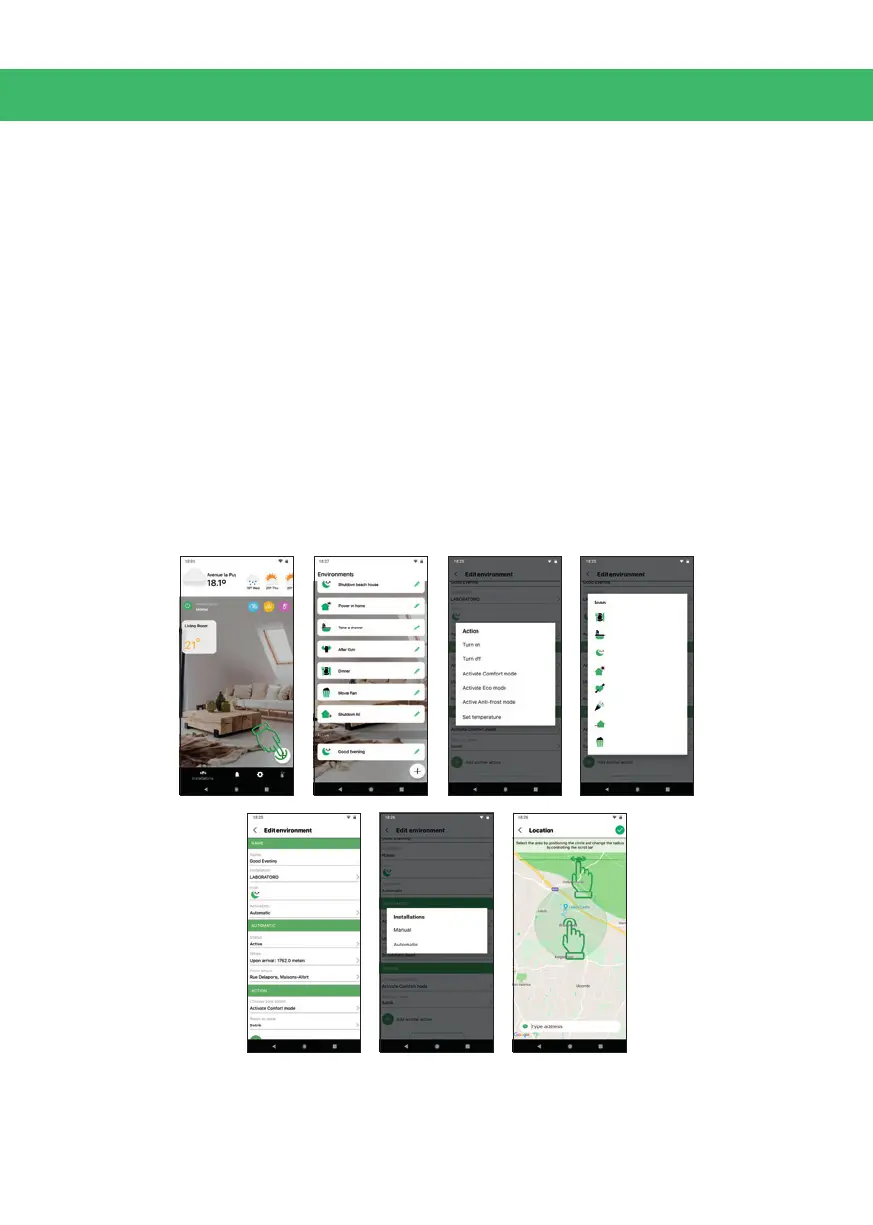
From the main screen, you can access the environments, with which you can
automate actions for one or several zones at once. For example, you can turn o a
zone, turn on the programming in another zone and place a specic
temperature in another zone with a single press. The environments can be used
manually by clicking on their name, or can be activated automatically when
accessing or leaving a place determined by your GPS position. For example, you
can turn o the entire installation when you leave home, or turn on the bathroom
when you are a minimum distance from home so that it is ready for when you
arrive. The environments can be created by pressing the + button, you edit by
pressing the pencil icon, or you can delete by pressing "delete environment" under
the "Save" button. You can congure the name, the installation, the icon, the
activation and the actions (that can be applied to one or several zones). The
environments screen is common to all installations, but each environment can only
be applied to one installation.



 To Next Page