Rointe efficient heating · 7
Rointe Connect App user manual
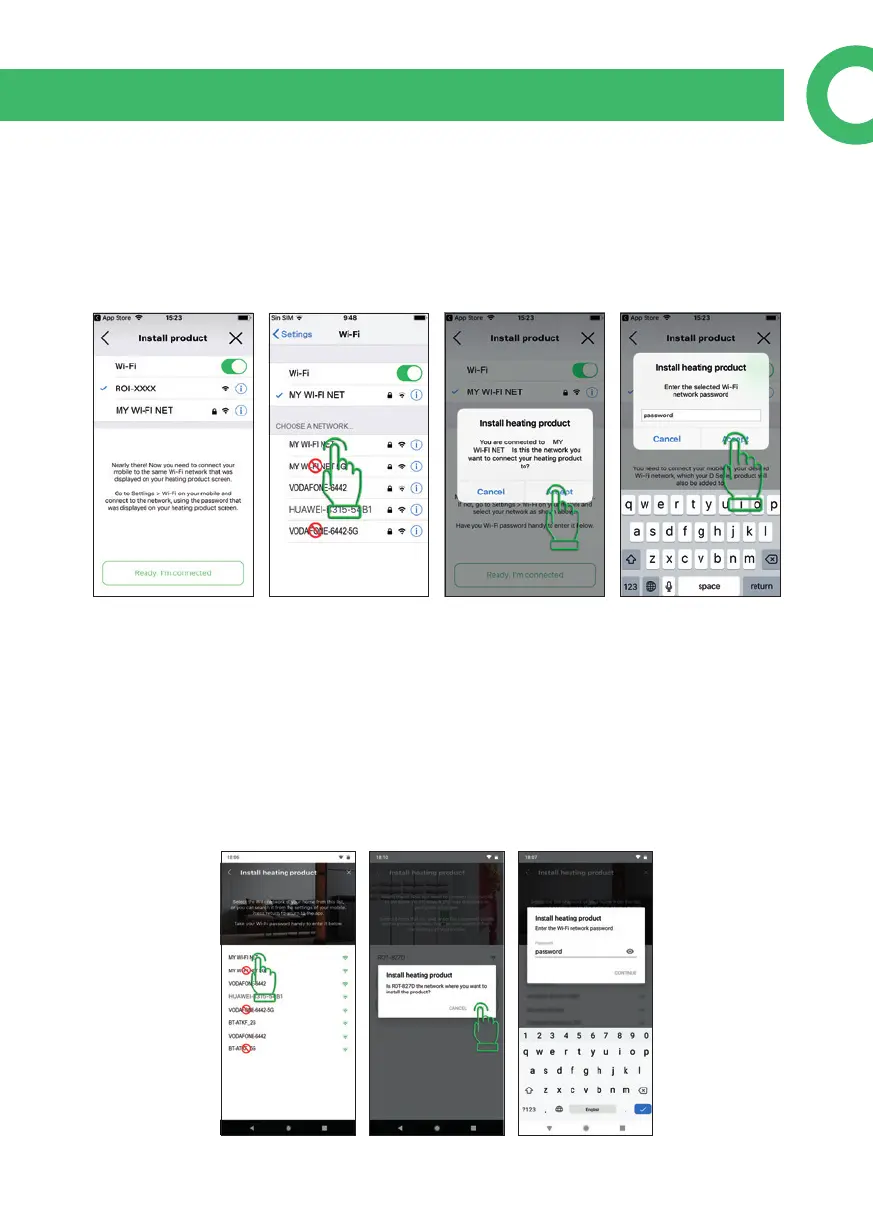
If your router generates 2.4GHz and 5GHz networks you should always use the
2.4GHz. Rointe products are not compatible with 5GHz networks. For example, if
you have two networks with the same name and one ends in 5G or plus, it should
not be used. Once connected to the Wi-Fi network, go back to the Rointe Connect
app, click on "Ready I'm connected", accept if it's the correct network and type the
password for your Wi-Fi network.
6.2.2. Android devices
Go to your Wi-Fi settings and choose the network you want to connect your Rointe
product to. It must be a 2.4GHz network.
If your router generates 2.4GHz and 5GHz networks you should always use the
2.4GHz. Rointe products are not compatible with 5GHz networks. For example, if
you have two networks with the same name and one ends in 5G or plus, it should
not be used. You'll be asked if it's the correct Wi-Fi network, press accept and type
the password for your Wi-Fi network (you can press the eye icon to see the password
as its typed).



 To Next Page