17
Chapter 1 Quick Start
Chapter 1
Playing Various Sounds
Let’s use the patch (p. 21) of
P0101 Conga
to hear various sounds from the
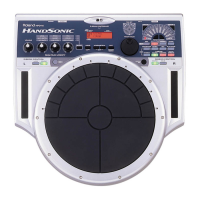
pads, ribbons, and D Beam.
* If the following screen is not shown, turn [PATCH/VALUE] until the following
screen appears.
fig.1-09
fig.1-10
Controlling Pad Sounds
Let’s use the patch (p. 21) of
P0201 Talking Drm
and use the ribbons, D
Beam, and other pads to control the pitch of the pads.
* If the following screen is not shown, turn [PATCH/VALUE] until the following
screen appears.
fig.1-10a
While striking the pad, rub the ribbons or move your hand over the D Beam
to raise the pitch.
While striking the pad, press one of the pads A1–A5 will also raise the pitch.
P01 LATIN
01 Conga
Conga
(Open/Slap)
Conga
(Heel/Open)
Conga
(Toe/Open)
Conga
(Low Open)
Conga
(Bass)
Bongo
(High)
Bongo
(Low)
Timbale
(High)
Timbale
(Low)
Shaker
Maracas
Tambourine
Claves
Cowbell
Agogo
Conga
Slide
Guiro
Bell Tree
If D Beam [SOUND] is not
lit, passing your hand over
the D Beam will not
produce sound. Press
[SOUND] to make it light.
If [SOUND] located above
the ribbon is not lit,
rubbing the ribbon will not
produce sound. Press
[SOUND] to make it light.
P02 AFRICAN
01 TalkingDrm
If D Beam [CONTROL] is
not lit, passing your hand
over the D Beam will not
modify the tone. Press
[CONTROL] to make it
light.


 To Next Page
 Loading...