80
Chapter 5. User Program Registration
Saving Performance Settings (User Program)
You can register up to 36 User Programs to the RG-3.
1.
Set the Tone, and other data until the settings are the way you
want them.
2.
Press the [Function] (Exit) button, getting its indicator to light.
3.
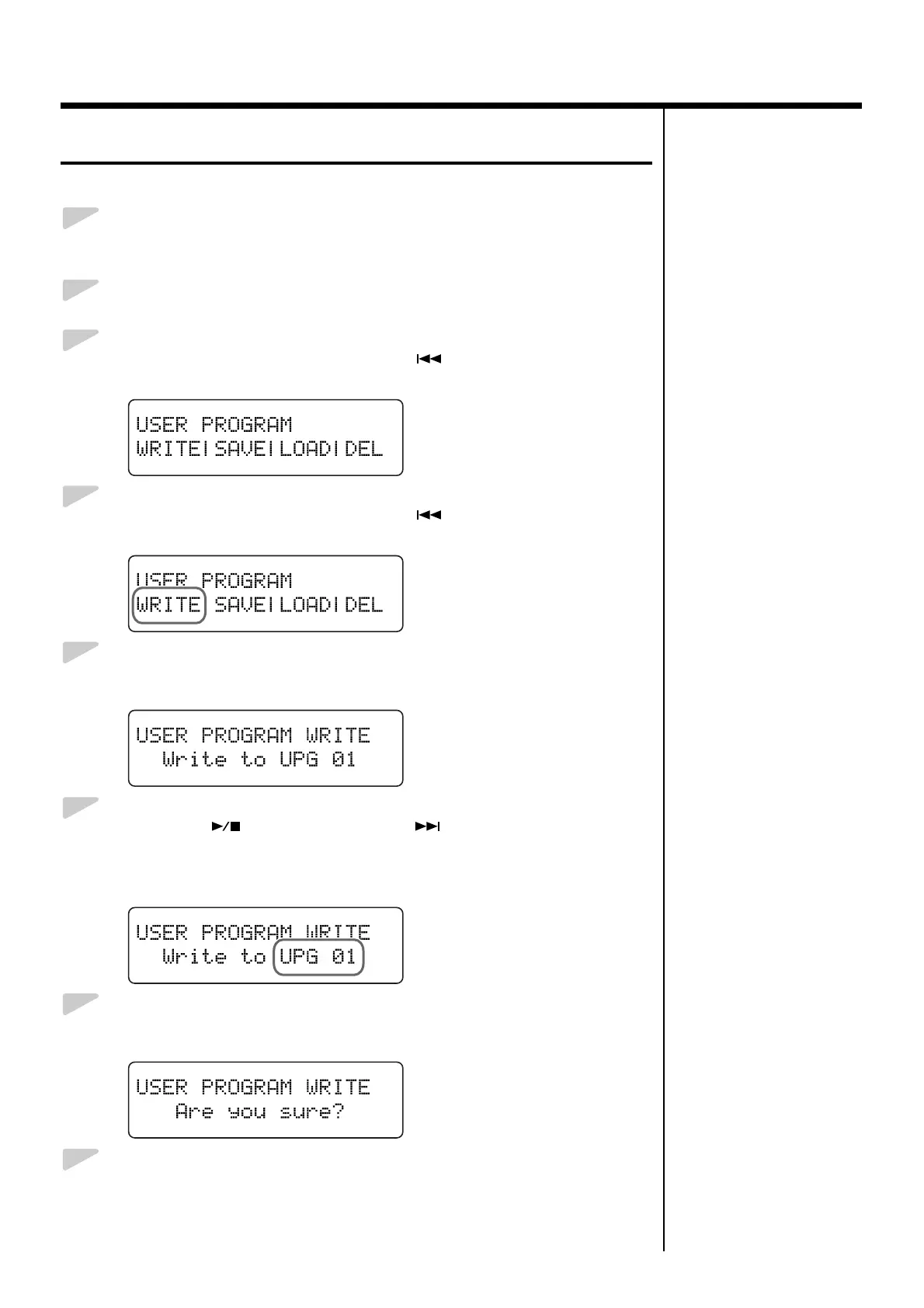
Press the [Song] (Select -) button or [ ] (Select +) button to
display the USER PROGRAM screen.
fig.05-020d
4.
Press the [Song] (Select -) button or [ ] (Select +) button so
“WRITE” is flashing.
fig.05-030d
5.
Press the [Enter] button.
The following screen appears.
fig.05-040d
6.
Press the [ ] (Value -) button or [ ] (Value +) button to
select the write-destination number.
Select a number from UPG 01 to UPG 36 as the performance settings write
destination.
fig.05-050d
7.
Press the [Enter] button.
A confirmation message appears in the screen.
fig.05-060d
8.
Press the [Enter] button.
The currently selected performance settings are registered, and the USER
PROGRAM screen returns to the display.



 To Next Page