43
Chapter 1. Playing Back Songs
Deleting Songs Saved to the “Favorites,”
USB Memory, and Floppy Disks
Use this procedure to delete songs saved to the “Favorites,” USB memory,
and floppy disks.
1.
Prepare the USB memory or floppy disk containing the song or
songs you want to delete.
• Connect the USB memory to the Ext Memory port.
• Insert the floppy disk in the floppy disk drive.
2.
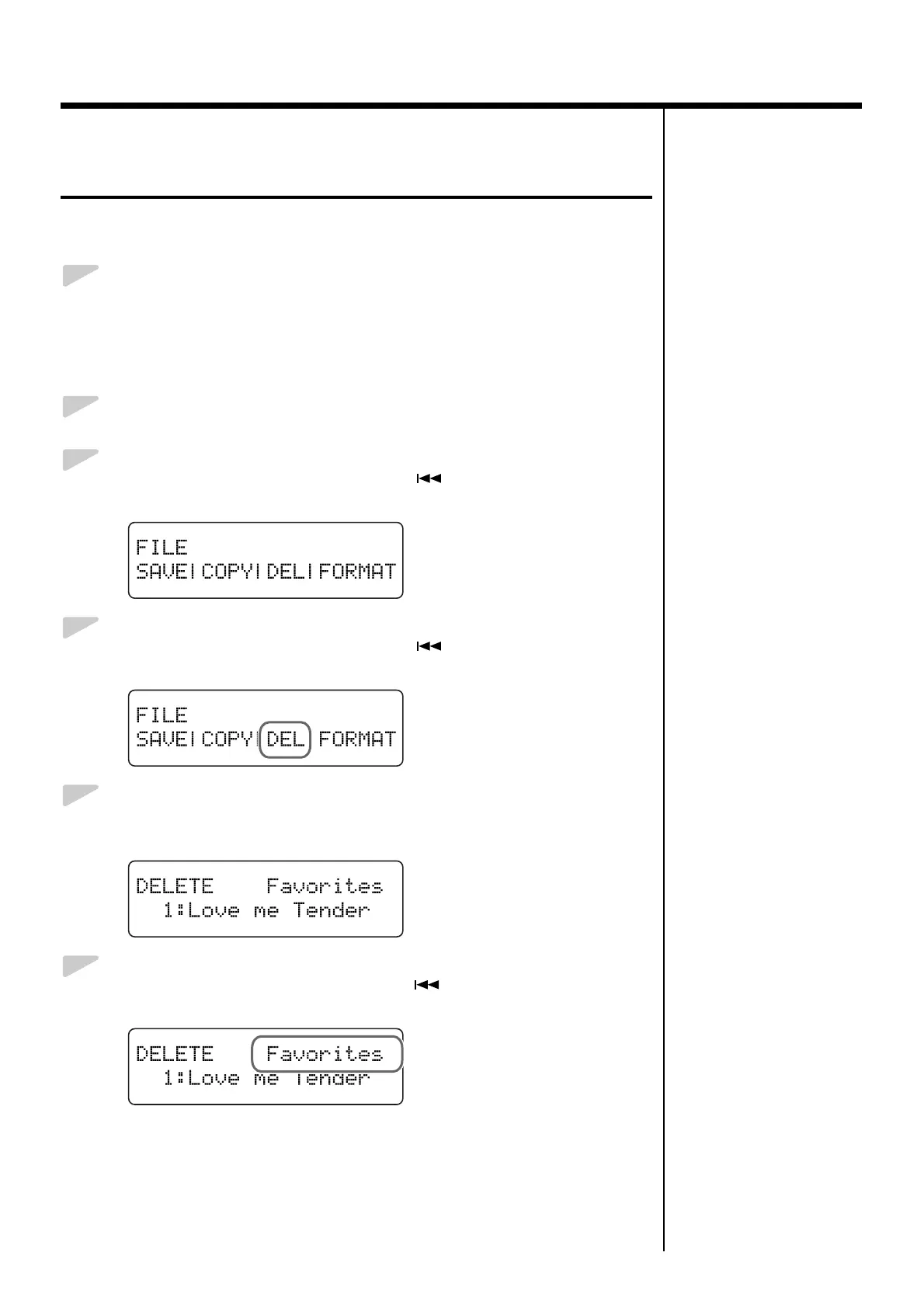
Press the [Function] (Exit) button so the indicator is lit.
3.
Press the [Song] (Select -) button or [ ] (Select +) button to
display the FILE screen.
fig.01-230d
4.
Press the [Song] (Select -) button or [ ] (Select +) button so
“DEL” (Delete) is flashing.
fig.01-330d
5.
Press the [Enter] button.
The following screen appears.
fig.01-340d
6.
Press the [Song] (Select -) button or [ ] (Select +) button so that
the “Saved Song to Delete” setting is flashing.
fig.01-350d


 To Next Page