EasyManua.ls Logo

Rosemount 333 HART Tri-Loop - Installation Guide for HART Tri-Loop

Rosemount 333 HART Tri-Loop
48 pages
Print Icon
To Next Page IconTo Next Page
To Previous Page IconTo Previous Page
Loading...
Section
2-1
2 Installation
This section contains an installation flowchart, an overview of the
Model 333 HART Tri-Loop, and procedures for installation and wiring.
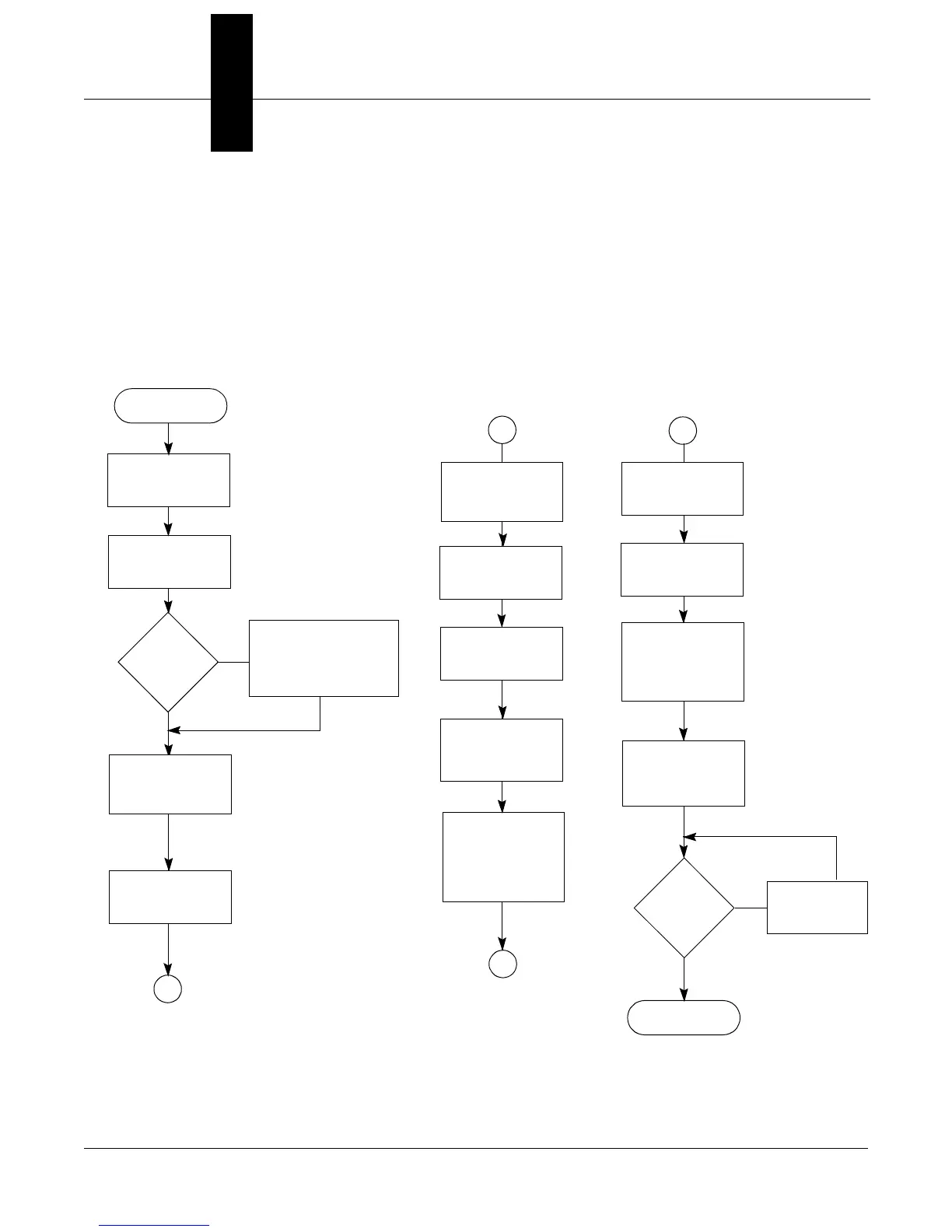
The suggested sequence of HART Tri-Loop installation and wiring is
shown in Figure 2-1.
FIGURE 2-1. HART Tri-Loop
Installation Flowchart.
A
B
START
A
Install the
Model 3095 MV
(See Rosemount
Publication Number
00809-0100-4716)
Model
3095 MV
Installed?
Unpack the
HART Tri-Loop
Review the
HART Tri-Loop
Product Manual
INSTALL THE
HART TRI-LOOP
Mount the
Tri-Loop to
DIN Rail
Connect wires
from Model 3095
MV to Tri-Loop
Burst Input
Connect Channel
1 Wires from
Tri-Loop to
Control Room
(Optional)Connect
Channel 2 and/or
Channel 3 Wires
from Tri-Loop to
Control Room
COMMISSIONING
(Section 3)
Install HART Tri-
LoopConfigurator
onto Your PC
DONE
No
Yes
Pass
System
Test?
No
Check Trouble-
shooting
Procedures
Yes
Configure
Tri-Loop to
Receive Model
3095 MV Burst
Commands
Set the Model
3095MV to Burst
HART Cmd 3
Set the Model
3095MV Burst
Command Order
(page 2-8)
Review Installation
Considerations
(pages 2-4 to 2-5)
B

Table of Contents