HART Tri-Loop HART-to-Analog Signal Converter
2-8
CONFIGURE THE MODEL
3095 MV FOR TRI-LOOP
OPERATION
The following information is an abbreviated guide for using the Model
3095 MV Engineering Assistant (EA) to configure the Model 3095 MV
for operation with a HART Tri-Loop. For additional information on the
EA or the Model 3095 MV, refer to the Model 3095 MV product manual
(Rosemount publication number 00809-0100-4716).
Select Process Variables
Maintenance
A
nalog Output
R
ange Values...
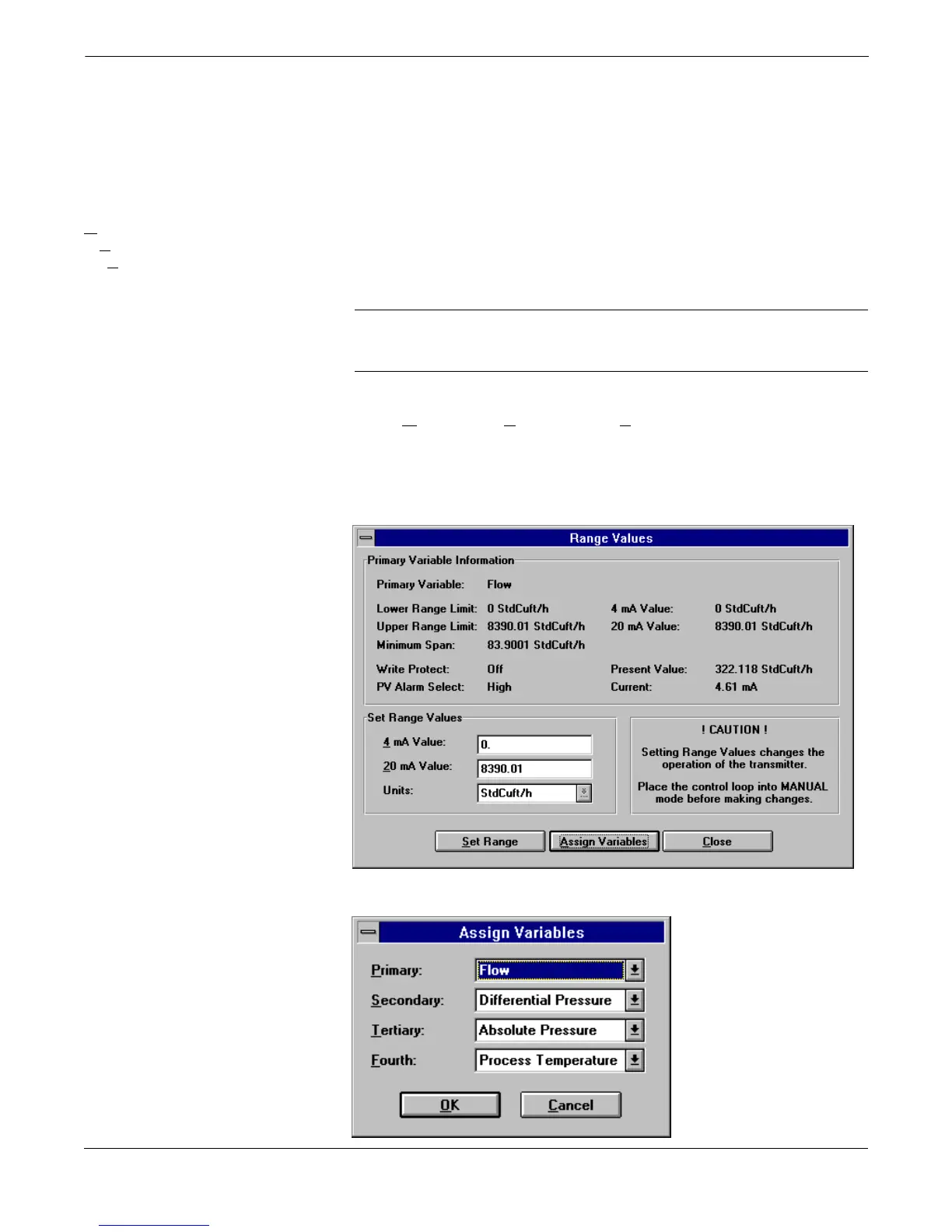
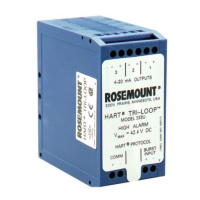
This screen sets the range values for the primary variable, and also
allows for reassigning the process variable output order. This
determines both which process variables are burst by the Model 3095
MV, and in which order the variables are sent.
NOTE
The Primary Variable (Figure 2-7) is also assigned as the Model 3095
MV 4–20 mA analog output.
1. Using the Model 3095 MV EA, access the Range Values Screen
(M
aintenance, Analog Output, Range Values...).
2. Select Assign Variables, then set the desired variable order
(see Figure 2-8).
3. Record the selected process variables in Table 2-1.
FIGURE 2-7. Range Values Screen.
FIGURE 2-8. Assign Variables Screen.
3095-30950116


 To Next Page