1918
Connection
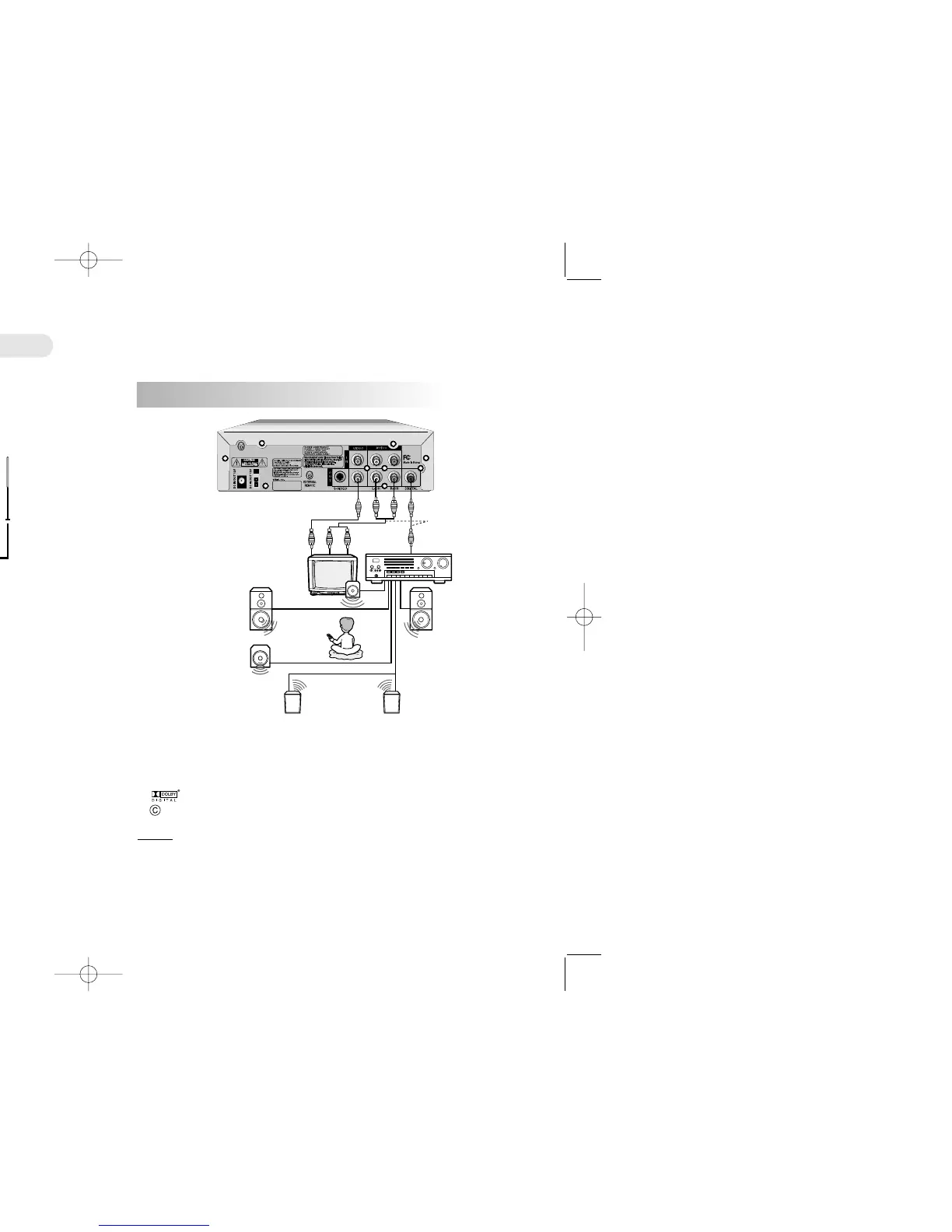
Connecting to a TV/AUDIO System
1. Connect the audio cables between the Audio Out L and R jacks on the back of your DVD player and the
corresponding Audio Input jacks on your audio system. You can listen more loudly to the sound of audio
CDs and DVD video discs in stereo when you are using a FM modulator.
2. Connect the video cables between the Video Out jacks on the back of your DVD player and the
corresponding Video Input jacks on your TV.
CC
CC
aa
aa
uu
uu
tt
tt
ii
ii
oo
oo
nn
nn �When you connect the DVD player to other equipment, be sure to turn off the
power and unplug all of the equipment from the power source before making any
connections.
�Be sure to adjust the receiver's volume to a moderate listening level. Otherwise,
the speakers may be damaged by a sudden high volume level.
�Turn off the receiver before you connect or disconnect the DVD player's power
cord. If you leave the receiver power on, the speakers may be damaged.
WW
WW
aa
aa
rr
rr
nn
nn
ii
ii
nn
nn
gg
gg �Do not set the Digital Audio Output of this DVD player to "PCM" unless you are
connecting the Digital Audio jack of this DVD player to an AV decoder that has
Dolby Digital decoding function.
�High volume sound may damage your hearing as well as speakers.
Connecting to a Dolby Digital Amp
● DVD disc must be recorded in Dolby Digtal.
● You must have Dolby Digital decoder or 6 channel Amp, 5 speakers and 1 bass woofer.
● You must set Digital Out of AC3 at "Raw" in Audio Setting
● This product is manufactured by technical co-operation with Dolby Laboratories
this symbol and trademark are reserved for Dolby Laboratories.
Dolby Laboratories Inc. All rights Reserved.
CC
CC
aa
aa
uu
uu
tt
tt
ii
ii
oo
oo
nn
nn �When connecting an amplifier equipped with Dolby Digital, connect it in the same way as
shown above
�When connecting it, refer to the Audio system's manual.
�Be sure to adjust the receiver's volume to a moderate listening level. Otherwise, the speakers
may be damaged by a sudden high volume level.
�Turn off the receiver before you connect or disconnect the DVD player's power cord.
If you leave the receiver power on, the speakers may be damaged.
Description
Video Cable
Center Speaker
Sub
Speaker
Front
Speaker
(left)
Rear Speaker
(left surround)
Front
Speaker
(right)
Rear Speaker
(right surround)
Audio
Cable
75 ohm Coaxial Cable
or
To digital audio output
Receiver equipped with a
Dolby digital decoder
Rear Panel
Rear Panel
TV or Monitor with
Audio/Video Inputs
Car FM Tuner
FM Antenna
Audio Cable
or
Video Cable


 To Next Page