17
Connection
16
Description
Installing Batteries in the Remote controller
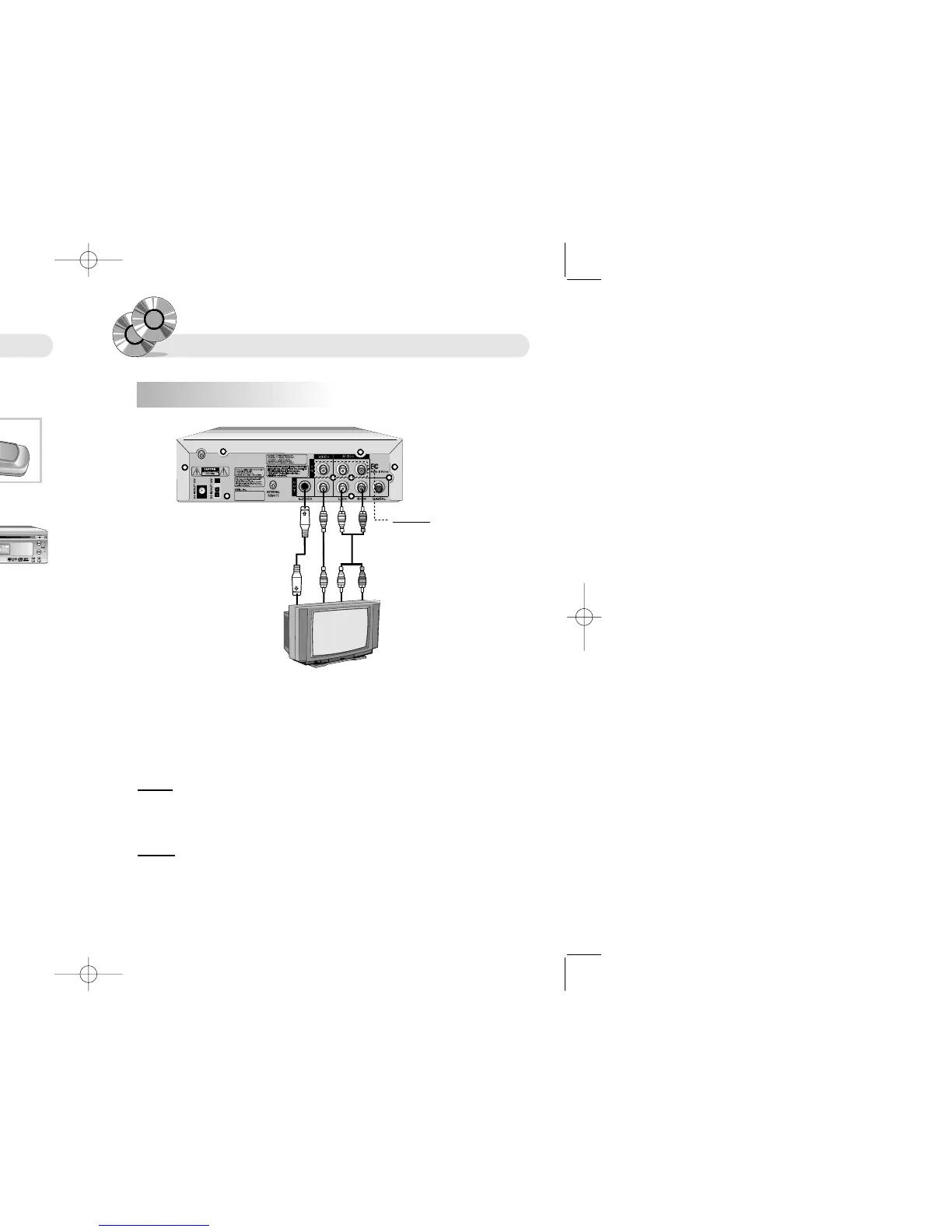
Connecting to a TV
Using the Remote controller
1. Slide and open the battery cover.
The effective operating range of the remote controller is
7m, and 30
°
left and right degrees from the DVD
receiver.
Battery Handling Precaution
● Incorrect use of the battery cause leakage or corrosion.
● Ensure that polarities are correct when inserting batteries.
● Do not impose heat or fire to the batteries. Do not disassemble or short-circuit the batteries
● Ensure that exhausted batteries are not inserted into the remote controller.
● Do not use different types of batteries together. Do not use old batteries together with new ones.
● If you don't use the remote controller for a long time, remove the batteries to avoid possible damage
from battery corrosion.
● Replace the batteries with new ones if the remote controller does not operate smoothly
or the operating distance comes to be short.
● If battery leakage occurs, clean the liquid completely from the remote control and insert new batteries.
Remote controller handling precaution
● Do not give a shock to remote controller.
● Do not leave a remote controller in a hot or damp place.
● Do not drop water or place a heavy object on the product on a remote controller.
● Do not disassemble a remote controller.
2. Insert new batteries and ensure
that the polarities are correct
when inserting.
3. Slide and close the battery cover.
1. Connect the audio cables between the AUDIO OUT (L/R) jacks on the back of your DVD player and the
corresponding Audio Input jacks on your TV. (If you have one Audio input jack on your TV, connect the
audio cables on the left jack of your DVD player)
2. Connect the video cable between the VIDEO OUT jack on the back of your DVD player and the
corresponding Video Input jack on your TV. (If you have S-video jack on you TV, connect this jack.
You will watch a better picture.)
CC
CC
aa
aa
uu
uu
tt
tt
ii
ii
oo
oo
nn
nn �When you connect the DVD player to your TV, be sure to turn off the power and unplug both
units from the wall outlet before making any connection.
�Connet the DVD player to your TV directly.
�If you connect the DVD player to a VCR, the playback picture will be distorted because DVD
video discs are copy protected.
WW
WW
aa
aa
rr
rr
nn
nn
ii
ii
nn
nn
gg
gg �Do not set the Digital Audio Output of this DVD player to "PCM" unless you are connecting the
Digital Audio jack of this DVD player to an AV decoder that has Dolby Digital decoding function.
�High volume sound may damage your hearing as well as speakers.
Audio Cable
Video
Cable
S-Video
Cable
RR
RR
ee
ee
ff
ff
ee
ee
rr
rr
ee
ee
nn
nn
cc
cc
ee
ee You can connect auxiliary devices
in this port, such as VCR.


 To Next Page