4544
Searching to the Desired Screen/Song
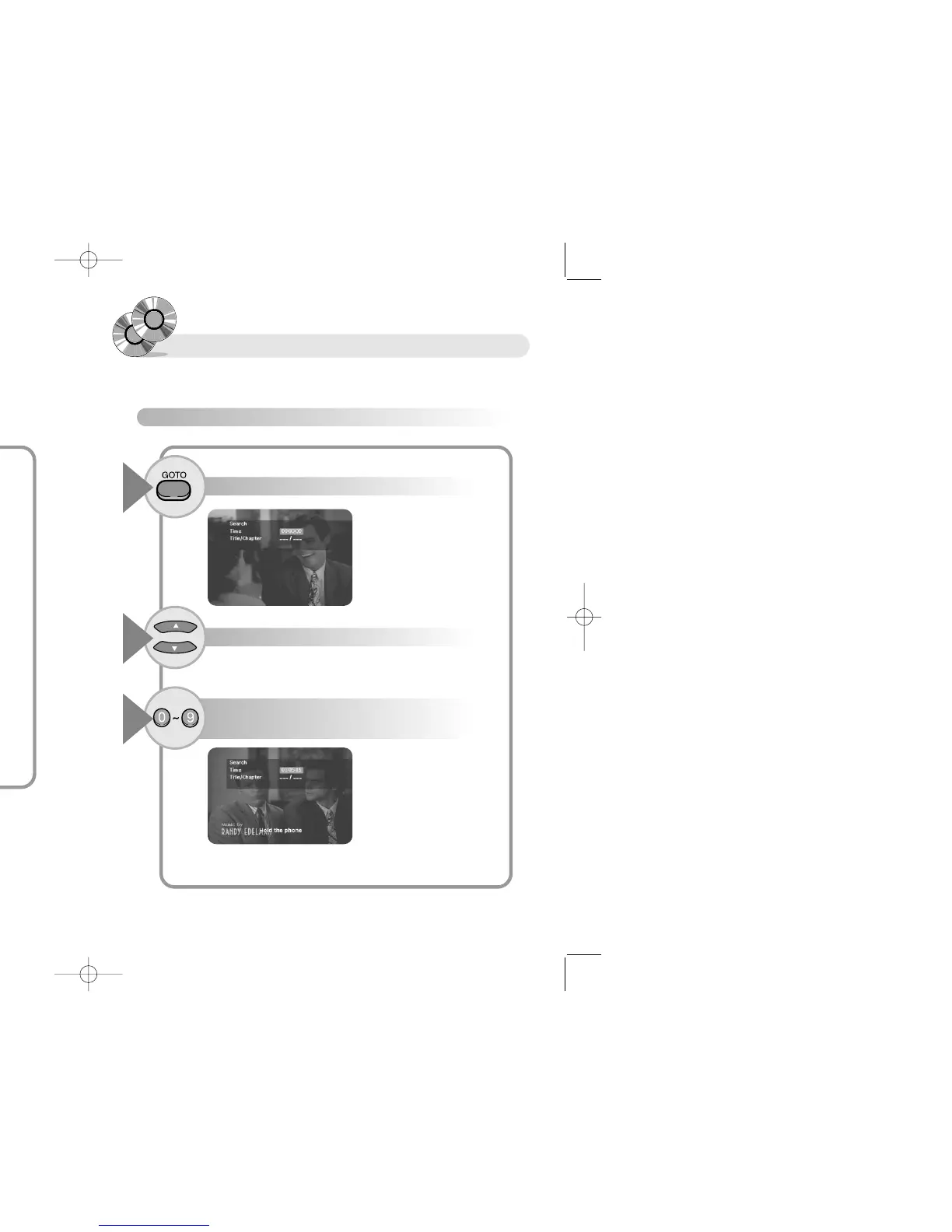
To scan by lapsing time (for example by 1 hour 5 minutes 15 seconds)
Press the GOTO button.
1
Press the … † buttons to move to time item.
2
Press the buttons '1, 0, 5, 1, 5' using numeric button,
and press the ENTER button.
3
You can find the desired screen or song by lapsing time, title, chapter, track.
● It playbacks the section lapsing 1hour 5minutes 15 seconds.
Enjoying magnified screen and
Changing Camera Angles
To changing Angle (DVD)
Press the ANGLE button.
1
● The Angle icon( ) is present, and the maximum number of screen appears.
● Press the ANGLE button, select the Camera Angle you want
● If the maximum number of screen is 1, the Camera Angle does not
change.
When a DVD contains multiple angles of a particular scene, you can select the Angle fuction.


 To Next Page