The Ross Video Ultripower is a rack-mount power supply unit designed to provide reliable, fault-tolerant, and fail-safe DC power to Ultrix routers. It delivers a maximum output of 1200W and includes an Ethernet port for monitoring via DashBoard. The Ultripower is a positive power rail supply and ensures load-balanced, high-reliability DC power to all connected routers.
Function Description:
The Ultripower serves as a redundant power supply for Ross Ultrix routers, ensuring continuous operation even in the event of a power supply module failure. It features two front hot-swappable AC-DC power supply modules, each capable of 1200W output at 15VDC and 20A per output connection. The unit has two rear-mounted AC inputs that support a universal input voltage range of 90-264VAC. In normal operating conditions with two power supply modules, the DC output power is shared between them. If one power supply fails, the remaining module automatically compensates for the increased demand, preventing any interruption to the connected devices.
The Ultripower supports various Ross Ultrix devices, including:
- ULTRIX-FR1 (up to four routers)
- ULTRIX-FR2 (up to two routers)
- ULTRIX-FR5 (one router)
Important Technical Specifications:
- Part Number: 2101DR-304-04
- Release Date: July 29, 2019
- Output Power: 1200W total, 15VDC @ 20A per output connection (x4)
- AC Inputs: 2 rear-mounted, 90-264VAC universal input voltage
- Power Supply Modules: 2 front hot-swappable AC-DC modules
- Cooling: 4 x dynamically controlled fans
- Dimensions:
- Width: 17.5" (444.5mm) (not including rack mounting ears)
- Depth (chassis only): 8.1" (206mm)
- Height: 1.7" (43.2mm)
- Weight (approx):
- Chassis + 1 PSU: 3.24kg (7.14lb)
- 1 PSU module only: 1.59kg (3.51lb)
- Environmental:
- Maximum Ambient Temperature Range: 0°C to 40°C (32°F to 104°F)
- Humidity: <70% (non-condensing)
- Airflow: Front-to-rear airflow management. Adequate ventilation is required, with a recommended 1RU gap between units.
- Ethernet Port: 10/100 RJ45 for monitoring and control via DashBoard (does not provide Power-over-Ethernet).
- DC Output Ports: Molex mini-fit 4-position connectors (x4)
Usage Features:
- DashBoard Interface: The Ultripower features a comprehensive DashBoard interface that allows system administrators and installers to configure, monitor, and manage the unit. This includes:
- Status Tabs: Overview of product, network, and PSU status, including read-only fields for monitoring.
- Configuration Tabs: Control, Log, Setup, and Network tabs for managing settings.
- IP Address Assignment: Initial IP address can be assigned using Walkabout in DashBoard.
- Device Assignment: PSU OUT ports can be assigned to specific external devices, with unique identifiers (Device Labels).
- Power Control: Power to external devices can be enabled or disabled via the Control tab in DashBoard.
- Access Restriction: The Network tab allows whitelisting DashBoard clients to communicate with the Ultripower.
- LED Indicators:
- Front Panel LEDs: Each power supply module has LEDs to indicate its status (DC output, AC input, and fan operation).
- DC: On (supplying DC voltage), Off (not supplying DC voltage).
- AC: On (valid AC voltage connected), Off (no AC voltage present).
- FAN: On (two module fans operating correctly), Off (one or both module fans not operating correctly).
- Rear Panel LEDs: The Ethernet port has LINK/ACTIVITY and PORT SPEED LEDs.
- LINK/ACTIVITY: Green (solid lit indicates valid link, flashing indicates communication activity), Off (invalid link or absence of communication).
- PORT SPEED: Yellow (lit indicates 100Base-T Ethernet connection), Off (indicates 10Base-T Ethernet connection).
- Rack Mounting: Designed for installation into a standard 19" equipment rack with integrated, reversible rack mount ears. Uses standard screws and cage nuts for secure fastening.
- Automatic Power-On: ULTRIX-FR1 and ULTRIX-FR5 routers automatically power on when power is applied to the Ultripower. For ULTRIX-FR2 and ULTRIX-FR5, DC cables must be connected before AC power to prevent drawing too much power with only one DC cable installed.
- Compatibility: When used with an ULTRIX-FR5, the ULTRIX-FR5 must run Ultrix software version 3.43 or higher.
Maintenance Features:
- Hot-Swappable PSU Modules: The two AC-DC power supply modules are hot-swappable from the front panel, allowing for easy replacement without interrupting power to connected devices.
- Module Removal/Installation:
- Removing a Blank Module Plate: Requires a #1 Phillips screwdriver to remove two screws.
- Removing a PSU Module: Involves pulling the module towards you to unseat it from the backplane, then setting it on a static-free surface. Two retaining bolts must be loosened.
- Installing a New PSU Module: Involves sliding the new module into the slot until fully seated, ensuring proper contact with the backplane. Two retaining bolts must be tightened equally to secure the module.
- Monitoring:
- DashBoard Monitoring: Allows monitoring of PSU slots and PSU OUT ports, including status (OK, Not Installed, Input Voltage Fault, Temperature Fault, Output Voltage Fault, Fan Fault, Fault) and output status (OK, Over Current, Under Voltage, Fault).
- Alarm on Missing PSU: An option in the Setup tab to trigger an alarm if only one PSU module is present.
- Log Tab: Displays messages for diagnostic and troubleshooting purposes, with a roll-over for entries approximately 50 days old. Messages include overcurrent, undervoltage, output faults, module not present, fan faults, and temperature faults.
- Factory Settings Restore: An option in the Setup tab to restore factory settings, which includes clearing the alarm on missing PSU, restoring factory settings, and enabling power to all output ports.
- ESD Susceptibility: Users are cautioned about static discharge and advised to exercise proper grounding precautions when handling circuit boards and related equipment.
The Ultripower is designed for ease of installation and maintenance, providing a robust power solution for critical broadcast environments.

 Need help?
 General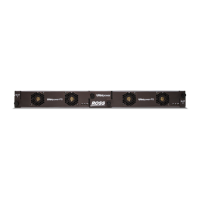

 To Next Page
